

Last updated: September 2026 · 14 min read
SoftSnoop earns a commission if you buy through some links on this page. It never changes what we write, and we pay for every app we test.

Key takeaways
- Structured is a visual day planner, not a task manager. It lays your whole day out as one vertical timeline. If your problem is “I have a list but no idea when any of it happens,” this is the fix. If your problem is “I have 400 tasks across six projects,” it isn’t.
- The free tier is unusually generous – unlimited tasks, subtasks, the Pomodoro timer, widgets, Apple Watch sync, no ads. The single thing most people hit the wall on is recurring tasks, which are Pro-only.
- Structured Pro costs US$6.99/month, US$29.99/year, or US$99.99 for lifetime (Structured’s own help centre, updated April 2026). Pricing is regional and purchasing-power-adjusted, so your number will differ.
- Ignore the $29.99 and $64.99 lifetime prices you’ll see quoted elsewhere. Those are legacy prices from 2022–2024. The UK App Store still lists old SKUs next to current ones, which is why the internet can’t agree on what this app costs.
- Annual is the only sensible starting point. Monthly costs 2.8× more per year. Lifetime takes about 3 years and 4 months to break even against annual – worth it only if you already know you’ll still be using this in 2029.
- Biggest trap: buying lifetime during your 3-day trial does not cancel the trial. You get billed for both.
Verdict at a glance
SoftSnoop rating: 4.4 / 5
| Ease of use | 4.8 |
|---|---|
| Free tier value | 4.7 |
| Feature depth | 3.6 |
| Cross-platform reliability | 4.1 |
| Value for money | 4.3 |
Best for: anyone who plans in sequence rather than in appointments – ADHD adults, students, freelancers, and people whose calendar is mostly empty but whose day is still full.
Skip it if: you manage a team calendar, need dependencies or project views, or want software to schedule for you automatically.
Best plan for most people: yearly. Take the 3-day trial, use it on a normal weekday rather than a quiet Sunday, and set a cancellation reminder for day 2.
Quick facts
| Best for | Visual daily planning and routine-building |
|---|---|
| Developer | unorderly GmbH (Germany) |
| Free tier | Yes – permanent, no ads |
| Starting price | US$6.99/mo · US$29.99/yr · US$99.99 lifetime |
| Free trial | 3 days, auto-converts to paid |
| Platforms | iPhone, iPad, Mac, Apple Watch, Apple Vision, Android, Web |
| Minimum OS (Apple) | iOS/iPadOS 17, macOS 14, watchOS 10 |
| Languages | 28 |
| App Store rating | 4.8 (30k UK ratings / 150k US ratings), Apple Editors’ Choice |
| Standout feature | The timeline itself – one screen, whole day, drag to reorder |
| SoftSnoop rating | 4.4 / 5 |
What Structured actually is
Most planning apps are one of two things. A calendar shows you a grid of hours, mostly empty, with three meetings floating in it. A to-do list shows you a stack of tasks with no relationship to time at all. Both leave you doing the hard part in your head: working out what happens next, and whether the day you’ve imagined actually fits into the day you have.
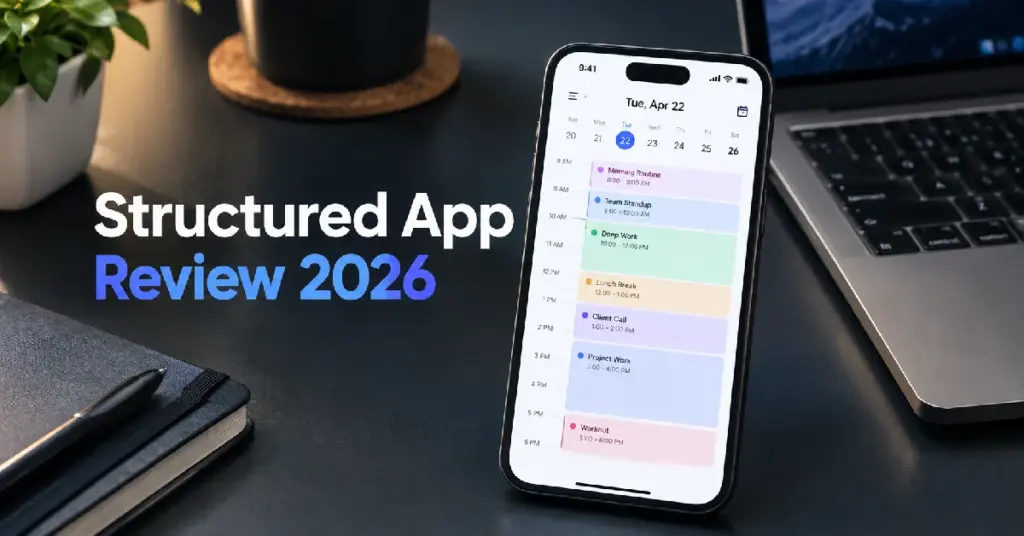
Structured takes a third route. Everything – calendar events, tasks, routines, breaks, the twenty minutes it takes to get anywhere – goes onto a single vertical timeline running from morning to night. A moving line shows where you are in the day. Tap and drag to move something. Anything you haven’t scheduled sits in an Inbox at the side until you place it.
That’s the entire concept, and the discipline of it is the point. There are no boards, no projects, no assignees, no dependencies. It is a picture of one day, and it is very good at being that.
The company behind it is unorderly GmbH, a small German developer that also ships a handful of other small utilities. It started as one person’s side project and grew into an Apple Editors’ Choice app with a claimed 15 million downloads. That history matters for two reasons: the app is refreshingly free of enterprise bloat, and its pricing has changed several times as the business model evolved – which is why price confusion follows it around.
How I tested this
I ran Structured for six weeks as my only day planner across an iPhone, an iPad and a Mac, plus two weeks on Android to check parity. I used the free tier for the first ten days deliberately, so I could feel exactly where the paywall bites rather than taking the marketing page’s word for it. I then took the 3-day Pro trial and continued on a paid annual plan.
What I planned in it: a normal working week with client calls, deep-work blocks, gym sessions, a recurring medication reminder, and a genuinely chaotic week involving travel and two rescheduled meetings – because a planner that only works on good weeks isn’t a planner.
Prices in this review were verified against Structured’s own help documentation and the App Store’s in-app purchase listing on 8 September 2026. Competitor prices are dated individually in the comparison table. If you’re reading this months later, check before you buy – this category reprices constantly.
Free vs Pro: what you actually get
This is the section that decides whether you spend anything at all, so here it is up front.
| Capability | Free | Pro |
|---|---|---|
| Visual timeline, unlimited tasks | ✅ | ✅ |
| Inbox for unscheduled capture | ✅ | ✅ |
| Subtasks and notes | ✅ | ✅ |
| Pomodoro focus timer | ✅ | ✅ |
| Live Activities and interactive widgets | ✅ | ✅ |
| Colour-coding and icon library | ✅ | ✅ |
| Sync across iPhone, iPad, Mac, Apple Watch | ✅ | ✅ |
| Accessibility (VoiceOver, Voice Control, dyslexia-friendly font) | ✅ | ✅ |
| Ads or data selling | None | None |
| Calendar and Reminders integration | ❌ | ✅ |
| Recurring tasks and routines | ❌ | ✅ |
| AI day planning | ❌ | ✅ |
| Replan (auto-reschedules missed tasks) | ❌ | ✅ |
| Custom notification rules | ❌ | ✅ |
| Focus Intervals (structured focus/break cycles) | ❌ | ✅ |
The free tier is more usable than most apps’ paid tiers. You can genuinely plan every day of your life in it forever, for nothing, with no advertising. The developer’s line on this is that Pro subscribers fund the free users, and to their credit the free experience isn’t crippled to force the upgrade.
But two of those Pro features are load-bearing, and it’s worth being honest about which:
Recurring tasks. Without them, every daily habit has to be re-entered by hand. Free-tier users in the app stores describe duplicating tasks each week as a workaround, which works but is exactly the kind of friction that kills a planning habit within a month. If you’re using Structured for routines – and routines are its strongest use case – this alone justifies Pro.
Calendar integration. Free Structured lives in its own world. Your work meetings stay in Google Calendar or Outlook and don’t appear on the timeline, which means the timeline isn’t a picture of your day, it’s a picture of half your day. For anyone with meetings, this is the deal-breaker.
The other three Pro features are nice rather than necessary. I’ll come back to the AI planner, because it’s the one most likely to be oversold to you.
Living in it: the six-week report
Setup takes about twenty minutes, and you should spend them
The default state is an empty day, which is intimidating. What worked for me:
- Connect your calendars first (Pro). Fixed commitments should be on the timeline before you add a single task, otherwise you’ll plan a beautiful day around a meeting you forgot about.
- Build the two anchors – a morning routine and an evening shutdown – as recurring tasks. These are what make the app stick. Everything else is optional.
- Put durations on everything, and inflate them. The timeline’s real value is showing you that your seven “quick” tasks add up to nine hours. That only works if the durations are honest.
- Leave a visible gap in the afternoon. Not a break task. An actual empty stretch. This is the single change that took Structured from “another thing making me feel behind” to genuinely useful.
- Add the widget. Structured is a glance-at app, not an open-it app. The Lock Screen and Home Screen widgets and Live Activities are where 80% of the value lands, and they’re free.
The thing nobody warns you about
Structured makes overplanning feel productive. Because tasks snap into a neat, colour-coded column with no gaps, a 14-hour day looks tidy. It looks like a plan. Then reality arrives, everything slides, and you end the evening staring at a stack of unfinished blocks – which for the exact audience this app is best for is the worst possible outcome.
The fix is a usage rule, not a feature: plan at 60% capacity. Three real tasks, not nine. Every experienced Structured user I’ve read arrives at some version of this independently, and it’s the most important thing in this review.
Replan is quietly the best Pro feature
Replan sweeps up tasks you didn’t get to and pushes them forward instead of leaving them as a wall of red. It sounds trivial. It isn’t. It’s the difference between a plan you keep returning to and one you abandon on Wednesday because opening it feels like being told off. If you’re weighing Pro, weigh this rather than the AI.
The AI planner is a decent first draft, not a scheduler
Structured’s AI takes a typed or dictated brain-dump and turns it into a laid-out day, and it will happily read an image of a timetable. It’s good at converting mess into structure. It is not a scheduling engine – it doesn’t learn your energy patterns, doesn’t defend your focus time against new meetings, and doesn’t re-optimise continuously. If automatic scheduling is what you’re shopping for, Motion and Reclaim are the category you want, and they cost several times more.
A note on version 4.5.4 (August 2026): natural-language task creation is still a beta feature you have to enable in Settings → Advanced, and it currently understands English, German, French and Spanish. If you’ve come from an app where typing “gym tomorrow 7am for 45 mins” just works, know that in Structured this is opt-in and still being finished. You can also now hide the AI tab entirely – a genuinely good decision by the developer, and rarer than it should be.
Sync: fixed, but it had a bad reputation for a reason
Sync complaints follow this app around older reviews, and they were real. The current picture is better and you can date the fix from the release notes: Structured Cloud left beta in version 4.4.7 (April 2026) and became the default for new accounts, and versions 4.5.2–4.5.3 (July 2026) specifically rewrote sync to be near-real-time between devices.
In six weeks I saw two brief delays between Mac and iPhone, both resolved within a minute, and no data loss. Existing users on the old sync method have to switch manually in Settings → Structured Cloud – if you’ve had this app for years and sync still annoys you, that’s very likely why.
Cross-platform reality
One purchase covers all your personal devices regardless of operating system – buy on Android, use on Mac. That’s a properly consumer-friendly policy and worth knowing about, because it means you can buy wherever it’s cheapest for you.
The Apple versions are clearly the flagship: Watch app, Live Activities, Vision Pro support, deep widget integration. Android and Web are competent and improving rather than equal. If Apple hardware isn’t in your life, Structured is still good, just less special.
Accessibility is a genuine strength
VoiceOver, Voice Control, larger text to 200%, reduced motion, sufficient contrast, differentiate-without-colour, and a dyslexia-friendly font – declared on the App Store listing. Very few planning apps in this price bracket document accessibility support this thoroughly, and for the neurodivergent audience the app markets to, it matters more than another feature.
What still isn’t there
- No snooze on a task notification. Requested by users for years, still absent. You dismiss and hope you remember.
- No collaboration. No shared plans, no assigning, no team anything. By design, but worth stating.
- No project layer. Subtasks are one level deep. Multi-week work with milestones has nowhere to live.
- Weekly and monthly views exist but are secondary. This is a day planner. Long-range planning happens elsewhere.
- The 3-day trial is short. Three days isn’t enough to test a tool whose whole value is habit formation.
Structured pricing in 2026: the full breakdown
Official pricing
Per Structured’s own help documentation (last edited April 2026), US pricing is:
| Plan | Price | Effective monthly | vs monthly |
|---|---|---|---|
| Monthly | US$6.99 | $6.99 | – |
| Yearly | US$29.99 | $2.50 | Saves 64% |
| Lifetime | US$99.99 one-off | – | Breaks even at 14 months |
UK pricing, from the current App Store in-app purchase listing:
| Plan | Price | Effective monthly |
|---|---|---|
| Monthly | £5.99 | £5.99 |
| Yearly | £17.99 | £1.50 |
| Lifetime | £59.99 one-off | – |
In some countries, Android users are also offered a weekly subscription.
Why every review quotes a different price
This is the single most confusing thing about buying Structured, and here’s the actual explanation.
Structured was a one-time purchase only until 2022, when it moved to subscriptions and raised the lifetime price. It has repriced since. The result is that the App Store’s in-app purchase list still displays legacy SKUs alongside current ones – the UK listing currently shows monthly at both £2.99 and £5.99, and yearly at both £9.99 and £17.99. Those lower numbers are grandfathered prices for existing subscribers, not what a new buyer pays.
Meanwhile, review articles written in 2024 quoting “$2.99/month, $9.99/year, $29.99 lifetime” are still ranking, still undated, and still wrong. If a page tells you Structured lifetime costs $29.99 or $64.99, it’s out of date. The current US figure is $99.99.
Buyer’s note: always check the price on the paywall inside the app (Settings → Get Structured Pro). That screen shows your regional price, which is the only number that matters.
Regional and purchasing-power pricing
Structured states plainly that pricing depends on your region, currency and local purchasing power. This isn’t a footnote – in lower-income markets the difference is substantial, and it’s the reason a global comparison table for this app is close to meaningless. Anyone quoting one universal price, including this article, is giving you a reference point rather than your invoice.
The three-year cost, worked out
The only honest way to compare a subscription against a one-off purchase is over a realistic ownership period. Here’s three years, US pricing:
| Plan | Year 1 | Year 2 | Year 3 | 3-year total |
|---|---|---|---|---|
| Monthly | $83.88 | $83.88 | $83.88 | $251.64 |
| Yearly | $29.99 | $29.99 | $29.99 | $89.97 |
| Lifetime | $99.99 | $0 | $0 | $99.99 |
Read that carefully, because it inverts the usual advice.
Lifetime does not pay for itself in three years. Against the annual plan, break-even lands at roughly 3 years and 4 months. Against monthly it’s 14 months, but nobody should be on monthly for 14 months anyway.
So the decision rule is: buy annual unless you are confident you’ll still be planning in this app in 2029. That’s a real bet on a small German studio’s roadmap, and “lifetime” means the life of the app, not yours. If you’re a student who’ll use it hard for a degree and then move on, annual is unambiguously correct.
The counter-argument for lifetime is behavioural rather than financial – some people simply plan better without a renewal date hanging over the tool. That’s a legitimate reason to pay the premium. Just don’t tell yourself it’s the cheaper option, because inside four years it isn’t.
Trial mechanics, and the trap
The trial is 3 days and converts automatically unless you cancel at least 24 hours before it ends. So the real decision window is 48 hours.
Now the trap, straight from Structured’s own documentation: buying the lifetime plan during an active trial or subscription does not cancel that trial or subscription. They run in parallel and you pay for both. If you decide mid-trial that you want lifetime, cancel the trial first, or buy lifetime directly from the App Store product page and then cancel separately.
The same applies later – you cannot swap a running subscription for lifetime from inside the app. You either buy lifetime from the store listing and cancel the subscription yourself, or cancel and wait for the subscription to lapse first.
READ MORE: OneDoc AI Review 2026: Does It Actually Live Up To The Hype
Discounts, and the one that actually exists
There are no discounts on the lifetime purchase. Don’t go hunting for a coupon.
What does exist is the Structured Scholarship – an application form for anyone who genuinely can’t afford the subscription. Approved applicants get a code for a free annual subscription, valid one year, redeemable once, on Structured Web. It’s funded by paying users, and the developer asks people to only apply if they actually need it. It’s a rare thing to find in this category and it’s worth flagging for students and people out of work rather than leaving buried in a help article.
What you’re not paying with
No ads. No data sold to third parties. The App Store privacy label declares email address and your task content as linked to your identity for app functionality, plus standard unlinked analytics and crash diagnostics. For a free-tier consumer app, that’s a clean profile – you’re the customer, not the product.
Pros and cons
- +The timeline genuinely solves the “list with no time attached” problem better than any calendar grid.
- +The free tier is permanent, ad-free and unusually complete.
- +Accessibility support is documented and broad – VoiceOver, Voice Control, dyslexia-friendly font, reduced motion.
- +One purchase covers every platform you own, including across Apple and Android.
- +Replan removes the shame spiral that kills most planning habits.
- –Recurring tasks and calendar sync – the two features that make it work – are both behind the paywall.
- –The 3-day trial is too short to test a habit-formation tool.
- –Lifetime at US$99.99 takes over three years to beat the annual plan, and the app’s own pricing history shows it can change.
- –No task snooze, no collaboration, no project layer; natural-language input is still in beta.
How Structured compares
| App | Best for | Price (verified date) | Free tier |
|---|---|---|---|
| Structured | Visual daily timelines, routines | $6.99/mo · $29.99/yr · $99.99 lifetime (8 Sep 2026) | Yes, generous |
| Tiimo | Neurodivergent-first design, gentler tone | $7.99/mo · $79.99/yr; family plan $119.99/yr (Jul 2026) | Yes, mobile-only |
| Sunsama | Guided daily planning ritual, work context | ~$25/mo · ~$20/mo billed annually (mid-2026, after a price rise) | No |
| Akiflow | Consolidating tasks from many work tools | ~$15–19/mo depending on billing (reported figures vary, 2026) | No, 7-day trial |
| Google Calendar / Apple Reminders | Appointments and shared calendars | Free | n/a |
Two things to take from this. First, Structured’s annual plan is the cheapest serious option in the category by a wide margin – Sunsama costs roughly eight times more per year. Second, competitor pricing in this space is genuinely unstable; Sunsama raised prices in 2026 after five years flat, and published Akiflow figures disagree with each other. Verify before you buy anything here, including from us.
If you want automatic scheduling rather than visual planning, neither Structured nor Tiimo is your answer – that’s Motion and Reclaim, a different and more expensive category.
Should you pay? A 5-question checklist
- Do you have meetings in an external calendar? Yes → you need Pro. Free Structured can’t see them, so the timeline lies to you.
- Are you building routines, or planning one-off days? Routines → Pro, for recurring tasks. One-off days → free is fine indefinitely.
- Do you want the app to plan for you? Yes → Structured isn’t it, at any price. Look at automatic schedulers.
- Will you still be planning in this specific app in 2029? Confident yes → lifetime. Anything less → annual.
- Is money genuinely tight? Apply for the scholarship before you subscribe. It exists precisely for this.
FAQ
Is Structured free?
Yes, permanently, with no ads. The free tier includes unlimited tasks, subtasks, the timeline, the Pomodoro timer, widgets and cross-device sync. Recurring tasks, calendar integration, AI planning and Replan require Structured Pro.
How much does Structured Pro cost in 2026?
US$6.99 monthly, US$29.99 yearly, or US$99.99 for lifetime access, per Structured’s own help documentation. In the UK it’s £5.99, £17.99 and £59.99. Pricing is regional and purchasing-power-adjusted, so check the paywall inside the app for your figure.
Is Structured lifetime worth it?
Only if you’ll use it for more than about three years and four months – that’s when $99.99 beats paying $29.99 annually. For students or anyone testing the habit, the annual plan is the better financial call.
Does Structured have a free trial?
Yes, three days, and it converts to a paid subscription automatically unless you cancel at least 24 hours before it ends. Buying lifetime during the trial does not cancel the trial, so you’d be charged twice.
Is Structured better than Google Calendar?
They do different jobs. Google Calendar is better for appointments, invitations and shared calendars. Structured is better at showing what your day actually looks like in sequence. Many people run both, with Structured pulling the calendar in via Pro.
Does Structured work on Android and Windows?
Yes on Android, and there’s a browser-based Structured Web app that covers Windows. The Apple apps are the most polished, with Watch, Live Activities and Vision Pro support. One purchase covers all your devices regardless of platform.
Is Structured good for ADHD?
It’s widely used for it and designed with that audience in mind – visual sequencing, routines, Live Activities, strong accessibility support. It isn’t a treatment, and it works best when you deliberately underfill the day rather than packing the timeline.
Can I get a discount on Structured Pro?
Not on lifetime – the developer states there are no discounts on it. There is a Structured Scholarship offering a free one-year annual subscription to people who can’t afford to subscribe, applied for via a form and redeemed on Structured Web.
