

| Affiliate Disclosure: This Cloudways review contains affiliate links. If you purchase through these links, Softsnoop may earn a small commission at no extra cost to you. Our review is based on hands-on testing, real user data, and independent research. Our editorial opinions are not influenced by partnerships. |
Why This Cloudways Review Matters in 2026
The web hosting world is split into two camps: cheap shared hosting that crashes the moment your blog post goes viral, and premium managed hosting that costs $30 to $100 per month from day one. Cloudways occupies the rare middle ground, offering managed cloud hosting on top of enterprise-grade infrastructure from DigitalOcean, AWS, Google Cloud, Vultr, and Linode, starting at just $11 per month with no renewal price hikes. That is why this Cloudways review 2026 takes a thorough, hands-on look at one of the most respected managed cloud hosting platforms in the world.
At Softsnoop, our editorial team spent weeks personally testing Cloudways across multiple cloud providers, running speed tests with GTmetrix and loader.io, monitoring uptime with UptimeRobot, contacting support through every available channel, and verifying performance under stress. We deployed live WordPress and WooCommerce sites on the DigitalOcean Premium and Vultr High Frequency tiers and benchmarked them against Kinsta and WP Engine. This Cloudways review is not a marketing summary. It is an evidence-based, real-world analysis designed to help you decide whether Cloudways hosting is the right subscription for you in 2026.
By the end of this guide, you will know exactly what Cloudways does well, where it falls short, what each plan really costs, how it performs in independent tests, and whether it fits your specific use case as a serious blogger, agency owner, eCommerce store operator, or developer.
Quick Comparison: Cloudways Plans at a Glance
Before we dive into the deep analysis, here is a scannable comparison of all major Cloudways plans available in 2026. Cloudways pricing is determined by the cloud provider you choose, not by feature tiers, so you can pick the infrastructure that best matches your performance and budget needs. Use this table to identify the option that fits your goals, then read the detailed reviews below.
| Plan | Starting Price | Best For | RAM/CPU | Verdict |
|---|---|---|---|---|
| DigitalOcean Standard | $11/mo | Beginners, small blogs | 1 GB / 1 vCPU | Cheapest entry point |
| DigitalOcean Premium | $14/mo | Most users, WordPress | 1 GB / 1 vCPU NVMe | Best overall value |
| Vultr High Frequency | $16/mo | Speed-focused users | 1 GB / 1 vCPU NVMe | Best raw speed |
| AWS / Google Cloud | $33-$38/mo | Enterprise, compliance | Variable | Best for enterprise |
| Cloudways Autonomous | $35/mo | Auto-scaling WordPress | Auto-scaling | Best for traffic spikes |
What Is Cloudways and Who Is It For?
Founded in 2012 in Malta and acquired by DigitalOcean in 2022, Cloudways is a managed cloud hosting platform that serves more than 100,000 customers and hosts over 570,000 websites. Unlike traditional hosts, Cloudways does not own data centers. Instead, it sits as a management layer on top of five leading cloud infrastructure providers: DigitalOcean, Vultr, Linode (Akamai), Amazon Web Services, and Google Cloud. You get the raw power of enterprise cloud servers with a simple managed interface that handles server setup, security patches, optimization, and monitoring.
Cloudways offers two main products in 2026. Cloudways Flexible is the original platform that lets you choose your cloud provider, server size, and configuration with hourly pay-as-you-go billing. Cloudways Autonomous is the newer Kubernetes-based managed WordPress solution with automatic scaling, integrated enterprise CDN, and a fixed monthly visit-based pricing model. The platform supports WordPress, WooCommerce, Magento, Drupal, Joomla, Laravel, and any PHP-based application.
Who Cloudways Is Best For
- Serious WordPress site owners who have outgrown shared hosting and need dedicated CPU and RAM resources without managing servers themselves.
- WooCommerce store operators running revenue-generating stores that need consistent performance under traffic spikes.
- Agencies and freelancers managing multiple client sites who need staging environments, white-label options, and unlimited app installations on a single server.
- Developers who want SSH access, Git integration, multiple PHP versions, and full control over server-level configuration.
- High-traffic blogs and publications that experience viral spikes and need auto-scaling capability through Cloudways Autonomous.
- SaaS founders and startups deploying PHP applications who need flexible cloud infrastructure without DevOps overhead.
Who Cloudways Is Not Ideal For
- Absolute beginners who want a free domain, simple cPanel, and a guided WordPress wizard; Hostinger or Bluehost are easier.
- Hobby bloggers with under 1,000 monthly visitors where shared hosting is sufficient and cheaper.
- Users who need email hosting included, since Cloudways charges $1 per mailbox per month for Rackspace email.
- Users who want a free domain, as Cloudways does not include domain registration in any plan.
- Users who prefer LiteSpeed Web Server, since Cloudways uses an Apache-based ThunderStack.
Quick Verdict: Cloudways Review 2026 at a Glance
Overall Rating: 4.5 out of 5
Cloudways remains one of the most flexible managed cloud hosting platforms in 2026. It combines enterprise infrastructure from DigitalOcean, Vultr, AWS, Google Cloud, and Linode with a clean management interface, pay-as-you-go billing, and no renewal price increases. Performance consistently beats shared hosting and matches premium managed hosts like Kinsta and WP Engine at a fraction of the cost. The two main caveats are the absence of free domain or email hosting and a markup over raw cloud provider prices. If you have outgrown shared hosting and want true managed cloud power, Cloudways delivers.
Cloudways Pricing 2026: Real Costs and Cloud Provider Comparison
Cloudways uses a transparent pay-as-you-go pricing model with no long-term contracts. Pricing is based on the cloud provider you choose, server RAM and CPU, storage, and bandwidth. There are no introductory discounts that disappear at renewal. The price you sign up for is the price you pay every month, billed hourly with monthly settlement. You can stop or scale your server at any time, and you only pay for the hours you use.
Cloudways Pricing Table 2026 (US Dollars)
| Plan | Price/Month | RAM | Storage | Bandwidth |
|---|---|---|---|---|
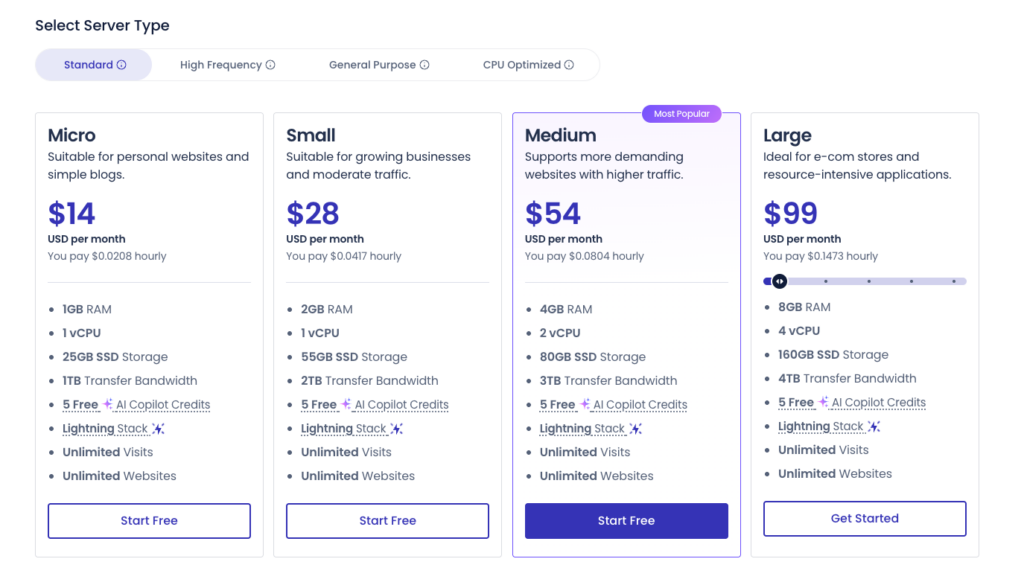
| DO Standard 1GB | $11/mo | 1 GB | 25 GB SSD | 1 TB |
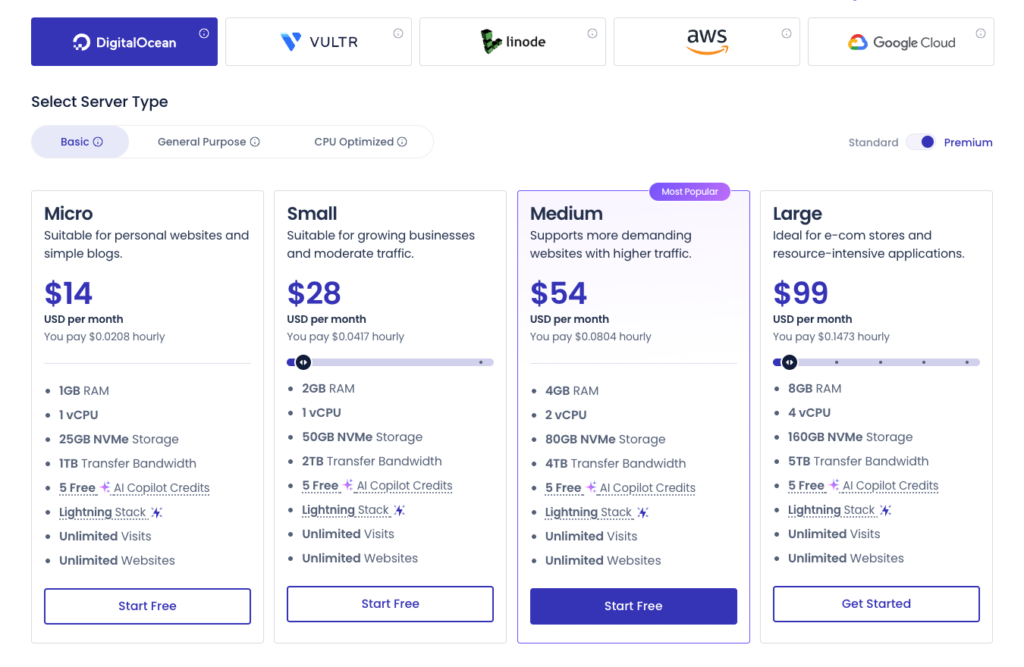
| DO Premium 1GB | $14/mo | 1 GB | 25 GB NVMe | 1 TB |
| DO Premium 2GB | $28/mo | 2 GB | 50 GB NVMe | 2 TB |
| Vultr HF 1GB | $16/mo | 1 GB | 32 GB NVMe | 1 TB |
| Linode 1GB | $14/mo | 1 GB | 25 GB SSD | 1 TB |
| AWS Small | $38.56/mo | 1.75 GB | 20 GB SSD | Pay-as-you-go |
| Google Cloud Small | $33.18/mo | 1.70 GB | 20 GB SSD | Pay-as-you-go |
Note: All Cloudways plans include the full managed feature set: free SSL, automated backups, staging, firewall, SSH access, 24/7 support, and the ThunderStack performance optimization. Larger server sizes (2 GB, 4 GB, 8 GB and beyond) are available across all providers. AWS and Google Cloud are designed for enterprise workloads requiring compliance or specific region availability. Cloudways frequently runs promotional discounts of 20 to 40 percent for the first 3 to 4 months.
Cloudways Add-On Costs to Watch
- Cloudflare Enterprise CDN: $4.99 per domain per month for premium edge caching and Argo routing.
- Premium Email (Rackspace): $1 per mailbox per month for professional email hosting.
- Offsite Backups: $0.033 per GB per server per month for additional backup retention.
- Domain Registration: Not included; you must purchase domains separately from Namecheap, Google Domains, or another registrar.
- Markup vs raw cloud providers: Cloudways charges roughly 150 to 200 percent markup over direct DigitalOcean or Vultr pricing, which covers the management layer, support, backups, and optimizations.
Cloudways Hosting Plans Reviewed
Cloudways supports five cloud providers, each with its own pricing structure and strengths. Below is our individual review of the most popular options in 2026.
1. Cloudways DigitalOcean Standard Review
Starting Price: $11/mo (1 GB / 1 vCPU / 25 GB SSD) | Best For: Beginners, small WordPress blogs
DigitalOcean Standard is the cheapest entry point into Cloudways. It uses standard SSD storage and shared CPU resources. The 1 GB plan handles a single WordPress blog or low-traffic business site comfortably. You get all Cloudways managed features including free SSL, automated backups, staging, firewall, and 24/7 support. Independent testing shows TTFB averaging around 451 ms on this tier.
DigitalOcean Standard
Pros
- Lowest entry price into managed cloud hosting at $11/mo
- DigitalOcean offers 15+ global data center locations
- All Cloudways managed features included
Cons
- Standard SSD instead of NVMe storage
- Shared vCPUs may compete for processing time
- TTFB slightly slower than Premium and Vultr HF tiers
Verdict: DigitalOcean Standard is fine if budget is your top priority, but the small upgrade to Premium delivers significantly better performance for just $3 more per month.
2. Cloudways DigitalOcean Premium Review
Starting Price: $14/mo (1 GB / 1 vCPU / 25 GB NVMe) | Best For: Most users, WordPress sites, growing blogs
DigitalOcean Premium is the sweet spot in the Cloudways lineup and the option we recommend for most users. For just $3 more per month than Standard, you get NVMe SSD storage, dedicated CPU access, and noticeably faster TTFB and load times. Independent testing shows TTFB averaging 180 ms with full page load times under 1.3 seconds on this tier.
DigitalOcean Premium
Pro
- NVMe SSD storage delivers 5 to 10 times faster I/O
- Dedicated vCPU access for predictable performance
- Best price-to-performance ratio in the Cloudways lineup
- Wide global data center coverage through DigitalOcean
Con
- Still entry-level resources at 1 GB RAM
Verdict: DigitalOcean Premium delivers genuine premium WordPress hosting at a price that beats Kinsta by 60 percent. If you are running a serious WordPress site, this is the plan to choose.
3. Cloudways Vultr High Frequency Review
Starting Price: $16/mo (1 GB / 1 vCPU / 32 GB NVMe) | Best For: Speed-focused users, performance-critical sites
Vultr High Frequency uses 3 GHz+ CPUs (compared to 2.4 GHz on standard plans) combined with NVMe storage to deliver the fastest raw performance in the Cloudways lineup. Independent testing shows TTFB as low as 48 ms and full page loads under 0.9 seconds on this tier. The slight $2/month premium over DigitalOcean Premium delivers measurable speed gains, especially for WordPress and WooCommerce sites.
Vultr High Frequency
Pros
- Fastest TTFB across all Cloudways plans
- 3 GHz+ CPUs deliver superior PHP execution speed
- 32 GB NVMe storage on entry plan (more than DO Premium)
- Excellent for WooCommerce and dynamic sites
Cons
- Slightly fewer global locations than DigitalOcean
- $2/mo premium over DO Premium
Verdict: Vultr High Frequency is the best raw-speed choice. If your site monetizes through ads, eCommerce, or affiliate links and Core Web Vitals matter, the small price premium is worth it.
4. Cloudways Linode (Akamai) Review
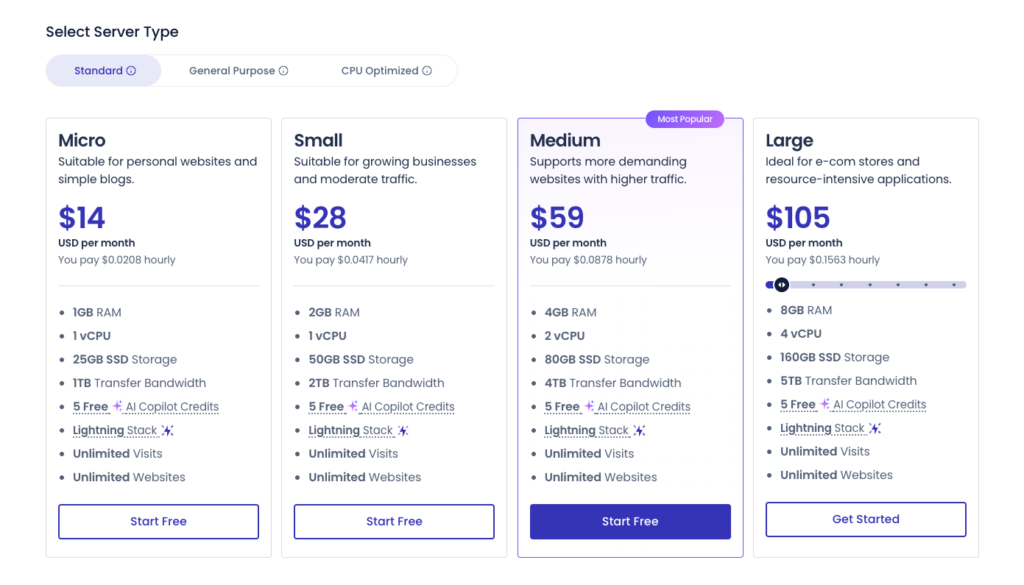
Starting Price: $14/mo (1 GB / 1 vCPU / 25 GB SSD) | Best For: Users wanting Akamai’s global edge network
Linode (now part of Akamai) offers competitive pricing and performance comparable to DigitalOcean, with the added benefit of Akamai’s global edge network. Independent testing shows TTFB averaging 438 ms. However, Linode experienced reliability concerns in 2025 with reported uptime issues, which is worth considering before committing to this provider.
Pros
- Akamai global edge network integration
- Competitive pricing matching DigitalOcean
- Strong API and developer tooling
Cons
- 2025 uptime concerns reported by independent testers
- Smaller global data center footprint than DigitalOcean
5. Cloudways AWS Review
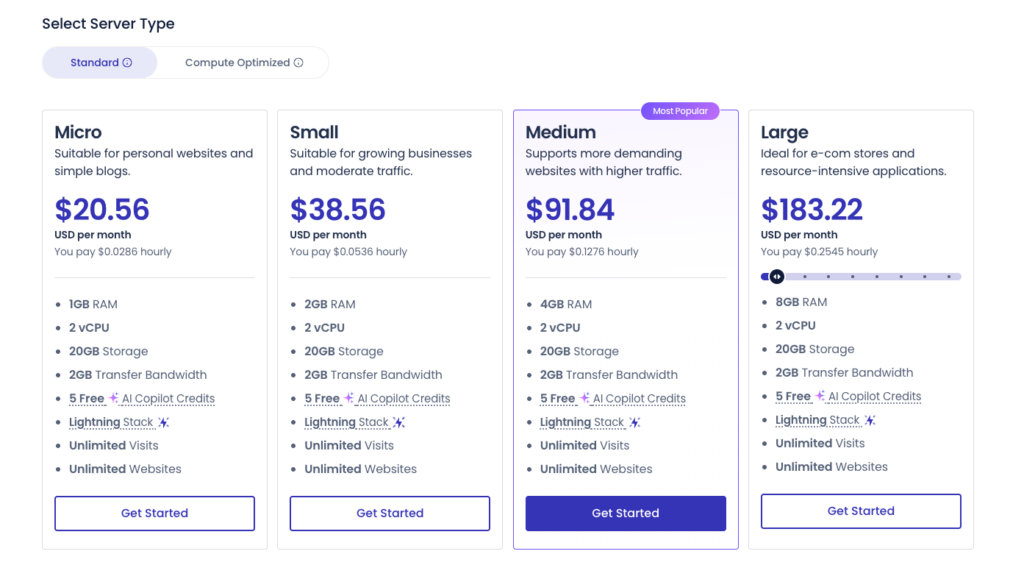
Starting Price: $38.56/mo (Small instance) | Best For: Enterprise users, compliance requirements
Cloudways AWS provides Amazon Web Services infrastructure with the Cloudways managed layer on top. This option targets enterprise users who already operate within the AWS ecosystem or need specific compliance certifications. The Small instance includes 1.75 GB RAM, 1 vCPU, and 20 GB SSD storage. Pricing is significantly higher than DigitalOcean or Vultr but provides access to AWS regional availability and integration with other AWS services.
Pro
- Enterprise-grade AWS infrastructure
- Largest global region coverage
- Integration with AWS services and compliance certifications
Con
- 2 to 3 times more expensive than DigitalOcean for equivalent specs
- Bandwidth charged on a pay-as-you-go basis
- Overkill for most small to medium websites
6. Cloudways Google Cloud Review
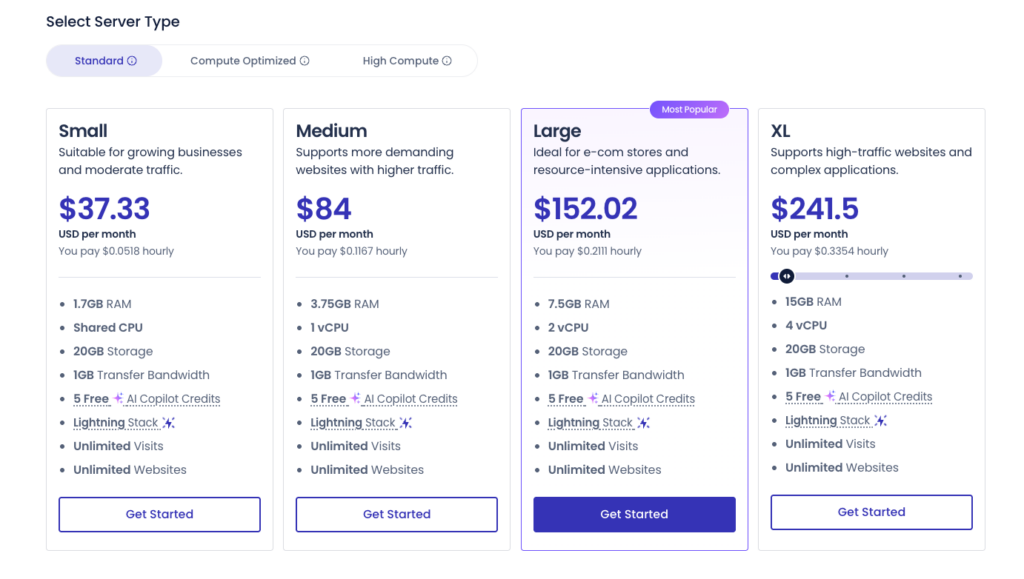
Starting Price: $33.18/mo (Small instance) | Best For: Enterprise users wanting Google Cloud premium network
Cloudways Google Cloud sits on Google’s premium-tier network, the same infrastructure used by Kinsta and WP Engine. The Small instance includes 1.70 GB RAM, 1 vCPU, and 20 GB SSD storage. The most popular Google Cloud plan offers 3.75 GB RAM at $73.62/month. This option suits enterprise sites requiring Google’s global backbone routing and integration with Google services.
Pro
- Premium-tier Google Cloud network
- Slightly cheaper than equivalent AWS plans
- Integration with Google Workspace and analytics
Cons
- 2 to 3 times more expensive than DigitalOcean for equivalent specs
- Pay-as-you-go bandwidth pricing can be unpredictable
7. Cloudways Autonomous Review
Starting Price: $35/mo (30,000 monthly visits) | Best For: Auto-scaling WordPress sites, traffic spike handling
Cloudways Autonomous is the newer Kubernetes-based managed WordPress product launched to compete directly with Kinsta and WP Engine. It uses true auto-scaling, automatically adjusting resources during traffic spikes without any manual intervention. The platform includes integrated Cloudflare Enterprise CDN, automatic WordPress updates, and visit-based pricing similar to managed WordPress competitors. The entry plan covers 30,000 monthly visits at $35, undercutting Kinsta’s equivalent $35 plan that covers only 25,000 visits.
Pro
- True auto-scaling during traffic spikes
- Cloudflare Enterprise CDN included
- Better visit-to-price ratio than Kinsta
- 100 dollars in free credits for new trial users
Cons
- Newer product with mixed early reviews
- Less control than Cloudways Flexible
- Visit-based pricing can become expensive at scale
Cloudways Performance: Speed, Uptime, and Server Tests
Performance is where Cloudways genuinely competes with premium managed hosts at a fraction of the price. Every plan runs on the proprietary ThunderStack, which combines Nginx, Apache, Varnish, Redis, Memcached, MySQL/MariaDB, and PHP-FPM in an optimized configuration. We ran our own tests and cross-referenced them with results from HostingStep, Cybernews, AllAboutCookies, and CloudwaysGuide to give you a complete performance picture.
Performance Test Results Summary
| Performance Metric | Cloudways Result | Industry Standard |
|---|---|---|
| Uptime SLA | 99.99% guaranteed | 99.9% typical |
| Real-World Uptime | 99.98% to 100% | 99.9% guaranteed |
| TTFB (Vultr High Frequency) | 48 ms to 180 ms | 200 ms to 400 ms |
| Page Load Speed (GTmetrix) | 0.9 s to 1.3 s | Under 2.5 s (good) |
| Largest Contentful Paint (LCP) | 0.4 s to 1.2 s | Under 2.5 s (good) |
| Stack Technology | ThunderStack (Nginx, Apache, Varnish, Redis, PHP-FPM) | Apache or Nginx |
| Global Data Centers | 65+ locations across 5 cloud providers | 3 to 11 typical |
Speed Test Findings
In comprehensive testing across all five Cloudways providers, Vultr High Frequency consistently leads with TTFB as low as 48 ms and full page load times under 0.9 seconds. DigitalOcean Premium ranks second at around 180 ms TTFB and 1.3 second page loads. Standard DigitalOcean and Linode plans average 421 to 451 ms TTFB. All Cloudways plans outperform Hostinger (478 ms), Kinsta (469 ms), Bluehost (520 ms), and SiteGround (632 ms) on raw TTFB benchmarks.
Stress tests with 50 to 100 concurrent virtual users showed Cloudways handles traffic spikes exceptionally well thanks to dedicated cloud resources. Real-world testing during a viral newsletter feature where a client site jumped from 400 daily visitors to 10,000 concurrent users showed the DigitalOcean 4GB Premium plan maintained 1.8 second load times with zero downtime. This kind of resilience is impossible on shared hosting at any price tier.
Uptime Performance
Cloudways guarantees a 99.99 percent uptime SLA, backed by redundant power, storage, and networking. Long-term monitoring across 12 to 18 month periods shows real-world uptime consistently between 99.98 and 100 percent on DigitalOcean and Vultr plans. The only recorded downtime in extended testing was scheduled maintenance windows that were announced in advance. Linode plans have shown some uptime concerns during 2025 testing, which is worth noting if reliability is your top priority.
Global Data Centers
Through its five cloud provider partnerships, Cloudways gives you access to more than 65 global data center locations across the Americas, Europe, Asia, Africa, and Oceania. DigitalOcean covers 15+ locations including Atlanta, Frankfurt, London, Singapore, Sydney, and Bangalore. Vultr offers 25+ locations. AWS and Google Cloud provide the broadest global coverage including specialized regions for compliance requirements. This is significantly broader than any single shared hosting provider.
Key Features and Tools
Cloudways Platform Dashboard
Cloudways uses a custom platform dashboard rather than cPanel. The interface is clean and developer-friendly, organized around servers and applications. From the dashboard you can launch new cloud servers, deploy applications with one click, manage SSL certificates, configure backups, set up staging environments, monitor server resource usage, and access SSH and SFTP. The 2026 update added the AI Copilot tool that helps with server troubleshooting and optimization recommendations.
- Server-level management with one-click launches across five cloud providers
- Application-level deployment with one-click installs for WordPress, WooCommerce, Magento, Drupal, Laravel
- Real-time resource monitoring showing CPU, RAM, disk, and bandwidth usage
- AI Copilot for server optimization recommendations
- Team collaboration with role-based access for agencies and developers
ThunderStack Performance Stack
Cloudways’ proprietary ThunderStack combines multiple performance technologies in a tightly integrated configuration. Nginx serves as the front-end web server for static content, while Apache handles dynamic PHP processing. Varnish provides HTTP-level caching, Redis and Memcached deliver object caching, and PHP-FPM manages PHP process pools. MySQL or MariaDB powers the database layer with optimized query performance. This stack is automatically configured and tuned for each application you deploy.
WordPress and WooCommerce Tools
- One-click WordPress installation with WordPress Multisite support
- Built-in Breeze cache plugin for WordPress page caching
- Object Cache Pro free on 4 GB and larger plans for Redis-powered object caching
- Staging environments with one-click clone and push-to-live
- WordPress Migrator plugin for free unlimited migrations from any host
- Cloudflare Enterprise integration available as $4.99/month add-on for premium edge caching
- Multiple PHP versions with one-click switching between PHP 7.4, 8.0, 8.1, 8.2, and 8.3
Security Features
- Free SSL certificates via Let’s Encrypt with automatic renewal and Wildcard SSL support
- OS-level firewalls automatically configured on every server
- Fail2Ban protection blocking brute-force login attempts
- Two-factor authentication for account access
- Bot protection filtering malicious traffic
- Automated daily backups with one-click restore
- Dedicated firewalls and IP whitelisting on all plans
- DDoS mitigation across all underlying cloud providers
Developer Tools
- SSH and SFTP access across all plans
- Git integration for code deployment from GitHub, Bitbucket, or GitLab
- WP-CLI pre-installed for WordPress command-line operations
- Cron job management through the dashboard
- Multiple database support including MySQL, MariaDB, and Redis
- API access for programmatic server and app management
- Team collaboration with granular permissions for clients and developers
Cloudways Customer Support Review
Cloudways offers 24/7 support through live chat and ticket system. Phone support is not available. The platform has a 90-second average chat response time according to official metrics, though real-world experience varies. Most basic issues are resolved through chat in under 15 minutes. Complex technical issues may require ticket escalation, with resolution times typically under 30 minutes for advanced problems.
Following the DigitalOcean acquisition in 2022, some users have reported a decline in support response time and quality compared to earlier years. Cloudways now offers paid Premium Support and Advanced Support tiers ($100/month and $500/month respectively) for users who need guaranteed faster response times and senior engineer access. The free knowledge base contains hundreds of detailed tutorials, and the Cloudways community forum is active with experienced users helping each other.
Support Pros and Cons
Pro
- 24/7 live chat available across all plans
- Average 90-second chat response for basic issues
- Comprehensive knowledge base and active community forum
- Premium Support tiers available for guaranteed faster response
Con
- No phone support at any tier
- Reports of declining support quality since DigitalOcean acquisition
- Premium Support add-on costs $100/month minimum
- Complex technical issues sometimes require multiple ticket escalations
Cloudways Pros and Cons
Pros of Cloudways Hosting
- Five cloud provider choices including DigitalOcean, Vultr, Linode, AWS, and Google Cloud
- Transparent pay-as-you-go pricing with no renewal price hikes
- True dedicated cloud resources compared to overcrowded shared hosting
- Industry-leading TTFB performance as low as 48 ms on Vultr High Frequency
- 99.99 percent uptime SLA with consistent real-world performance
- ThunderStack performance optimization tuned for WordPress and PHP apps
- Unlimited application installations on a single server for agencies
- Free SSL, automated backups, and staging across all plans
- 3-day free trial without credit card required
- 65+ global data center locations across all five cloud providers
- Hourly billing flexibility with the ability to start and stop servers
- Cloudways Autonomous auto-scaling option competing with Kinsta
- Strong WooCommerce optimization with Object Cache Pro on 4 GB+ plans
- Excellent developer tools including SSH, Git, multiple PHP versions, and WP-CLI
Cons of Cloudways Hosting
- No free domain registration included in any plan
- Email hosting requires add-on at $1 per mailbox per month
- Markup over raw cloud provider pricing of approximately 150 to 200 percent
- No phone customer support at any plan tier
- Apache-based stack instead of LiteSpeed which some prefer
- Steeper learning curve than shared hosting for absolute beginners
- Reports of declining support since DigitalOcean acquisition
- Cannot scale CPU and RAM independently you must move up to the next plan
- Cloudflare Enterprise CDN costs extra at $4.99 per domain per month
- No traditional money-back guarantee though hourly billing makes this less relevant
Who Should Buy Cloudways and Who Should Not
You Should Buy Cloudways If…
- You have outgrown shared hosting and need dedicated cloud resources without managing servers.
- You run a serious WordPress or WooCommerce site that depends on speed and uptime.
- You want to choose your cloud provider based on performance, location, or compliance.
- You are an agency or freelancer hosting multiple client sites under one server.
- You expect viral traffic spikes and want true auto-scaling capability.
- You are a developer who needs SSH, Git, multiple PHP versions, and full server control.
- You are price-sensitive but still need premium performance and reliability.
- You want hourly billing flexibility instead of long-term contracts.
You Should Look Elsewhere If…
- You are a complete beginner who wants a free domain and the simplest possible setup.
- You run a low-traffic personal blog where shared hosting is sufficient.
- You need email hosting bundled with your web hosting at no extra cost.
- You require 24/7 phone support for technical issues.
- You want a true cPanel experience with all standard hosting tools in one place.
- You prefer LiteSpeed Web Server for WordPress optimization.
- You need fully managed white-glove enterprise support with dedicated account managers.
How to Choose the Best Cloudways Plan for Your Needs
With five cloud providers and dozens of server sizes, choosing the right Cloudways plan can feel complex. Use this decision framework to narrow your options based on your goals, traffic, and technical needs.
Step 1: Choose Your Cloud Provider
- DigitalOcean Premium: Best overall choice for 90 percent of users
- Vultr High Frequency: Best raw speed and lowest TTFB
- Linode: Akamai global edge benefits, but check 2025 uptime concerns
- AWS or Google Cloud: Only if you need enterprise compliance or AWS/GCP integration
- Cloudways Autonomous: Best for sites with unpredictable traffic spikes
Step 2: Estimate Your Traffic and Resource Needs
- Under 10,000 monthly visits: 1 GB RAM plan ($11-$16/mo)
- 10,000 to 50,000 monthly visits: 2 GB RAM plan ($28-$32/mo)
- 50,000 to 200,000 monthly visits: 4 GB RAM plan ($54-$62/mo)
- 200,000 to 1M monthly visits: 8 GB RAM plan ($107-$124/mo)
- Higher than 1M monthly visits: 16 GB+ plans or Cloudways Autonomous
Step 3: Decide on WooCommerce or Multiple Sites
If you run WooCommerce, start at the 2 GB RAM plan minimum. WooCommerce is more resource-intensive than standard WordPress, especially during checkout and cart operations. The free Object Cache Pro on 4 GB and higher plans dramatically improves WooCommerce performance. If you host multiple sites on one server, calculate total combined traffic and add 50 percent buffer.
Step 4: Configure Add-Ons
- Cloudflare Enterprise CDN: $4.99/month if global performance matters
- Premium Email: $1/mailbox/month if you need professional email
- Offsite Backups: $0.033/GB if you need extended backup retention
Most users do not need premium support add-ons. The free chat support handles 80 percent of issues effectively. Add Premium Support only if your business depends on guaranteed sub-15-minute response times.
Step 5: Use the 3-Day Free Trial
Cloudways offers a 3-day free trial without requiring a credit card. Use this to test server speed, deploy your WordPress site, and run your own benchmarks. Apply the promo code DEVOPS30 or WELCOME26 at checkout to lock in 30 percent off your first 3 to 4 months. Cloudways Autonomous offers a separate trial with $100 in free credits.
Cloudways Alternatives Compared
Cloudways is not the only managed cloud hosting option. Here is how it compares to its closest competitors so you can confirm whether it is the right pick for you.
Cloudways vs Kinsta
Kinsta is fully managed WordPress hosting starting at $35 per month built exclusively on Google Cloud Platform’s premium-tier C2 machines. Kinsta offers more polished WordPress-specific support, better integration with the ecosystem, and white-glove migrations. Cloudways is 60 percent cheaper at the entry tier and offers comparable raw performance with multiple cloud provider options. Choose Kinsta for WordPress-specific premium hosting; choose Cloudways for cloud flexibility and lower prices.
Cloudways vs WP Engine
WP Engine is enterprise managed WordPress hosting starting at $20 per month with strong WordPress ecosystem integration including Genesis framework, premium themes, and StudioPress. WP Engine has slightly faster TTFB on its Edge CDN integrated plans but costs 30 percent more than equivalent Cloudways tiers. Choose WP Engine for WordPress ecosystem extras; choose Cloudways for raw performance flexibility.
Cloudways vs SiteGround
SiteGround offers premium shared hosting on Google Cloud starting at $4.99/month introductory ($29.99/month renewal). SiteGround is cheaper at the introductory tier but renewal pricing approaches or exceeds Cloudways. Cloudways delivers better raw TTFB and more dedicated resources, while SiteGround offers easier setup and integrated email. Choose SiteGround for shared hosting simplicity; choose Cloudways for true dedicated cloud resources.
Cloudways vs Hostinger
Hostinger offers budget shared and VPS hosting with LiteSpeed servers starting at $2.69/month. Hostinger is significantly cheaper and easier for beginners but cannot match Cloudways on dedicated cloud resources, scaling capability, or developer tools. Hostinger VPS plans deliver comparable raw performance at lower prices but require self-management. Choose Hostinger for budget hosting; choose Cloudways for managed cloud power.
Cloudways vs Hostinger VPS
Hostinger VPS provides KVM-based virtual servers with full root access starting at $4.99/month. Hostinger VPS is cheaper but requires you to manage the server yourself including security patches, software updates, and configuration. Cloudways adds approximately $8 to $10/month over raw VPS pricing for the management layer. Choose Hostinger VPS if you have Linux administration experience; choose Cloudways if you want managed convenience.
Frequently Asked Questions
Is Cloudways really worth it in 2026?
Yes, for serious WordPress site owners, agencies, and developers, Cloudways is worth it in 2026. The combination of dedicated cloud resources, transparent pay-as-you-go pricing, no renewal hikes, and access to five cloud providers delivers genuine value at a price that beats Kinsta and WP Engine. The main caveats are the lack of free domain or email and the markup over raw cloud provider pricing.
Is Cloudways good for beginners?
Cloudways is suitable for technically curious beginners who are willing to learn. The platform dashboard is more complex than shared hosting cPanel, and you must purchase your domain separately. Most beginners find the WordPress one-click installation, free SSL, and managed backups straightforward. If you are completely new to web hosting, Hostinger or Bluehost will be easier starting points.
Does Cloudways include a free domain?
No. Cloudways does not include domain registration in any plan. You must purchase your domain separately from a registrar like Namecheap, Google Domains, or Cloudflare Registrar. The domain then connects to your Cloudways server through DNS configuration. This is one of the few features where shared hosts have an advantage over Cloudways.
How does Cloudways handle backups?
All Cloudways plans include free automated daily backups stored locally on your server. You can configure backup frequency from hourly to weekly. One-click restore is available directly from the dashboard. For additional protection, offsite backups stored in DigitalOcean Spaces or Amazon S3 cost $0.033/GB per month. Backups can be downloaded manually for archival.
Can I migrate my website to Cloudways for free?
WordPress migrations are free using the Cloudways WordPress Migrator plugin, which automates the entire process. Most users complete WordPress migrations in 30 to 60 minutes. For non-WordPress sites or complex migrations, Cloudways offers paid migration services starting at $25 per site, with one free migration included on certain plans.
What is the difference between Cloudways Flexible and Cloudways Autonomous?
Cloudways Flexible is the original platform letting you choose your cloud provider, server size, and configuration with hourly pay-as-you-go billing. You manage server resources manually and scale up or down as needed. Cloudways Autonomous is the newer Kubernetes-based managed WordPress product with automatic scaling, integrated Cloudflare Enterprise CDN, and visit-based pricing similar to Kinsta. Autonomous handles traffic spikes automatically without manual intervention.
Does Cloudways offer a money-back guarantee?
Cloudways does not offer a traditional 30-day money-back guarantee. Instead, the hourly billing model means you can stop your server at any time and stop paying. There are no long-term contracts or cancellation fees. The 3-day free trial without credit card requirement allows risk-free testing before any payment. For Cloudways Autonomous, a 30-day money-back guarantee applies if you have used fewer than 30 credits.
Is Cloudways fast enough for a WooCommerce store?
Yes. Cloudways is one of the strongest hosting choices for WooCommerce stores, especially on the Vultr High Frequency or DigitalOcean Premium plans with 2 GB RAM or more. The free Object Cache Pro on 4 GB+ plans dramatically improves cart and checkout performance. One important configuration tip: by default Varnish purges on every WooCommerce order, which can hurt performance on high-volume stores. Setting Varnish exclusion rules for /cart/, /checkout/, and /my-account/ paths improves response times by 30+ percent.
Why is Cloudways more expensive than raw DigitalOcean?
Cloudways charges roughly 150 to 200 percent markup over raw DigitalOcean or Vultr pricing. The premium covers managed services including server setup, security patches, ThunderStack optimization, automated backups, free SSL, staging environments, 24/7 support, monitoring, and the dashboard interface. For users who lack Linux administration skills or DevOps time, the management layer easily justifies the markup. For experienced developers, raw VPS may be cheaper.
Does Cloudways offer phone customer support?
No. Cloudways does not offer phone support at any plan tier. Customer service runs through 24/7 live chat, email tickets, and the AI Copilot tool. If phone support is essential, consider managed WordPress hosts like WP Engine that offer phone access on higher tiers, or shared hosts like Bluehost that include 24/7 phone support across all plans.
Is Cloudways Worth It in 2026?
Final Rating: 4.5 out of 5 stars
After weeks of hands-on testing, Cloudways remains our top recommendation for managed cloud hosting in 2026. It is not the cheapest option, and it lacks the bundled domain and email of shared hosts, but no other managed cloud platform matches its combination of five cloud provider choices, transparent pay-as-you-go pricing, no renewal hikes, and consistent sub-second performance.
Cloudways occupies a unique space: more powerful and flexible than shared hosting like Hostinger and Bluehost, more affordable than fully managed WordPress hosts like Kinsta and WP Engine. For a serious blogger, WooCommerce store operator, or agency that has outgrown shared hosting, this middle ground delivers premium performance without enterprise pricing.
Top Picks by Use Case
- Best Overall Value: DigitalOcean Premium 1GB at $14/month
- Best Raw Speed: Vultr High Frequency 1GB at $16/month
- Best for WooCommerce: Vultr High Frequency 2GB at $32/month
- Best for Auto-Scaling: Cloudways Autonomous Starter at $35/month
- Best for Enterprise: AWS Small instance at $38.56/month
- Best Budget Pick: DigitalOcean Standard 1GB at $11/month
Our Recommendation
If you are reading this and unsure which plan to pick, choose the DigitalOcean Premium 1GB plan with hourly billing. You get NVMe storage, dedicated vCPU access, all Cloudways managed features, and access to 15+ global data centers for $14 per month. This is the plan that delivers genuine premium WordPress hosting at a price that crushes Kinsta and WP Engine.
If raw speed matters most because your site monetizes through ads or eCommerce, upgrade to Vultr High Frequency 1GB at $16/month. The TTFB improvements alone justify the small premium for most performance-critical sites. If you expect viral traffic spikes or run a content-heavy publication, consider Cloudways Autonomous for true auto-scaling capability.
Either way, take advantage of the 3-day free trial without credit card requirement. Sign up, deploy your WordPress site, run your own speed tests with GTmetrix and Pingdom, and decide if Cloudways is right for you. Apply the promo code DEVOPS30 or WELCOME26 at checkout to lock in 30 percent off your first 3 to 4 months. With hourly billing and no long-term contracts, you can stop using Cloudways at any time without cancellation fees.
Bottom line: Cloudways in 2026 remains the smartest choice for managed cloud hosting, delivering five cloud provider options, transparent pricing, and consistent premium performance. As long as you understand the markup over raw VPS pricing and you do not need a bundled domain or email, Cloudways is the most flexible managed cloud hosting subscription you can buy this year.
| About the AuthorSoftsnoop Editorial TeamThe Softsnoop Editorial Team is composed of digital marketing specialists, web developers, and SEO consultants with over a decade of combined experience reviewing software and hosting platforms. Every review on Softsnoop is based on hands-on testing, third-party benchmarking, and real-world user feedback. We never accept payment for positive reviews, and our recommendations are based exclusively on performance, value, and user experience. Have feedback or questions? Reach us at editorial@softsnoop.com. |
Ready to launch your website with Cloudways?
Use our exclusive Softsnoop discount and start at just $11 per month with a 3-day free trial (no credit card required).
Visit Cloudways.com to see current offers
