


Last updated: September 2026 · Reading time: 14 min
SoftSnoop may earn a commission if you buy through links on this page. It never changes our rating or our ranking.
Key takeaways
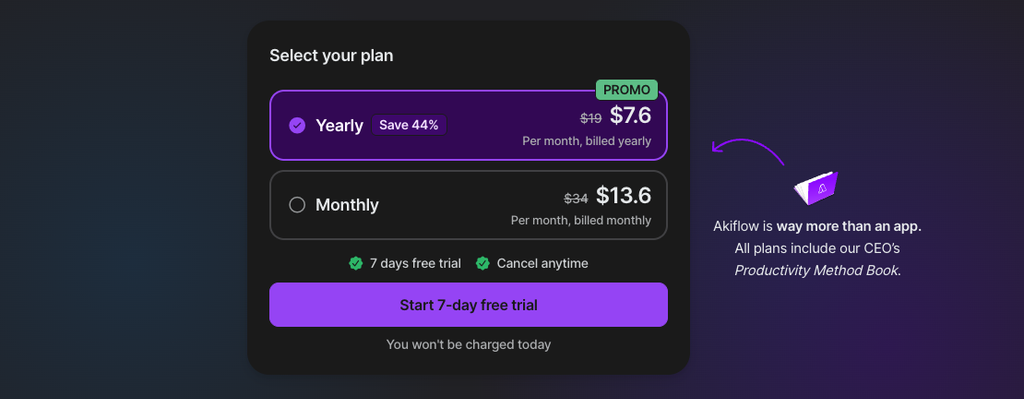
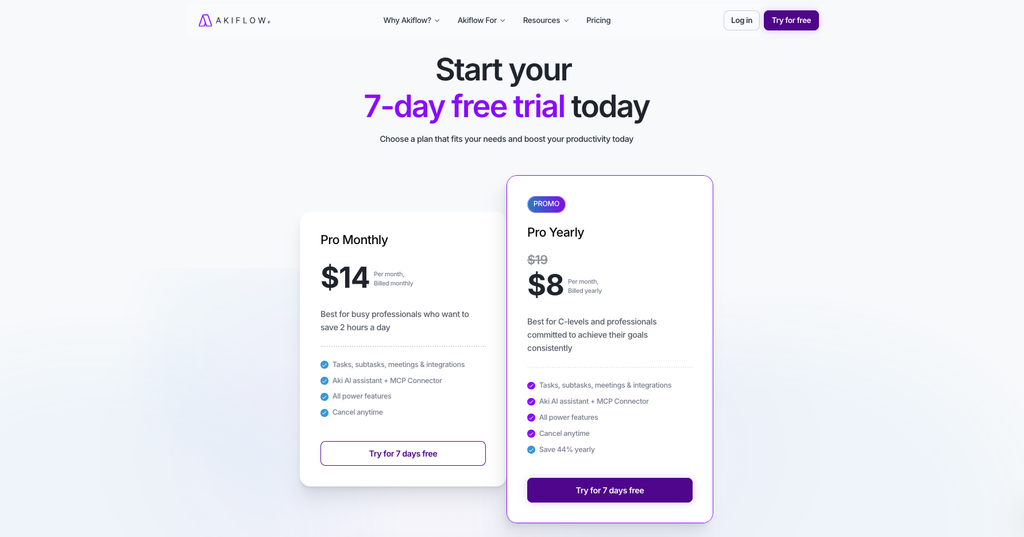
- Akiflow costs $34/month, or $19/month billed annually ($228 upfront). There is no free plan – only a 7-day trial that requires a card. Verified 8 September 2026 against akiflow.com/pricing.
- It is a consolidation tool, not a planner that plans for you. Akiflow pulls tasks in from Gmail, Slack, Asana, Notion, Jira and others. You still drag every one of them onto your calendar by hand.
- The single most important limitation: completing a task in Akiflow does not always mark it complete in the source app. Several tools sync one way only, which means checking things off twice.
- Reviews are bimodal, not uniformly good. Trustpilot sits at 4.4/5, but that average hides 81% five-star and 11% one-star ratings. Almost every one-star review is about billing, not the product.
- Break-even is roughly 10 hours saved per month at a $34/hour rate. If you bill less than that, or your tasks already live in one app, the maths doesn’t work.
Quick verdict
SoftSnoop rating: 4.2 / 5
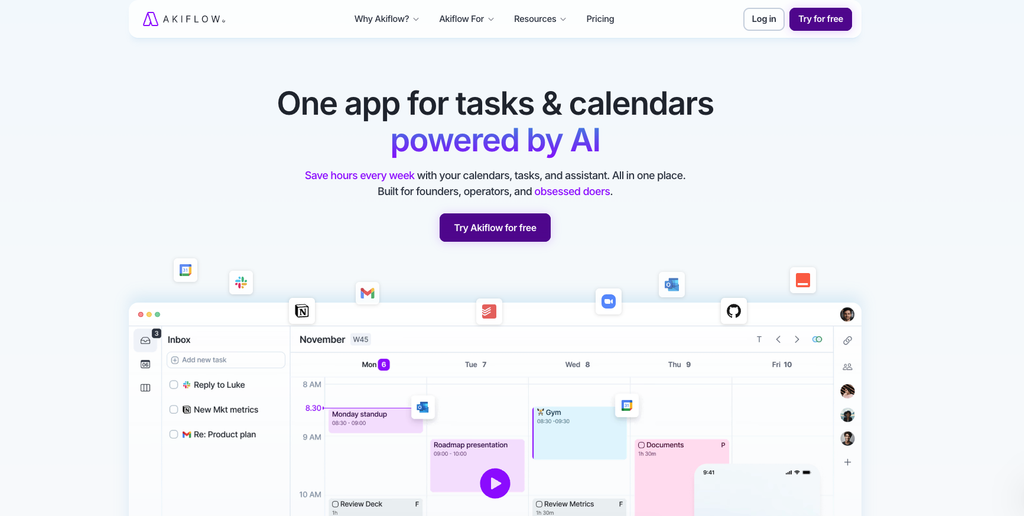
Akiflow is the best tool on the market at one specific job: taking tasks scattered across eight or ten different apps and putting them into a single, keyboard-driven queue you can time-block. Nothing else in the daily-planner category integrates as widely.
It is also priced at the top of the category, requires a daily ritual you have to actually keep, and does very little of the thinking for you. If your problem is “I don’t know what I’m supposed to be doing today because it’s spread across five tools”, Akiflow solves it properly. If your problem is “I have too much to do”, it will hand you a longer list, faster.
Buy it if: you are a founder, consultant, PM or freelancer working across many tools, you like keyboard shortcuts, and you’ll commit to a 10-minute daily planning habit.
Skip it if: your tasks already live in one place, you want AI to schedule your day for you, or you need real team collaboration.
Akiflow at a glance
| Best for | Professionals consolidating tasks from many separate tools |
|---|---|
| Starting price | $19/month billed annually ($228/year) |
| Monthly price | $34/month |
| Free tier | None — 7-day trial, card required |
| Platforms | macOS, Windows, web, iOS, Android |
| Standout feature | Universal inbox + command bar (Cmd+K) |
| Native integrations | ~18 direct, plus Zapier and IFTTT |
| Company | Akiflow, Y Combinator-backed |
| SoftSnoop rating | 4.2 / 5 |
Akiflow pricing in 2026
Akiflow sells one feature set with different billing cycles. There are no feature tiers, no seat minimums for individuals, and no functionality locked behind a higher plan. What changes is how long you commit for.
| Plan | Price | Billed | Annual cost | What you get |
|---|---|---|---|---|
| Pro Monthly | $34/mo | Monthly | $408 | Everything. Cancel anytime. |
| Pro Yearly | $19/mo | Yearly, $228 upfront | $228 | Everything, plus a 1:1 onboarding call. 44% cheaper. |
| Believer | ~$14.90/mo (reported) | Every 2 years upfront | ~$179/yr equivalent | Same features, plus early access and priority support |
| Teams | Not published | Contact sales | — | Akiflow’s help centre references ~40% off for invited team members |
| Students / researchers | Not published | Contact support | — | Email support@akiflow.com |
Three things worth knowing about this table:
1. The Believer plan is not on the pricing page.
It only becomes visible inside your billing settings after you start a trial. Older reviews still quote a five-year Believer plan at around $8.33/month; the two-year version at roughly $14.90/month is what current sources report. Because Akiflow doesn’t publish it, treat any Believer figure – including ours – as unconfirmed until you see it in your own account. We flag this because a two-year prepay is a genuine commitment, and you should not make it on the basis of a blog post.
2. The student discount is real but unquantified.
Akiflow’s pricing page invites students and researchers to get in touch, without stating a number. Third-party guides quote anywhere from 50% to 60%. Trustpilot reviewers report getting a response within the hour. Ask before you subscribe, not after.
3. Team pricing is quote-only.
If you want more than a couple of seats, you’re booking a sales call. Budget for that timeline.
Worked cost example
Here is what Akiflow actually costs a small consulting firm over three years. Assume four people, all on the annual plan, no negotiated discount.
| Line item | Year 1 | Year 2 | Year 3 | 3-year total |
|---|---|---|---|---|
| 4 × Pro Yearly @ $228 | $912 | $912 | $912 | $2,736 |
| Same four seats on monthly billing | $1,632 | $1,632 | $1,632 | $4,896 |
The annual commitment saves this firm $2,160 over three years. That is the single largest lever on the price, and it is why we’d argue nobody should stay on monthly billing beyond the first two or three months of evaluation.
Now the part most reviews leave out. Akiflow is a layer on top of your existing stack, not a replacement for it. The four-person firm above is likely also paying for the tools Akiflow reads from:
| Tool | Typical 4-seat annual cost |
|---|---|
| Akiflow | $912 |
| Project management (Asana, ClickUp or similar) | $500–$1,200 |
| Slack | $350–$700 |
| Google Workspace | $340–$700 |
| Realistic total | $2,100–$3,500/year |
Akiflow’s value increases the more tools you already pay for – and so does your total software bill. That is the honest framing. If you’re trying to reduce the number of subscriptions you run, adding an eleventh tool to manage the other ten is a strange way to do it.
Hidden costs and billing friction
This is where Akiflow’s otherwise strong review profile takes damage, so we’re putting it in the pricing section rather than burying it.
- The trial requires a card and auto-converts. Seven days, then you are charged. On Trustpilot, unexpected post-trial charges and slow refunds are the dominant theme in negative reviews.
- You can usually get the trial extended. Multiple reviewers report that clicking cancel triggers an offer of an extra 7–14 days. Booking the 1:1 onboarding call during your trial also extends it. Use both.
- Annual is charged as one lump. $228 leaves your account on day one. There is no monthly instalment option on the annual rate.
- No usage-based surprises. Unlike Motion, Akiflow does not meter AI credits. What you’re quoted is what you pay. Credit to them for that.
Our advice: start on monthly, set a calendar reminder for day six, and only move to annual once you’ve kept the daily planning habit for a full month. The $180/year saving is not worth locking into a tool you’ll abandon in week three.
How we evaluated Akiflow
We assessed Akiflow across five criteria weighted for its category: integration breadth (30%), speed of daily use (25%), value for money (20%), sync reliability (15%) and mobile parity (10%). We verified every price against Akiflow’s official pricing page on 8 September 2026 rather than repeating figures from other reviews – which matters here, because several widely-cited numbers are out of date.
We also read through the current public review corpus: 228 Trustpilot reviews and 106 Capterra reviews, plus published hands-on testing from Efficient App and Productive with Chris. Where a claim appears only in vendor marketing, we say so.
One correction worth making up front. Several 2024–2025 reviews list “no subtasks” as a dealbreaker. Akiflow’s current pricing page explicitly includes tasks and subtasks. That gap has been closed. Similarly, the “3,000+ integrations” figure that circulates in older posts is counting Zapier’s catalogue, not Akiflow’s. Akiflow’s own directory lists roughly 18 native integrations. Both numbers are technically defensible; only one is useful.
What Akiflow actually does
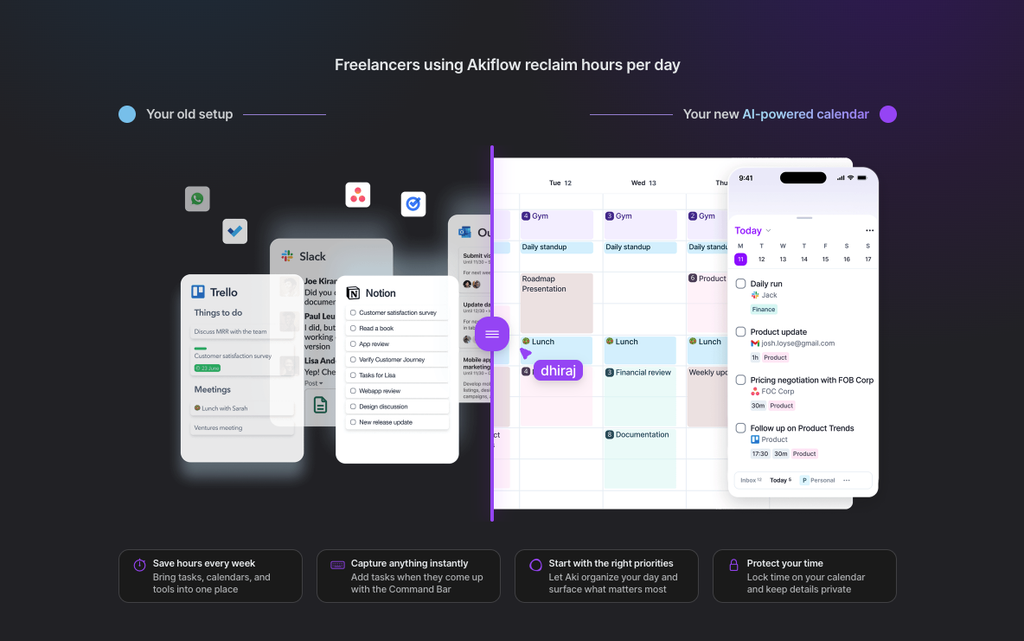
Akiflow occupies a narrow category: the daily planner that sits above your other tools. It is not a project manager. It is not a calendar replacement. It is a triage surface.
The universal inbox. Connect Gmail, Outlook, Slack, Asana, ClickUp, Todoist, Notion, Jira, Linear, GitHub, Trello and others, and anything that becomes a task in those systems lands in one Akiflow inbox. Star a Slack message, flag an email, get assigned a Jira ticket – it arrives in the same queue. The promise is that you stop opening eight apps to answer “what am I supposed to be doing?”
The command bar. Cmd+K opens a command palette from which you can create, schedule, label, reschedule and complete tasks without touching a mouse. This is the feature power users consistently single out. If you have used Superhuman or Linear, the mental model transfers immediately.
Time blocking. You drag tasks from the inbox onto the calendar on the left. The task becomes a block. Your calendar becomes your to-do list. Akiflow syncs two-way with Google Calendar and Outlook Calendar, so those blocks show up to colleagues checking your availability.
Rituals. A guided morning planning session and an end-of-day shutdown that rolls unfinished work forward. This is the habit the whole product depends on – more on that below.
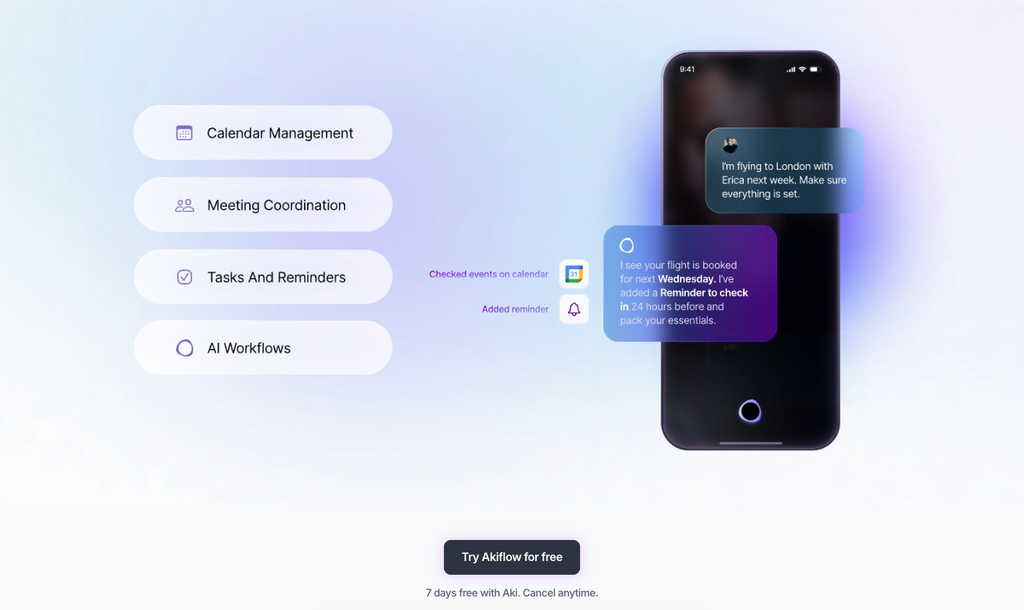
Aki, the AI assistant. Natural-language commands for scheduling and reorganising. Akiflow also ships an MCP connector, which lets external AI clients read and write your Akiflow data.
Meeting assistant. AI transcription, summaries and action items, layered on top of the base plan.
Where Akiflow is genuinely strong
Integration breadth is the real product. This is not a marketing claim – it’s the thing Akiflow does better than Sunsama, Morgen or Motion. If your working life is genuinely spread across Jira, Notion, Slack and three email accounts, Akiflow is the only tool in this category that will pull all of it into one queue without you building the plumbing yourself. Efficient App, which was otherwise fairly critical of the product, concluded that integrations are where Akiflow beats every other daily planner.
Speed, once you learn it. The keyboard-first design is not a gimmick. Processing 30 inbox items with the command bar is meaningfully faster than clicking through the same 30 items in five different web apps. The learning curve is real, but it’s front-loaded – a few days, not a few weeks.
Support is unusually good. This shows up everywhere. Capterra rates Akiflow’s customer support 4.9/5, its highest sub-score by a clear margin. Trustpilot reviewers repeatedly name individual support staff. One reviewer emailed about a student discount and had it granted within the hour. For a company of Akiflow’s size, that is a genuine differentiator, and it’s the reason we’d trust them to fix a problem if one arises.
Predictable pricing.
No AI credit metering, no feature tiers, no seat-based upsell path for individuals. In a category where Motion has moved toward credit-metered AI with per-100-credit overages, Akiflow’s flat price is a real advantage for anyone who needs to budget.
Where Akiflow falls short
Sync is not fully bidirectional.
This is the most consequential flaw and the one most reviews mention only in passing. Completing a task inside Akiflow does not reliably mark it complete in the tool it came from. You end up ticking the same task off twice – once in Akiflow, once in Asana. For a product whose entire premise is eliminating app-switching, this is a meaningful hole.
The Zapier connector is thin.
Akiflow’s Zapier integration supports creating tasks, but not searching or updating them. Any custom automation you build on top of it will be one-directional and fairly basic. If you were counting on Zapier to fill gaps in the native integration list, temper expectations.
Aki is not the executive assistant the marketing implies.
Akiflow describes Aki as an assistant “beyond human limits.” Independent testing has been consistently less impressed – Efficient App characterised it as behaving closer to a wrapper around a general-purpose chat model than a genuine scheduling agent. Aki is useful for natural-language task entry. It will not plan your week.
Planning stays manual.
Akiflow gives you excellent tools for time blocking; it does not time-block for you. Every task gets dragged onto the calendar by a human. When your day gets blown up by a client call, you re-plan it yourself. Motion automates this. Akiflow deliberately does not – which is a philosophy, not a bug, but you should know which one you’re buying.
Consolidation can backfire.
The most useful critique we found: just because you can put all your tasks in one place doesn’t mean you should. Efficient App’s testers stopped using Akiflow because pooling every Slack reply and email into one queue produced overwhelm rather than clarity. If you dump everything in, you’ll spend more time managing the list than working from it. The tool rewards selectivity, and nothing in the interface enforces it.
Mobile and Outlook are the weak spots. Recurring complaints across review platforms centre on mobile app stability and slow Outlook sync. Google Calendar users report far fewer issues than Outlook users. If you’re a Microsoft 365 shop, test this hard during the trial.
It requires a habit you might not keep. Akiflow only works if you review it daily. Skip three days and the inbox becomes a backlog, the calendar becomes fiction, and you are paying $34/month for a list you’re avoiding. This is the single most common reason people churn off tools in this category.
What real users say
We pulled the current public ratings rather than quoting selectively.
| Platform | Rating | Reviews | Notable |
|---|---|---|---|
| Trustpilot | 4.4/5 | 228 | 81% five-star, 11% one-star |
| Capterra | 4.7/5 | 106 | 90% would recommend |
| Capterra – Customer support | 4.9/5 | 106 | Highest sub-score |
| Capterra – Ease of use | 4.6/5 | 106 | |
| Capterra – Features | 4.5/5 | 106 | |
| Capterra – Value for money | 4.4/5 | 106 | Lowest sub-score |
Ratings checked 8 September 2026.
Two patterns are worth pulling out of this data.
First, the Trustpilot distribution is bimodal.
A 4.4 average sounds like a product with mild, evenly-spread reservations. It isn’t. Four out of five reviewers give it full marks, and roughly one in nine gives it the lowest possible score, with almost nothing in between. Reading the one-star reviews, the pattern is consistent: they are about billing – unexpected charges after the trial converted, and difficulty getting refunds – rather than about the software. Akiflow has replied to 83% of its negative reviews, which is a better response rate than most SaaS companies manage.
Second, value for money is Akiflow’s weakest score on Capterra by design, not by accident.
People who use it rate the product highly on ease of use, features and support, and comparatively lower on whether it’s worth the money. That is exactly what you’d expect from a good product priced at the top of its market. It is not a red flag; it’s a pricing signal. The people who love Akiflow still think it’s expensive.
The praise, where it’s specific, clusters tightly: multi-calendar consolidation in a single view, the speed of keyboard shortcuts, and having tasks from Jira, Notion and Gmail land in one place. One project coordinator described cutting daily task-wrangling down to a few minutes. Several ADHD users report that the imposed structure is the thing that makes it work for them.
Akiflow vs the alternatives
| Tool | Price (annual / monthly) | Best for | Key difference vs Akiflow |
|---|---|---|---|
| Akiflow | $19 / $34 per mo | Consolidating many tools | Widest native integrations; manual planning |
| Sunsama | $17 / $22 per mo | Mindful, ritual-led planning | Calmer, fewer integrations, 14-day no-card trial |
| Motion | $19 / $29 per seat/mo | AI auto-scheduling | Schedules for you; adds project management; AI credit metering |
| Morgen | ~$15 / – per mo | Budget-conscious planning | Cheaper, AI planning suggestions, smaller ecosystem |
| Todoist | ~$5 per mo | Simple task management | A fraction of the price; no calendar-first planning |
Competitor pricing verified 8 September 2026 across vendor pages and help centres. Note: Sunsama’s marketing page and its billing documentation currently disagree – the billing docs show $22 monthly / $17 annual, while parts of the pricing page still display $25 / $20. Motion’s pricing has changed repeatedly through 2026 and is now credit-metered. Confirm both at checkout.
The short version. Choose Sunsama if you want the planning ritual and don’t need ten integrations – its 14-day trial without a card is also a meaningfully lower-risk way to test the category. Choose Motion if you’d rather an AI made the scheduling decisions and you want project management bundled in. Choose Akiflow if integration breadth is the actual problem and you want to keep control of your own calendar. Choose Todoist if you’re honest with yourself that you just need a good list.
Who should buy Akiflow – and who shouldn’t
Buy it if you are:
- A founder, consultant, agency lead or PM whose work is genuinely fragmented across 5+ tools
- Someone who bills at $34/hour or more, where a 30-minute daily saving clears the price
- A keyboard-shortcut person who found Superhuman or Linear intuitive
- Working somewhere you have no control over which tools the team uses
- Someone who needs external structure to function well and will keep a daily ritual
Skip it if you are:
- Already living inside one tool – if all your tasks are in Todoist, Akiflow adds a layer without removing one
- Looking for AI to plan your day (Motion) or a calmer, cheaper ritual (Sunsama, Morgen)
- Managing a team’s work rather than your own – collaboration features are thin
- Deep in Microsoft 365 and unable to tolerate slow Outlook sync
- Trying to cut your software spend
- Unwilling to spend 10 minutes a day maintaining it
The 5-question buying checklist
Run these before you enter a card.
- How many separate tools do my tasks actually live in right now? Fewer than four, and Akiflow’s core advantage largely disappears.
- What is an hour of my time worth? Multiply by 10 hours. If the answer is under $34, the monthly plan doesn’t pay for itself. Under $19 and neither does the annual.
- Will I genuinely do a 10-minute daily review? Be honest. Look at whether you kept the last productivity habit you started.
- Do I want to plan my own day, or have it planned? This single question decides Akiflow vs Motion more than any feature list.
- Is my calendar Google or Outlook? If Outlook, stress-test sync speed on day one of the trial, not day six.
FAQ
Does Akiflow have a free plan?
No. Akiflow offers a 7-day free trial that requires payment details, then converts to a paid subscription automatically. There is no permanent free tier. Many users report the trial can be extended by another 7–14 days by attempting to cancel or by booking an onboarding call.
How much does Akiflow cost per year?
$228 if you pay annually ($19/month), or $408 if you pay monthly ($34/month). The annual plan saves $180 per year, about 44%. Both plans include identical features.
Is Akiflow better than Sunsama?
Akiflow wins on integrations and keyboard speed; Sunsama wins on the guided planning ritual, a calmer interface and a 14-day trial that doesn’t require a card. Sunsama is also slightly cheaper. Pick Akiflow if consolidating many tools is your actual problem.
Does Akiflow sync tasks both ways?
Partially. Tasks flow into Akiflow from connected apps reliably, but completing a task in Akiflow does not consistently mark it complete in the source tool. Verify this behaviour for your specific integrations during the trial.
Can I cancel Akiflow anytime?
Yes. Akiflow states you can cancel at any time and keep access through the end of your billing cycle, with no cancellation fee. Refunds for charges already taken are a separate matter and are the most common complaint in negative reviews.
Is there an Akiflow student discount?
Yes, but Akiflow does not publish the amount. Students and researchers are directed to email support@akiflow.com. Third-party sources quote 50–60%. Reviewers report fast responses.
Does Akiflow work for teams?
It has team collaboration features, but they are not its strength – Akiflow is built around individual planning. Team pricing isn’t published; you contact sales. Akiflow’s help centre references around 40% off for invited team members, but confirm any figure with them directly.
What is the Akiflow Believer plan?
A long-term prepay option offering the lowest effective monthly rate plus early access to features and priority support. It is not shown on the public pricing page and only appears in your billing settings after you start a trial. Reported figures vary; verify inside your own account before committing.
Verdict
Akiflow is a very good product with a narrow ideal customer and a price that filters hard for that customer.
If you spend a real portion of every day reconstructing your own to-do list from Slack, email and two project trackers, Akiflow removes that work better than anything else available, and $228 a year is a rounding error against the time it returns. The command bar is excellent, the integration list is unmatched in this category, and the support team is genuinely responsive in a way that matters when something breaks.
If any part of that description doesn’t fit – if your tasks are already in one place, if you want the scheduling decisions made for you, or if you know you won’t keep the daily habit – you’ll be paying premium prices for a tool that quietly becomes another inbox you’re avoiding.
Best for consolidation: Akiflow. Best value in the category: Sunsama or Morgen. Best if you want AI to plan for you: Motion.
Our recommendation: take the 7-day trial, connect only your three noisiest tools rather than all of them, and use it exclusively for a week. Extend the trial if offered. Decide on day 14, not day 7 – and stay on monthly billing until the habit is a month old.
[See current Akiflow pricing →]
Changelog
Updated September 2026:
Verified all pricing against Akiflow’s official pricing page.
Corrected the outdated “no subtasks” claim still circulating in older reviews – subtasks are now included.
Clarified that the widely-quoted “3,000+ integrations” figure counts Zapier’s catalogue, not Akiflow’s ~18 native connections.
