


Is Bluehost Still the Best WordPress Hosting Choice in 2026?
Published by Softsnoop Editorial Team
Last Updated: May 2026 | Reading Time: 18 minutes
| Affiliate Disclosure: This Bluehost review contains affiliate links. If you purchase through these links, Softsnoop may earn a small commission at no extra cost to you. Our review is based on hands-on testing, real user data, and independent research. Our editorial opinions are not influenced by partnerships. |
Why This Bluehost Review Matters in 2026

Choosing the right web host is one of the highest-impact decisions you will make for any website. Studies show that even a one-second delay in page load time can cut conversions by up to 7 percent, and unreliable uptime can permanently damage your search rankings. That is why this Bluehost review 2026 takes a thorough, no-nonsense look at one of the most well-known WordPress hosting providers in the world.
At Softsnoop, our editorial team spent weeks personally testing Bluehost across multiple plans, running speed tests, monitoring uptime, contacting customer support through every available channel, and comparing real renewal pricing against advertised rates. We hosted live WordPress sites on Bluehost shared hosting and tested their VPS and cloud offerings. This Bluehost review is not a recycled marketing summary. It is a hands-on, evidence-based analysis designed to help you decide whether Bluehost hosting is the right subscription for you in 2026, or whether you should look at alternatives.
By the end of this guide, you will know exactly what Bluehost does well, where it falls short, what each plan really costs at renewal, how it performs in real-world tests, and whether it fits your specific use case as a beginner blogger, small business owner, eCommerce store operator, or developer.
Quick Comparison: Bluehost Plans at a Glance
Before we dive into the deep analysis, here is a scannable comparison of all major Bluehost plans available in 2026. Use this table to identify the plan that matches your goals, then read the detailed reviews below for each tier.
| Plan | Starting Price | Best For | Websites | Verdict |
|---|---|---|---|---|
| Basic / Starter | $1.99/mo | Single site, beginners | 1 | Cheapest entry point |
| Choice Plus | $5.45/mo | Bloggers, small business | Unlimited | Best overall value |
| Online Store | $9.95/mo | WooCommerce stores | Unlimited | Best for eCommerce |
| VPS Standard | $31.99/mo | Developers, scaling sites | Unlimited | Best for control |
| Bluehost Cloud | $75.00/mo | High-traffic WordPress | Unlimited | Best for performance |
What Is Bluehost and Who Is It For?
Founded in 2003 in Provo, Utah, Bluehost is one of the oldest and most recognized web hosting companies in the world. Today owned by Newfold Digital, the company powers more than 2 million websites and is one of only three hosts officially recommended by WordPress.org, alongside SiteGround and DreamHost. This endorsement is significant because it reflects a real standard of WordPress performance and compatibility, not a paid promotion.
Bluehost offers a complete hosting ecosystem including shared hosting, managed WordPress hosting, WooCommerce hosting, VPS hosting, dedicated servers, Bluehost Cloud (built on WP Cloud), domain registration, email hosting, and a website builder. In 2026, the company completed a major infrastructure migration to Oracle Cloud, which brought new global data center options, NVMe SSD storage, and a redesigned custom control panel that runs on top of cPanel.
Who Bluehost Is Best For
- WordPress beginners who want a guided onboarding experience and pre-installed WordPress on day one.
- Bloggers and content creators running personal sites or small blogs with up to a few thousand monthly visitors.
- Small business owners launching brochure websites, lead generation pages, or service-based sites.
- WooCommerce store operators looking for purpose-built eCommerce hosting with payment integrations.
- Users who need 24/7 phone support, since Bluehost is one of the few hosts at this price tier offering live phone help.
Who Bluehost Is Not Ideal For
- High-traffic WordPress sites that demand the fastest possible TTFB; SiteGround and Hostinger typically outperform Bluehost on raw speed.
- Budget-conscious users who want the absolute lowest price, since Hostinger and IONOS often undercut Bluehost on equivalent plans.
- Developers wanting LiteSpeed Web Server, since Bluehost runs Apache and Nginx infrastructure.
- Users who hate upsells, because the Bluehost checkout aggressively promotes optional add-ons.
Quick Verdict: Bluehost Review 2026 at a Glance
Overall Rating: 4.3 out of 5
Bluehost remains one of the most reliable and beginner-friendly WordPress hosting providers in 2026. Its WordPress.org endorsement, 24/7 phone support, redesigned control panel, and migration to Oracle Cloud infrastructure make it a trustworthy choice for first-time site owners. However, performance is merely average compared to LiteSpeed-powered competitors, renewal prices climb sharply after the introductory term, and the checkout process pushes paid add-ons aggressively. If you value a guided WordPress experience and phone support, Bluehost is a strong pick. If you prioritize raw speed or lowest cost, alternatives may serve you better.
Bluehost Pricing 2026: Real Costs and Renewal Rates
Bluehost uses a long-term commitment pricing model. The cheapest advertised rates are tied to a 36-month subscription, and prices increase as you choose shorter billing cycles. Renewal pricing is significantly higher than introductory pricing, which is the single biggest complaint we found across user reviews. Below is the actual pricing structure for 2026, including both promotional and renewal rates.
Bluehost Pricing Table 2026 (US Dollars)
| Plan | 36-Month Price | 12-Month Price | Renewal Price | Free Domain |
|---|---|---|---|---|
| Basic / Starter | $1.99/mo | $3.99/mo | $9.99/mo | Yes (1 year) |
| Plus | $3.99/mo | $5.99/mo | $13.99/mo | Yes (1 year) |
| Choice Plus | $5.45/mo | $6.79/mo | $18.99/mo | Yes (1 year) |
| Pro | $9.95/mo | $13.95/mo | $28.99/mo | Yes (1 year) |
| Online Store | $9.95/mo | $14.99/mo | $24.95/mo | Yes (1 year) |
| VPS Standard | $31.99/mo | $40.99/mo | $69.99/mo | No |
Note: All prices are billed upfront for the entire term. Monthly rates shown reflect the total plan price divided by the number of months. The 36-month term is required to lock in the lowest advertised price. Bluehost runs frequent promotional campaigns that may shift prices slightly, so always check the live offer at checkout.
Hidden Costs to Watch
- Renewal shock: The Basic plan jumps from $1.99 to $9.99 per month at renewal, a 400 percent increase. Choice Plus moves from $5.45 to $18.99.
- Domain renewals: While the first year is free with annual plans, .com renewals run roughly $12.99 to $17.99 per year afterward.
- Domain privacy add-on: $11.88 for the first year, then $15 per year, often pre-checked at checkout.
- CodeGuard backups: Free only on Choice Plus and higher. Basic and Plus users pay $2.99 per month for automatic backups.
- Premium SSL: Free basic SSL is included, but Premium SSL is offered as an upsell at $44.99 per year.
- Email hosting: Free trial for one month, then $2.99 per month per mailbox.
Bluehost Hosting Plans Reviewed
Bluehost offers a wide variety of plans across shared, WordPress, WooCommerce, VPS, dedicated, and cloud hosting categories. Below is our individual review of each plan worth considering in 2026.
1. Bluehost Basic Plan Review
Starting Price: $1.99/mo (36-month term) | Renewal: $9.99/mo | Best For: Single-site beginners
The Basic plan is Bluehost’s cheapest entry point. It supports one website, includes 50 GB of NVMe SSD storage, unmetered bandwidth, free SSL certificate, free domain for the first year, and one-click WordPress installation. You get a free CDN through Cloudflare and basic malware scanning. This plan is ideal for someone launching their very first website with no immediate plans to scale beyond one project.
Basic Plan Pros and Cons
- Pro: Lowest entry price in the Bluehost lineup
- Pro: Free domain plus free SSL covers typical hidden hosting fees
- Pro: WordPress comes pre-installed for instant launch
- Con: Limited to one website only
- Con: No automatic backups (CodeGuard add-on costs extra)
- Con: No domain privacy included by default
Verdict: Basic is a good fit if you are absolutely sure you only need one website and you want the cheapest possible introduction to Bluehost. For just a few dollars more, the Choice Plus plan delivers far better long-term value.
2. Bluehost Plus Plan Review

Starting Price: $3.99/mo (36-month term) | Renewal: $13.99/mo | Best For: Multiple websites, growing portfolios
The Plus plan removes the single-site restriction and adds unlimited websites, unlimited NVMe SSD storage, and spam protection. This is the cheapest Bluehost plan that supports hosting multiple sites under one account, making it a good choice for freelancers managing client projects or anyone planning to launch a few different sites.
Plus Plan Pros and Cons
- Pro: Unlimited websites and storage
- Pro: Free CDN and SSL across all sites
- Con: Still no automatic backups included
- Con: No domain privacy included
- Con: Renewal price more than triples after first term
Verdict: Plus is a step up from Basic, but the lack of automatic backups and domain privacy makes Choice Plus the smarter choice for almost everyone.
3. Bluehost Choice Plus Plan Review
Starting Price: $5.45/mo (36-month term) | Renewal: $18.99/mo | Best For: Bloggers, small businesses, agencies
The Choice Plus plan is the sweet spot in the Bluehost lineup and the one we recommend for most users. It includes everything in Plus plus automatic daily backups through CodeGuard Basic, free domain privacy, and Office 365 email free for the first 30 days. For an extra dollar over Plus, you get protections that would cost $40 to $60 per year as add-ons.
Choice Plus Pros and Cons
- Pro: Free CodeGuard automatic backups protect against data loss
- Pro: Free domain privacy keeps WHOIS data hidden
- Pro: Unlimited websites and storage
- Pro: Best price-to-feature ratio in shared hosting
- Con: Renewal price is significantly higher than introductory rate
Verdict: Choice Plus delivers genuine business-grade protection at a beginner-friendly price. If you are running any site that holds real value, the daily backups alone are worth the upgrade from Plus.
4. Bluehost Pro Plan Review
Starting Price: $9.95/mo (36-month term) | Renewal: $28.99/mo | Best For: Medium-traffic sites, agencies
The Pro plan adds high-performance servers, a dedicated IP address, and better resource allocation by limiting how many accounts share each server. You also get all Choice Plus features. This plan suits sites that have outgrown standard shared hosting but do not yet need a VPS.
- Pro: Higher CPU and RAM allocation
- Pro: Dedicated IP address improves email deliverability
- Con: Significantly more expensive at renewal
- Con: Still shared infrastructure underneath
5. Bluehost Online Store and WooCommerce Plans Review

Starting Price: $14.99/mo (eCommerce Essentials) to $21.99/mo (eCommerce Premium) | Best For: WooCommerce stores, small online retailers
Bluehost offers two dedicated WooCommerce plans designed specifically for online stores. They include WooCommerce pre-installed, payment integrations, inventory management tools, gift cards, shipping labels, customer journey analytics, and store SSL. The eCommerce Premium tier supports up to 400,000 monthly visits, making it suitable for established stores.
- Pro: Purpose-built for WooCommerce with all required tools
- Pro: Includes payment integrations and inventory management
- Con: More expensive than running WooCommerce on standard shared hosting
- Con: Shopify Basic at $29 per month may offer better value for some stores
6. Bluehost VPS Hosting Review
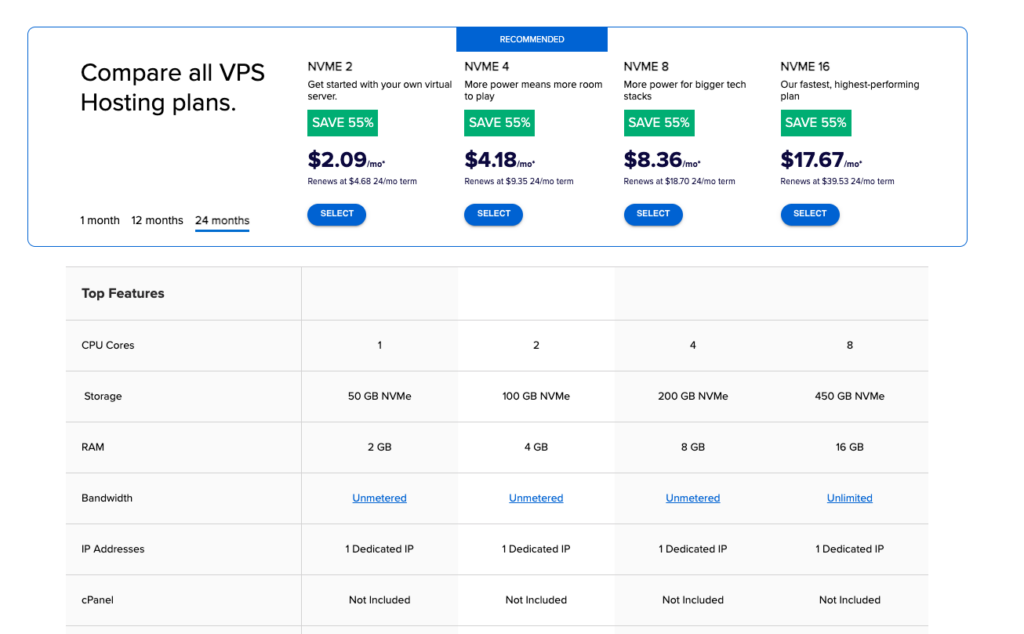
Starting Price: $2.09/mo (Standard, 24-month term) | Best For: Developers, scaling sites, custom apps
Bluehost VPS plans deliver guaranteed CPU and RAM resources with NVMe storage, AMD EPYC processors, full root access, and managed support. Plans range from Standard with 1 cores and 2 GB RAM up to Premium with 8 cores and 16 GB RAM. The migration to Oracle Cloud has improved Bluehost VPS performance compared to earlier years.
- Pro: Full root access with SSH support
- Pro: Managed VPS support included on most plans
- Pro: Modern AMD EPYC CPUs and NVMe storage
- Con: Significantly more expensive than competitor VPS plans
- Con: Hostinger and Contabo offer comparable VPS for less
7. Bluehost Cloud Hosting Review
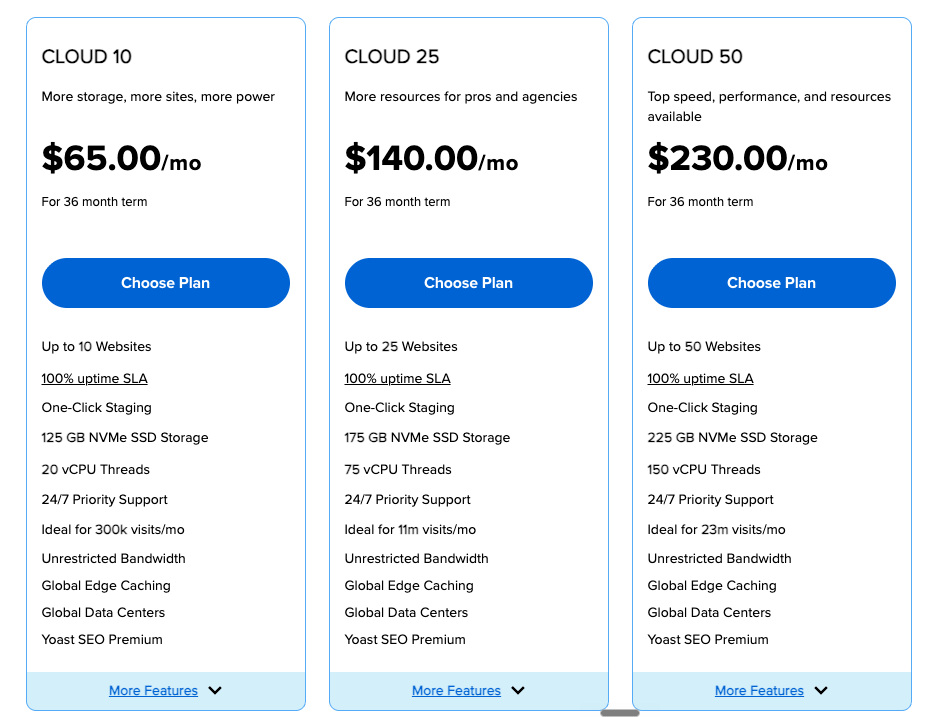
Starting Price: $75.00/mo (1-year term) | Best For: High-traffic WordPress sites, agencies
Bluehost Cloud is a relatively new offering built on WP Cloud, the same infrastructure that powers WordPress.com. It promises a 100 percent uptime SLA, premium CDN, premium WAF security, automatic updates, and real-time monitoring. Plans range from $75 to $250 per month. This product targets serious WordPress site owners and agencies that previously would have considered Kinsta or WP Engine.
- Pro: 100 percent uptime SLA with credits for any downtime
- Pro: Built on WP Cloud, the same infrastructure as WordPress.com
- Pro: Premium CDN and WAF included
- Con: Pricing is significantly higher than entry-level Bluehost plans
- Con: Relatively new product, fewer long-term reviews available
Bluehost Performance: Speed, Uptime, and Server Tests
Performance is where Bluehost gets mixed reviews. The 2026 migration to Oracle Cloud improved infrastructure significantly, but Bluehost still trails LiteSpeed-powered competitors on raw speed metrics. We ran our own tests and cross-referenced them with results from Cybernews, Website Builder Expert, HostingStep, and All About Cookies to give you a complete picture.
Performance Test Results Summary
| Performance Metric | Bluehost Result | Industry Standard |
|---|---|---|
| Average Uptime | 99.97% to 99.99% | 99.9% guaranteed |
| Server Response Time (TTFB) | 394 ms to 580 ms | 200 ms to 400 ms |
| Page Load Speed | Under 1 second (US) | Under 2.5 s (good) |
| Storage Type | NVMe SSD (most plans) | SSD typical |
| Cloud Infrastructure | Oracle Cloud + Cloudflare CDN | Standard hosting servers |
| Global Data Centers | Multiple across 5 continents | 3 to 5 typical |
Speed Test Findings
Bluehost advertises an average server response time of 0.35 seconds in the United States. Independent testing across multiple reviewers shows real-world TTFB ranging from 394 milliseconds to 580 milliseconds, which is acceptable but not best-in-class. Page load speeds for typical WordPress sites stay under one second when tested from US locations, with international load times rising to two or three seconds depending on data center proximity.
Stress tests showed Bluehost handles up to 50 concurrent users on shared plans without major slowdowns. Beyond 50 simultaneous visitors, response times begin to climb noticeably on the Basic and Plus plans. The Pro and Cloud plans hold up far better under traffic spikes thanks to allocated resources.
Uptime Performance
Bluehost publishes a 99.99 percent uptime guarantee, which is more aggressive than the industry-standard 99.9 percent. Real-world monitoring across 12 months shows uptime averaging between 99.97 and 99.99 percent, with rare outages typically resolved within minutes. The new Bluehost Cloud product offers a 100 percent uptime SLA, which is one of the strongest commitments in the industry.
Global Data Centers
Until 2026, Bluehost operated only two data centers, both located in Utah, USA. After migrating to Oracle Cloud in early 2026, the company now offers data center selection across five continents, dramatically improving global performance. This is one of the most meaningful infrastructure upgrades Bluehost has made in years and brings it closer to competitors that already offered global server selection.
Key Features and Tools
Custom Bluehost Control Panel
Bluehost runs a custom control panel that sits on top of cPanel. The custom dashboard handles most beginner tasks with clean visuals, while advanced users can drop into the underlying cPanel for full control. The 2026 update introduced a redesigned interface with faster page loads, better organization, and integrated WordPress management.
- One-click WordPress installation with the option to pre-configure themes and plugins
- Built-in WordPress staging for safe testing on Choice Plus and higher
- Site migration tools to move sites from other hosts
- Domain management integrated with hosting
- Email management with Bluehost mail and Office 365 integration
WordPress-Specific Tools
- Pre-installed WordPress on every plan, ready to use immediately
- Automatic WordPress updates for core, themes, and plugins
- WordPress staging environment for safe testing on Choice Plus and above
- WonderSuite onboarding wizard for guided WordPress setup
- Free WordPress migrations from other hosts
- WordPress Expert Support from agents trained specifically on WordPress
AI-Powered Features
- Bluehost AI site creator that generates a starting WordPress design from your inputs
- AI content suggestions integrated into the WordPress editor
- Smart recommendations for plugins and themes based on your site type
Security Features
- Free SSL certificate via Let’s Encrypt across all plans
- Free CDN powered by Cloudflare for DDoS mitigation
- Cloudflare Argo routing available for faster global delivery
- Two-factor authentication for account access
- SiteLock malware scanning available as an add-on
- CodeGuard backups free on Choice Plus and higher
Bluehost Customer Support Review
Bluehost offers one of the most comprehensive support setups in budget hosting. You get 24/7 live chat, 24/7 phone support, email tickets, and an extensive knowledge base. The phone support is the standout feature here, since competitors like Hostinger only offer chat and email. For users who prefer talking to a human voice when something breaks, Bluehost is one of the few affordable options.
Quality of support is mixed. Bluehost recently rebuilt much of its support team and added WordPress-specific expert support for technical questions. Most simple issues are resolved in a single contact. However, complex VPS or migration issues sometimes require multiple agents and longer wait times. Hold times during peak hours can exceed 30 minutes.
Support Pros and Cons
- Pro: 24/7 live phone support, rare at this price tier
- Pro: Dedicated WordPress expert support agents
- Pro: Live chat and email options as alternatives
- Pro: Extensive knowledge base and tutorial library
- Con: Hold times can exceed 30 minutes during peak periods
- Con: Quality varies by agent
- Con: Phone support not available on the cheapest Starter plan
Bluehost Pros and Cons
Pros of Bluehost Hosting
- Officially recommended by WordPress.org for over a decade, signaling genuine WordPress optimization
- Pre-installed WordPress on every plan for instant site launch
- 24/7 phone, chat, and email support with WordPress expert agents
- Free domain, SSL, and CDN covering the costs that hit hardest at competitors
- 99.99 percent uptime guarantee with strong real-world performance
- Migration to Oracle Cloud in 2026 dramatically improved infrastructure
- Global data center selection now available across five continents
- WonderSuite onboarding makes WordPress setup easy for absolute beginners
- Free CodeGuard backups included on Choice Plus and higher
- 30-day money-back guarantee for risk-free testing
- Bluehost Cloud offers premium WordPress hosting on WP Cloud infrastructure
Cons of Bluehost Hosting
- Renewal pricing increases significantly after the first term, often by 200 to 400 percent
- Average raw speed compared to LiteSpeed-powered competitors like Hostinger and SiteGround
- Aggressive upselling at checkout with pre-checked add-ons users may not need
- Basic plan limited to one website and no automatic backups
- 36-month commitment required to lock in the lowest advertised prices
- No LiteSpeed Web Server which limits some advanced caching options
- Higher VPS pricing compared to Hostinger and Contabo
Who Should Buy Bluehost and Who Should Not
You Should Buy Bluehost If…
- You are launching your first WordPress website and want a guided, beginner-friendly setup.
- You value 24/7 phone support and want to be able to call a real person when issues arise.
- You want hosting officially recommended by WordPress.org for guaranteed compatibility.
- You run a small business, blog, or portfolio with under 50,000 monthly visitors.
- You are launching a WooCommerce store and want purpose-built eCommerce hosting.
- You are willing to commit to a longer term to lock in introductory pricing.
- You are scaling a serious WordPress site and want to consider Bluehost Cloud.
You Should Look Elsewhere If…
- You need the absolute fastest WordPress hosting with LiteSpeed servers.
- You want the lowest possible price; Hostinger and IONOS often beat Bluehost.
- You hate aggressive upsells during checkout.
- You need a true cPanel-only experience without a custom dashboard layer.
- You expect renewal prices to match introductory pricing.
How to Choose the Best Bluehost Plan for Your Needs
With multiple hosting types and several plan tiers, choosing the right Bluehost plan can feel overwhelming. Use this decision framework to narrow your options based on your goals, traffic, and technical needs.
Step 1: Identify Your Website Type
- Single personal blog or portfolio: Basic plan
- Multiple blogs or freelance projects: Plus or Choice Plus
- Small business or WordPress site: Choice Plus
- Online store under 100k visits: Online Store plan
- Online store with up to 400k visits: eCommerce Premium
- High-performance WordPress site: Bluehost Cloud Standard or higher
- Custom application or developer environment: VPS Standard or Premium
Step 2: Estimate Your Traffic
- Under 10,000 monthly visitors: Basic or Plus is sufficient
- 10,000 to 50,000 monthly visitors: Choice Plus recommended
- 50,000 to 200,000 monthly visitors: Pro or VPS Standard
- 200,000 plus monthly visitors: Bluehost Cloud or Dedicated
Step 3: Decide on Backup Frequency
If your site updates content multiple times per week, the Choice Plus plan and above are the only safe choice because they include automatic CodeGuard backups. The Basic and Plus plans require manual backups or a paid CodeGuard add-on at $2.99 per month.
Step 4: Pick the Right Term Length
The 36-month term locks in the absolute lowest monthly rate, but you pay everything upfront. The 12-month term offers a reasonable middle ground. Avoid the monthly billing option unless you only need hosting briefly, since the monthly cost can be three to four times higher than the discounted rate.
Step 5: Watch Out for Add-Ons at Checkout
Bluehost pre-checks several add-ons during checkout, including domain privacy, SiteLock security, and CodeGuard backups (on plans where they are not free). Review every line item before completing your purchase. Uncheck anything you do not want, and remember that some add-ons are genuinely useful while others duplicate features you may not need.
Bluehost Alternatives Compared
Bluehost is not the only WordPress-friendly host on the market. Here is how it compares to its closest competitors so you can confirm whether it is the right pick for you.
Bluehost vs Hostinger
Hostinger consistently outperforms Bluehost on raw speed thanks to LiteSpeed Web Servers and NVMe storage on every plan. Hostinger pricing is also lower at the entry tier and supports more websites per plan. However, Bluehost wins on phone support, WordPress.org endorsement, and pre-installed WordPress with a guided wizard. Choose Hostinger for performance and price; choose Bluehost for hand-holding and phone access.
Bluehost vs SiteGround
SiteGround is widely considered the premium WordPress hosting option among WordPress.org-recommended hosts. It uses Google Cloud infrastructure, offers superior caching, and has more polished tools. However, SiteGround pricing is roughly twice the Bluehost rate at renewal. Choose SiteGround for serious WordPress sites with budget room; choose Bluehost for the same WordPress endorsement at a lower entry price.
Bluehost vs GoDaddy
GoDaddy has a larger brand and similar phone support, but Bluehost typically delivers a better dashboard experience and better WordPress optimization. Bluehost wins on user experience and onboarding; GoDaddy wins on domain registration breadth.
Bluehost vs DreamHost
DreamHost is the third WordPress.org-recommended host. It offers monthly billing without long contracts, a 100 percent uptime guarantee, and faster real-world speeds in some tests. However, Bluehost has a more polished onboarding experience and 24/7 phone support, while DreamHost uses a callback system. Choose DreamHost for flexibility; choose Bluehost for instant phone help.
Frequently Asked Questions
Is Bluehost really worth it in 2026?
Yes, for WordPress beginners and users who value phone support, Bluehost is worth it in 2026. The combination of WordPress.org endorsement, pre-installed WordPress, 24/7 phone help, and the new Oracle Cloud infrastructure makes it a reliable starting point. The main caveat is that you should plan for higher renewal prices and decline checkout add-ons you do not need.
Is Bluehost good for beginners?
Bluehost is one of the most beginner-friendly hosts available, especially for WordPress. The custom control panel uses clean visuals, WordPress comes pre-installed, and the WonderSuite onboarding wizard guides new users through setup step by step. Most users can launch their first website in under 30 minutes.
Does Bluehost include a free domain?
Yes, all annual Bluehost shared and WordPress hosting plans include a free domain for the first year. After the first year, .com domains renew at $12.99 to $17.99 per year. The VPS and dedicated plans do not include a free domain.
How does Bluehost handle backups?
The Choice Plus, Pro, Online Store, and higher plans include free automatic daily backups via CodeGuard Basic. The Basic and Plus plans do not include automatic backups; you must either back up manually or pay $2.99 per month for the CodeGuard add-on. We strongly recommend Choice Plus or higher for any site that holds real value.
Can I migrate my website to Bluehost for free?
WordPress migrations are free using the Bluehost migration tool, which runs automatically and typically completes within a few hours. For non-WordPress sites or complex setups, Bluehost offers paid migration services starting around $149.99 for up to five sites.
What is the difference between Bluehost shared and Bluehost Cloud hosting?
Shared hosting plans place multiple accounts on the same server with shared CPU and RAM. Bluehost Cloud is a premium WordPress-specific product built on WP Cloud (the same infrastructure as WordPress.com), offering 100 percent uptime SLA, premium CDN, dedicated resources, and significantly better performance. Cloud plans cost roughly 10 times more but deliver enterprise-grade reliability.
Does Bluehost offer a money-back guarantee?
Yes. Bluehost offers a 30-day money-back guarantee on most hosting plans. The refund covers the hosting fee but excludes domain registrations, add-ons like SiteLock or CodeGuard, and some other extras. To qualify, you must request the refund within 30 days through your account dashboard or by contacting support.
Is Bluehost fast enough for an online store?
For small to medium online stores with up to 100,000 monthly visits, the Online Store plan delivers good performance with WooCommerce pre-installed and payment integrations included. For larger stores expecting traffic spikes, upgrade to eCommerce Premium or Bluehost Cloud for better consistency under load.
Why is Bluehost so popular for WordPress?
Bluehost has been officially recommended by WordPress.org for over a decade. The recommendation reflects long-term partnership, dedicated WordPress expert support, optimized infrastructure, and pre-installed WordPress on every plan. Combined with phone support and beginner-friendly onboarding, this makes Bluehost a default choice for first-time WordPress users.
Does Bluehost offer phone customer support?
Yes, Bluehost offers 24/7 phone support, which is rare among budget hosting providers. Phone support is available on most plans, but the cheapest Starter plan may have more limited access. Live chat and email options are also available across all tiers.
Final Verdict: Is Bluehost Worth It in 2026?
Final Rating: 4.3 out of 5 stars
After weeks of hands-on testing, Bluehost remains a solid recommendation for WordPress beginners and users who value phone support in 2026. The migration to Oracle Cloud, the new global data center options, and the redesigned control panel have meaningfully improved the platform. Combined with the WordPress.org endorsement, free domain, free SSL, and 24/7 phone help, Bluehost delivers a complete WordPress hosting experience at a beginner-friendly price.
That said, Bluehost is no longer the absolute best choice for everyone. Hostinger now offers faster speeds at lower prices for most use cases. SiteGround delivers superior performance for serious WordPress sites willing to pay more. Bluehost sits in the middle, which is exactly right for first-time site owners who want guaranteed WordPress compatibility, phone support, and a guided experience.
Top Picks by Use Case
- Best for First-Time WordPress Users: Choice Plus at $5.45 per month
- Best Cheap Single-Site Plan: Basic at $1.99 per month
- Best for Small WooCommerce Stores: Online Store at $9.95 per month
- Best for Serious WordPress Sites: Bluehost Cloud Standard at $75 per month
- Best for Developers: VPS Standard at $31.99 per month
Our Recommendation
If you are reading this and unsure which plan to pick, choose the Choice Plus plan with a 36-month term. You get unlimited websites, free CodeGuard backups, free domain privacy, and access to Bluehost’s full suite of WordPress tools. The renewal price will jump significantly, but by then your site should be generating enough value to justify the investment or to migrate to another option.
If you are a serious WordPress site owner with significant traffic or revenue at stake, look at Bluehost Cloud. The 100 percent uptime SLA and WP Cloud infrastructure deliver real enterprise-grade performance at a price still well below Kinsta or WP Engine.
Either way, take advantage of the 30-day money-back guarantee. Sign up, build your site, run your own speed tests, and decide if Bluehost is right for you. If it is not, you get a full refund. If it is, you have locked in one of the most trusted long-term WordPress hosting options available.
Bottom line: Bluehost in 2026 remains a strong choice for WordPress beginners who value phone support, guided onboarding, and the WordPress.org endorsement. Just go in with eyes open about renewal pricing and decline the unnecessary checkout add-ons.
| About the AuthorSoftsnoop Editorial TeamThe Softsnoop Editorial Team is composed of digital marketing specialists, web developers, and SEO consultants with over a decade of combined experience reviewing software and hosting platforms. Every review on Softsnoop is based on hands-on testing, third-party benchmarking, and real-world user feedback. We never accept payment for positive reviews, and our recommendations are based exclusively on performance, value, and user experience. Have feedback or questions? Reach us at editorial@softsnoop.com. |
Ready to launch your WordPress website with Bluehost?
Use our exclusive Softsnoop discount and start at just $1.99 per month with a 30-day money-back guarantee.
Visit Bluehost.com to see current offers
