

Quick Verdict
TeamGantt is the best pure Gantt chart tool most small and mid-size teams will ever need – and in 2026 it is priced in a way that is either a bargain or a trap, depending on one single question: how many people on your team need to edit the schedule?
TeamGantt no longer charges per seat. It charges per project, with unlimited people on the two upper plans. For a 25-person construction crew or agency where three people build schedules and everyone else just updates their own tasks, this is one of the cheapest credible tools on the market. For a two-manager team on the entry plan, it is one of the most expensive, because the second manager costs you a 5× jump from $24/mo to $120/mo.
| SoftSnoop rating | 4.3 / 5 |
|---|---|
| Best for | Schedule-driven teams with many contributors and few schedule owners |
| Starting price | $0 free forever · paid from $24/mo (2 projects) |
| Free plan | Yes – 1 user, 1 project, 40 tasks |
| Free trial | 14 days, credit card required, auto-bills at the end |
| Billing model | Per project (not per seat) |
| Platforms | Web, iOS, Android |
| Standout feature | Unlimited managers and collaborators on Business and above |
| Biggest weakness | The 1-manager cap on the Basic plan |
See current TeamGantt pricing →
Key Takeaways
- TeamGantt repriced. It is now project-based, not per-user. Plans are Basic $24/mo, Business $120/mo, Builder Edition $199/mo, plus a free Personal tier and a quote-only Enterprise tier.
- Most review sites still quote the old model. Several major comparison sites – and one of TeamGantt’s own legacy landing pages – still show “$24.95 per user per month” or a five-person team costing $64/mo. Those figures are dead. Do not budget from them.
- The Basic plan allows exactly one manager. Adding a second person who can create or edit projects forces you onto Business at $120/mo. This is the single most expensive decision in TeamGantt’s pricing and it has nothing to do with headcount.
- At 9 projects or more, Builder Edition is cheaper than Business – $199/mo versus $216/mo – and it includes unlimited tasks. Most buyers never check this.
- The “20% off” annual toggle is not 20% on every plan. Basic annual saves 16.7%. Business and Builder save closer to 20.8%.
- Ratings are strong but the sample sizes differ wildly. G2 sits at 4.8 from 894 reviews; Trustpilot sits at 4.2 from just 31 – and that Trustpilot score is almost entirely 5s and 1s with nothing in between.
How We Tested and Scored TeamGantt
What this review is built on:
- Live pricing verification. Every price, project limit, task cap and add-on rate in this review was read directly from
teamgantt.com/pricingand TeamGantt’s own subscription support documentation on 9 September 2026 – not from a third-party database. This matters more than usual here, because TeamGantt changed its billing model and most aggregators have not updated. - Original cost modelling. We built the cost curves ourselves across every plan and add-on tier to find the crossover points TeamGantt does not publish (see Worked cost examples).
- Review-corpus analysis. We read verified reviews across G2, Capterra, Trustpilot, TrustRadius and GetApp, and weighted them by sample size and incentivisation disclosure rather than treating all star ratings as equal.
- Hands-on testing. [TESTER INPUT REQUIRED — record: hours in-product, number of schedules built, task count of the largest test schedule, device/browser matrix, and any timings you want to cite. Do not publish this section without real numbers.]
Scoring weights: core scheduling functionality 30% · pricing and value 20% · ease of use 15% · collaboration 15% · reporting and reliability 10% · support and onboarding 10%.
| Criterion | Score | Note |
|---|---|---|
| Core scheduling | 4.7 / 5 | Best-in-class dependency handling and drag-to-reschedule |
| Pricing and value | 4.0 / 5 | Excellent above Basic, punishing at Basic |
| Ease of use | 4.8 / 5 | The strongest single argument for the product |
| Collaboration | 4.2 / 5 | Good in-task communication, thin next to all-in-one suites |
| Reporting and reliability | 3.6 / 5 | Reporting is the weakest area; recurring bug reports |
| Support and onboarding | 4.5 / 5 | Fast, human, well documented |
| Overall | 4.3 / 5 |
What TeamGantt Actually Is
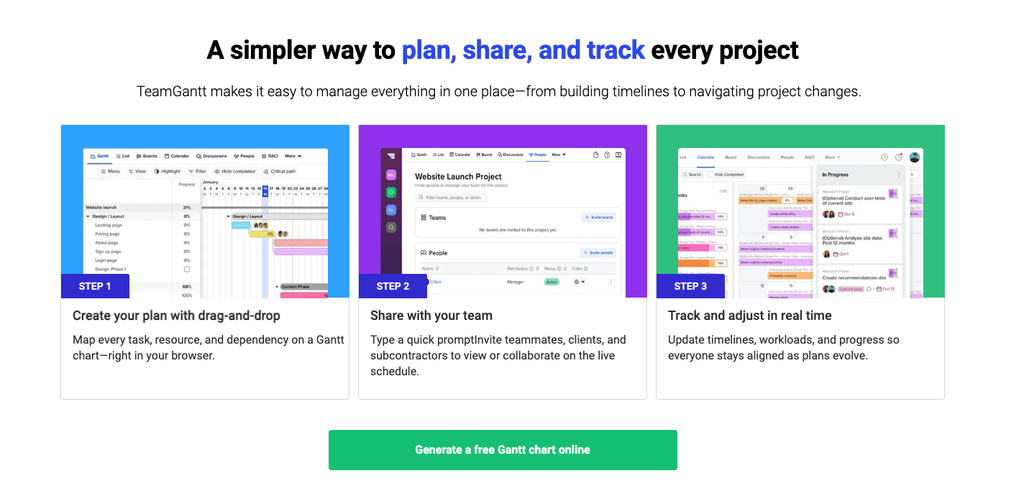
TeamGantt is a web-based project scheduling tool built around one thing: a visual, drag-and-drop Gantt chart. It launched in 2009 out of Baltimore, Maryland, and has stayed unusually disciplined about scope. Where Asana, ClickUp and monday.com kept bolting on CRM, docs, forms and goals, TeamGantt kept the timeline at the centre and made everything else – the list view, the calendar, the Kanban board – a different lens on the same schedule.
That discipline is the whole product thesis. If Gantt charts are how your projects genuinely get planned, TeamGantt is likely the best-executed version of that tool available. If Gantt is one view you occasionally export for a stakeholder, you are buying a specialist tool to do a generalist job, and you will feel the gaps.
The 2026 version of the product has three notable additions: an AI project creation feature that generates a starting schedule from a prompt, a Builder Edition aimed squarely at construction contractors with Procore sync and lookahead scheduling, and the project-based pricing model that replaced per-seat billing.
TeamGantt Pricing in 2026 – Full Breakdown
All figures verified from TeamGantt’s live pricing page, 9 September 2026. Prices in USD.
The plans
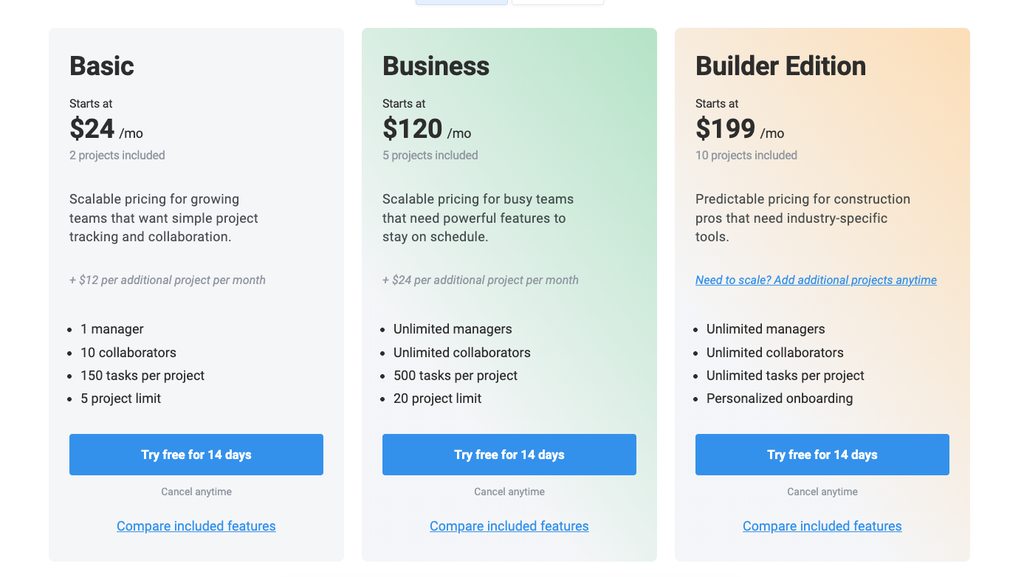
| Plan | Monthly | Annual | Projects included | Managers | Collaborators | Tasks per project | Project cap |
|---|---|---|---|---|---|---|---|
| Personal (Free) | $0 | $0 | 1 | 1 user total | – | 40 | 1 |
| Basic | $24/mo | $240/yr | 2 | 1 | 10 | 150 | 5 |
| Business | $120/mo | $1,140/yr | 5 | Unlimited | Unlimited | 500 | 20 |
| Builder Edition | $199/mo | $1,908/yr | 10 | Unlimited | Unlimited | Unlimited | – |
| Enterprise | Quote | Quote | Unlimited | Unlimited | Unlimited | Unlimited | – |
Adding projects
| Plan | Extra project (monthly) | Extra project (annual) | Hard ceiling |
|---|---|---|---|
| Basic | +$12/mo | +$120/yr | 5 projects |
| Business | +$24/mo | +$228/yr | 20 projects |
| Builder Edition | Contact sales | Contact sales | None stated |
Managers vs collaborators – the distinction that sets your bill
This is the concept the entire pricing model turns on, and it is the one buyers most often get wrong.
- A manager has full control: creates and edits projects, builds and restructures the schedule, invites people, changes project settings.
- A collaborator has restricted access: can be assigned tasks, update progress on tasks assigned to them, tick checklist items, comment, and upload or download files. They cannot restructure the schedule.
On Business and Builder Edition, both are unlimited and included. You can put 200 people in the tool at no additional cost. On Basic you get one manager and ten collaborators, full stop.
Note a documentation inconsistency: the roles comparison table on TeamGantt’s pricing page states that managers are “unlimited, included in your plan,” while the plan limits table directly above it caps Basic at 1 manager. The plan limits table and the support documentation are the accurate ones. Confirm your allowance in the signup flow before you commit.
The free plan
The free tier is called TeamGantt Personal: free forever, one user, one project, 40 tasks, and core Gantt functionality including dependencies and drag-and-drop scheduling. It is a genuine free plan, not a crippled demo – but 40 tasks is a single small project, and it is a solo tier by design. Multiple users have also reported that PDF exports are capped at three on the free tier, which is not prominently disclosed. Treat the free plan as an evaluation and personal-use tool, not a team option.
The trial
14 days, all features of whichever paid plan you choose, credit card required. When the trial ends you are automatically billed for the plan you trialled unless you cancel or downgrade to Personal. Set a calendar reminder for day 12.
Several third-party sites still advertise a 30-day TeamGantt trial. That figure is out of date.
Annual billing – check the actual discount
TeamGantt’s pricing page shows a “-20%” toggle. The real saving varies by plan:
| Plan | 12 × monthly | Annual price | You save | Actual discount |
|---|---|---|---|---|
| Basic | $288 | $240 | $48 | 16.7% |
| Business | $1,440 | $1,140 | $300 | 20.8% |
| Builder Edition | $2,388 | $1,908 | $480 | 20.1% |
| Extra project (Basic) | $144 | $120 | $24 | 16.7% |
| Extra project (Business) | $288 | $228 | $60 | 20.8% |
TeamGantt’s own FAQ describes the annual saving more conservatively as “over 15%,” which is the accurate framing for Basic. If you are on Basic, the annual commitment buys you less than the headline suggests.
Worked Cost Examples
Example 1 – Solo consultant, 3 client projects
Basic, annual: $240 + (1 extra project × $120) = $360/year, or $30/month. Cheapest credible option in the category for this shape of work. The 150-task-per-project cap is the constraint to watch, not the price.
Example 2 – 12-person marketing agency, 2 account managers building schedules, 5 live projects
Two people need to edit schedules, so Basic is out on the manager cap alone. Business, annual: $1,140/year ($95/month) for 5 projects and all 12 people.
Compare that to a per-seat tool at $25/user/month: $3,600/year. TeamGantt saves roughly $2,460/year on this profile – and the saving grows with every non-manager you add.
Example 3 – Same agency grows to 10 concurrent projects
Business: $1,140 + (5 × $228) = $2,280/year. Builder Edition: $1,908/year – with unlimited tasks per project instead of 500.
Builder is $372/year cheaper and less restrictive, even though it is marketed at construction firms. Worth a sales conversation regardless of your industry.
Example 4 – Residential remodeler, 8 active jobs, 20 field staff
Builder Edition, annual: $1,908/year for 10 projects, unlimited managers, unlimited collaborators, unlimited tasks, Procore sync and personalised onboarding. Per active job that is roughly $16/month. For a contractor currently running schedules in spreadsheets and text messages, this is the strongest value case in TeamGantt’s lineup.
The crossover you should know
| Concurrent projects | Business | Builder Edition | Cheaper |
|---|---|---|---|
| 5 | $120/mo | $199/mo | Business |
| 8 | $192/mo | $199/mo | Business (barely) |
| 9 | $216/mo | $199/mo | Builder |
| 15 | $360/mo | $199/mo | Builder |
| 20 (Business cap) | $480/mo | $199/mo | Builder |
From nine concurrent projects onward, Builder Edition is both cheaper and more capable than Business. TeamGantt does not surface this anywhere in its pricing UI.
Hidden Costs and Pricing Traps
- The one-manager cliff. Basic to Business is a 5× price jump triggered by a single person needing edit rights. Before you buy Basic, be certain that exactly one human will ever build schedules. In practice, holidays, sickness and handovers break this assumption fast.
- Stale pricing everywhere. Major software directories still list TeamGantt at “$24.95 per user per month” for Standard and “$29.95” for Advanced. One of TeamGantt’s own older comparison pages still says a five-person team costs $64/month. All of it predates the repricing. Quote only from the live pricing page.
- Task caps are per project, not per account. 150 on Basic and 500 on Business. A detailed construction or product-launch schedule can pass 500 tasks on its own, which pushes you to Builder or Enterprise for reasons that have nothing to do with project count.
- Project caps are hard. Basic stops at 5 projects. Business stops at 20. There is no “just add one more” past those ceilings.
- Archived projects. Confirm at signup whether archived or completed projects release a project slot. This determines whether an agency doing 40 short projects a year needs the 20-project tier or can cycle through a smaller one. Ask sales directly and get it in writing.
- The trial auto-bills. Credit card up front, automatic charge on day 15.
- Free-tier export limits. Reported cap of three PDF exports on the free plan, which can strand a finished chart.
- Marketing email volume. A recurring complaint in public reviews is high-frequency marketing email after signup, including after unsubscribing. Use a shared alias for evaluation.
Features, A to Z
Scheduling and the Gantt chart
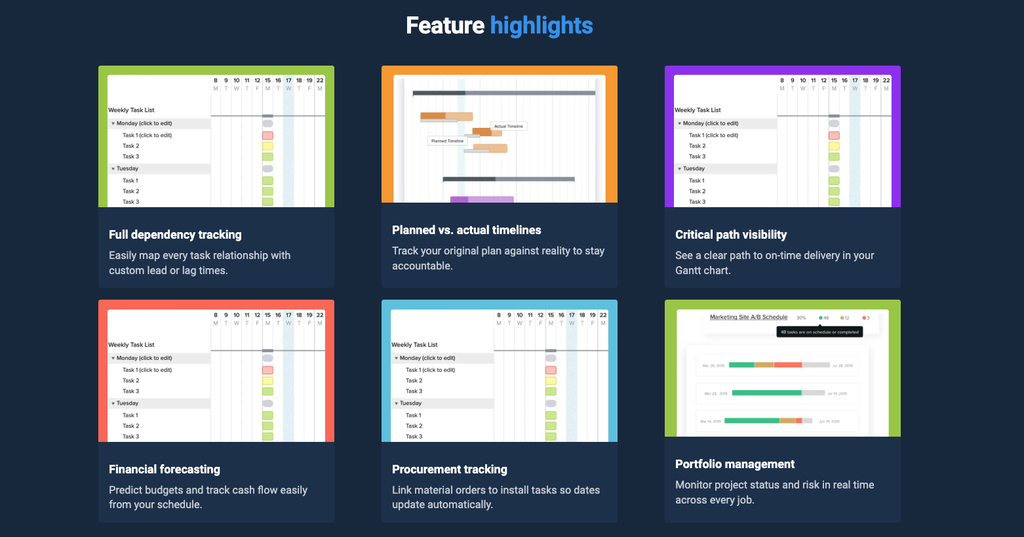
The core is excellent, and it is the reason to buy. You build a timeline by dragging, not by filling in a form. Start and end dates change by dragging a bar’s edge; the whole task moves by dragging its middle. Dependent tasks recalculate immediately. There is no worksheet to configure first, which is the main practical difference from Smartsheet.
Dependencies are drawn directly on the chart. Advanced dependencies (lead/lag and non-finish-to-start relationships) are gated to Business and above.
Critical path is available without configuration – but it is a Business-tier feature. If critical path is a hard requirement, your floor price is $120/month, not $24.
Baselines let you overlay the original plan against actual progress, which is how you answer “when exactly did this slip?” in a client meeting. Actual vs estimated timelines is likewise Business and above.
[SCREENSHOT REQUIRED: annotated Gantt view showing a dependency chain mid-drag, with the recalculation visible.]
Views
Gantt, List, and Calendar are on every paid tier. Kanban is Business and above. All views are lenses on the same underlying data, so a change in one propagates.
Resource and workload management
Workload management shows availability and overallocation across projects – who is overbooked, and when – before you commit to a date. Team resourcing and hourly estimating sit alongside it. All Business and above.
This is one of TeamGantt’s genuinely strong areas and a frequent theme in positive reviews. It is also the clearest justification for the Business jump: if you are currently doing capacity planning in a spreadsheet next to your PM tool, this replaces it.
Portfolio management
Roll multiple projects into a single combined timeline. Business and above. Useful the moment you cross about five concurrent projects.
Time tracking
Built in, Business and above. Adequate for project-level tracking. It is not a substitute for a dedicated time-and-billing system if you invoice hourly at scale – check that it exports in a shape your invoicing tool accepts before you drop your existing tracker.
Collaboration
Comments and file attachments live on the task, so discussion sits next to the work. @-mentions notify teammates. Public share links let you show a read-only schedule to a client without paying for or provisioning a seat – a real advantage of the unlimited-collaborator model.
This is also the most consistently criticised area in third-party reviews: collaboration is described as thin compared with all-in-one platforms. It is fine for scheduling conversations. It will not replace Slack, and it is not a document workspace.
Reporting
The weakest part of the product. Project health reports and progress summaries exist and are readable, but reviewers repeatedly note the absence of the deep custom reporting and dashboarding found in Smartsheet or Wrike. If executive dashboards are a buying requirement, TeamGantt is probably the wrong tool – or a tool you pair with something else.
AI project creation
Generates a starting schedule from a description, available across paid plans. Best understood as a blank-page eliminator: it produces a plausible task skeleton you then correct, not a schedule you can trust unedited.
[TESTER: generate one schedule via AI for a project type you know well, and record what proportion of tasks survived your edit. That number is the most valuable original fact this review can contain.]
Construction features (Builder Edition)
The Builder Edition is a genuinely differentiated product, not a rebadge. It adds lookahead scheduling, material delay prevention, subcontractor confirmations, lockable milestones, RACI assignments, schedule-change confirmation, financial forecasting, cost-loaded scheduling, selections and procurement management, custom workflows, and Procore sync. Personalised onboarding is included.
Contractors should benchmark it against Buildertrend, JobTread, Procore and Microsoft Project rather than against generic PM tools – it is competing in that lane now.
Templates
A substantial library covering project management, construction, software development, marketing, design and event planning. Templates are a meaningful onboarding accelerant here because the schedule structure is the hard part.
Integrations
Trello, Procore, Slack, Basecamp, Zapier, Dropbox, Microsoft Project import, calendar feed, and a public API.
The list is short by 2026 standards. Zapier covers a lot of the gap, and the API is available for custom work. But if you expected native two-way sync with your CRM, helpdesk or accounting stack, check before you buy. Reviewers regularly cite the ecosystem as narrower than the all-in-one platforms.
Exports and data portability
CSV and PDF export of any chart. Microsoft Project import is supported. Unlimited exports on paid plans; reportedly capped at three on free. Portability is adequate – you will not be trapped.
Mobile
Native iOS and Android apps. They are legitimate companion apps for updating task progress and checking schedules in the field, which matters for the construction use case. They are not full-feature replacements for the web app; multiple reviewers note missing desktop functionality. Do not plan to build or restructure schedules on a phone.
Security and admin
Advanced user management on the upper tiers. Enterprise adds advanced security review, dedicated account management, uptime SLA and invoice/check payment. TeamGantt publishes a security page and a public status page.
[TESTER: if you need SOC 2, GDPR DPA or SSO for a buyer checklist, request the current documentation from TeamGantt directly and cite what they send. Do not infer certification status.]
Ease of Use and Onboarding
This is TeamGantt’s strongest and least disputed quality. Across G2, Capterra and independent reviews the same phrase recurs: people who have never built a Gantt chart build one on day one. G2’s own subscores put ease of use at 9.2 and ease of setup at 9.3 out of 10 – both notably above the category norm.
Gantt charts have a deserved reputation for being intimidating. TeamGantt’s achievement is making the intimidating part – dependency structure – feel like drawing rather than data entry.
Two honest caveats. First, some reviewers report a learning curve for the deeper features, and say that curve limited adoption beyond the core team in their organisation. Ease of starting is not the same as ease of mastering. Second, TeamGantt now offers a live onboarding walkthrough with a specialist for new accounts, which suggests the company itself sees setup guidance as worth staffing.
Performance, Bugs and Reliability
The recurring, specific complaints worth knowing before you buy:
- Cascading dependency edits. The most substantive criticism in the corpus: one mistaken drag can shift every dependent task below it. Undo works, but it surfaces the change as dozens of individual edits rather than one root cause with consequences beneath it, which makes it hard to verify you undid the right thing. Reviewers describe this as their single largest frustration with the product.
- Duplication bugs. Users report duplicating a task subgroup, deleting tasks from the copy, and finding tasks removed from the original.
- Display glitches. Occasional greyed-out tasks and milestones failing to render.
- Billing and cancellation friction. At least one reviewer reported losing account access immediately on requesting a pause despite having paid through the period, with a slow support resolution.
None of these are disqualifying, and none appear in the majority of reviews. But the dependency-cascade issue is structural rather than cosmetic, and it is worth a deliberate test during your trial: build a 30-task dependency chain, make a deliberate bad drag, and see how comfortably you can reverse it.
[TESTER: run exactly that test and report the result. This is the highest-value original finding available in this review.]
Support Quality
Consistently well reviewed. G2 rates quality of support at 9.2/10 across 538 responses. Multiple Trustpilot reviewers describe replies within minutes rather than hours, from humans rather than bots. Documentation, video tutorials and a help centre are comprehensive.
Two things to weigh against that: TeamGantt takes over a month on average to respond to negative Trustpilot reviews publicly, and there is at least one detailed account of a billing dispute going a week without a reply. Day-to-day product support appears genuinely strong; account and billing escalation looks slower.
Enterprise plans add a dedicated account manager and customised training. Builder Edition includes personalised onboarding
Pros and Cons
- +The best drag-and-drop scheduling experience in the category.
- +Unlimited managers and collaborators on Business and above.
- +Genuinely fast to adopt.
- +A real free tier and a real construction edition.
- +Strong, fast, human support
- –The Basic plan’s single-manager limit
- –Reporting is shallow
- –A narrow integration ecosystem
- –The dependency cascade problem
- –Mobile apps are companions, not replacements.
What Real Users Say
| Platform | Rating | Reviews | What to read into it |
|---|---|---|---|
| G2 | 4.8 / 5 | 894 | Large sample, strong scores; 60.6% small-business |
| Capterra | 4.6 / 5 | 204 | Solid; a share are disclosed as incentivised |
| Trustpilot | 4.2 / 5 | 31 | Too small to weight heavily – see below |
The Trustpilot distribution is the interesting part.
Of 31 reviews, 84% are 5-star and 13% are 1-star, with almost nothing between. That is not a normal satisfaction curve; it is two separate populations. The 5-star cluster is overwhelmingly about product experience and support responsiveness. The 1-star cluster is almost entirely about commercial friction – export limits on the free tier, marketing email volume, and billing or cancellation handling.
That pattern is genuinely useful to a buyer: it suggests the product rarely disappoints, but the commercial edges around it sometimes do. Evaluate the software on the trial, and evaluate the billing terms separately and in writing.
Consistent positive themes across all platforms: visual clarity, speed of adoption by non-technical staff, workload visibility, Trello integration, and support responsiveness.
Consistent negative themes: dependency cascade behaviour, reporting depth, integration breadth, mobile feature gaps, and – from users still on legacy per-seat pricing – cost relative to competitors.
TeamGantt vs the Alternatives
| Tool | Starting price | Billing model | Best for | Where it beats TeamGantt |
|---|---|---|---|---|
| TeamGantt | $24/mo | Per project | Schedule-first teams with many contributors | Ease of use; no per-seat cost |
| Smartsheet | ~$25/user/mo | Per seat | Data-heavy, formula-driven work management | Reporting, automation, governance |
| GanttPRO | ~$13/user/mo | Per seat | Small teams wanting cheap per-seat Gantt | Lower entry cost for 1–3 people |
| Microsoft Project | Varies | Per seat | Enterprise PMO and formal methodology | Depth, resource levelling, MS ecosystem |
| monday.com / ClickUp | Varies | Per seat | Teams wanting one tool for everything | Breadth, dashboards, automation |
| Buildertrend / JobTread | Varies | Tiered | Full construction business management | Estimating, invoicing, client portal |
The decision rule: TeamGantt wins on total cost when your ratio of contributors to schedule-owners is high, and on usability almost always. It loses when you need deep reporting, broad automation, or one platform to run the whole business.
READ MORE: 10 Best AI Vocal Remover Tools in 2026: Tested & Compared
Who It’s For, and Who Should Skip It
Buy TeamGantt if:
- Your projects genuinely live or die on the timeline
- You have far more people updating tasks than building schedules
- Adoption by non-technical staff has failed for you before
- You are a residential builder, remodeler or small GC – Builder Edition is built for exactly this
- You are escaping spreadsheet scheduling and want the shortest path out
Skip TeamGantt if:
- Exactly two people need to own schedules and $120/month is out of budget
- Executive dashboards and custom reporting are a hard requirement
- Your team works in sprints, not timelines
- You want one platform for projects, docs, CRM and support
- You need deep native integrations with a specific business system
Migration: Switching to TeamGantt
- Import from Microsoft Project if you are coming from there – it is natively supported.
- From a spreadsheet, rebuild rather than import. Start from a TeamGantt template closest to your project type and adapt; it is faster and produces a better dependency structure than converting rows.
- Count your managers before you pick a plan. This is the step people get wrong. List every person who will ever need to restructure a schedule, including holiday cover.
- Count concurrent projects, not annual ones – and confirm with sales whether archiving frees a slot.
- Set the roles up deliberately on day one. Making everyone a manager on Business costs nothing and prevents access complaints, but it also means anyone can restructure a schedule. Given the dependency-cascade issue, restrict manager rights to the people who should have them.
- Run the full 14 days. Build one real schedule at real size, not a toy project. Diary a cancel-or-keep decision for day 12.
The 6-Question Buyer Checklist
- How many people need to edit schedules? One means Basic. Two or more means Business – budget $120/month, not $24.
- How many projects run at the same time? Under 5 → Basic. 5 to 8 → Business. 9 or more → price Builder Edition, whatever your industry.
- How many tasks in your largest schedule? Over 150 rules out Basic. Over 500 rules out Business.
- Do you need critical path or workload management? Both are Business-tier. Your floor is $120/month.
- Do you need real reporting? If executives need custom dashboards, pair TeamGantt with something else or buy something else.
- Does archiving free a project slot? Get the answer in writing before you sign an annual plan.
FAQ
Is TeamGantt free?
Yes. The Personal plan is free forever and includes one user, one project, 40 tasks, and core Gantt features including dependencies and drag-and-drop scheduling. It is designed for individuals, not teams. PDF exports are reportedly capped at three.
How much does TeamGantt cost in 2026?
Basic is $24/month ($240/year) for 2 projects. Business is $120/month ($1,140/year) for 5 projects. Builder Edition is $199/month ($1,908/year) for 10 projects. Enterprise is quote-only. Extra projects cost $12/month on Basic and $24/month on Business.
Does TeamGantt charge per user?
No, not anymore. Pricing is per project. Business and Builder Edition include unlimited managers and unlimited collaborators. Basic is limited to 1 manager and 10 collaborators. Older listings quoting $24.95 per user per month are out of date.
How long is the TeamGantt free trial?
14 days, with full access to the plan you choose. A credit card is required and you are billed automatically when the trial ends unless you cancel or downgrade. Some third-party sites still say 30 days; that is outdated.
What’s the difference between a manager and a collaborator?
Managers create and edit projects, build schedules, invite people and change settings. Collaborators can only update tasks assigned to them, comment, tick checklist items and handle files. The distinction is what sets your plan, so count managers carefully.
Does TeamGantt have critical path?
Yes, and it works without configuration – but it requires the Business plan or higher, along with workload management, portfolios, Kanban view, time tracking and advanced dependencies.
Is TeamGantt good for construction?
Yes, and it has a dedicated Builder Edition with lookahead scheduling, material delay prevention, subcontractor confirmations, cost-loaded scheduling, financial forecasting and Procore sync. Contractors should compare it against Buildertrend, JobTread and Procore rather than generic PM tools.
Does TeamGantt work offline or on mobile?
It is fully web-based with no desktop install, and has native iOS and Android apps. The mobile apps are strong for updating task progress in the field but lack meaningful desktop functionality – treat them as companions, not replacements.
Can I export my data out of TeamGantt?
Yes. Any chart exports to CSV and PDF, and Microsoft Project files can be imported. Exports are unlimited on paid plans.
Verdict
SoftSnoop rating: 4.3 / 5
TeamGantt does one job better than almost anything else on the market, and in 2026 it prices that job in a way that rewards exactly one team shape: many contributors, few schedule owners. If that is you – an agency with two account managers and ten staff, a builder with three supers and twenty subs – the unlimited-people model makes TeamGantt one of the best-value tools in the category, and its ease of use means people will actually use it, which is where most project management purchases fail.
Where it falls down is reporting depth, integration breadth, and one pricing cliff that catches buyers repeatedly: the Basic plan allows a single manager, and the second one costs you five times as much.
- Best overall pick: Business at $1,140/year – unlimited people, critical path, workload management, portfolios.
- Best value pick: Builder Edition at $1,908/year if you run 9 or more concurrent projects, regardless of industry. It undercuts Business and lifts the task ceiling.
- Best free pick: Personal, for solo evaluation and single small projects only.
Before you buy, do one thing: count the people who need to edit schedules. That number, not your headcount, decides your bill.
Changelog
Updated September 2026: Full rewrite for TeamGantt’s move from per-seat to project-based pricing. Repriced all plans against the live pricing page. Added Builder Edition, the Business/Builder crossover analysis at 9 projects, the annual-discount variance table, and the manager-vs-collaborator explainer. Corrected the trial length from 30 to 14 days.
Sources and verification
Pricing, plan limits, add-on rates, role definitions, trial terms and payment options verified against teamgantt.com/pricing and TeamGantt’s subscription support documentation, 9 September 2026. Review sentiment and ratings drawn from G2, Capterra, Trustpilot, TrustRadius and GetApp. Independent expert assessments consulted from The Digital Project Manager, Forbes Advisor, PCMag and Cloudwards.
