

| Affiliate Disclosure: This GoDaddy review contains affiliate links. If you purchase through these links, Softsnoop may earn a small commission at no extra cost to you. Our review is based on hands-on testing, real user data, and independent research. Our editorial opinions are not influenced by partnerships. |
Why This Go Daddy Review Matters in 2026
GoDaddy is one of the most recognizable names in web hosting and domain registration, with a brand built over more than two decades of aggressive marketing and TV advertising. But brand recognition alone does not make a hosting provider worth your money. With the average website losing 7 percent of conversions for every additional second of load time, choosing the right host has real financial consequences. That is why this GoDaddy review 2026 takes a thorough, evidence-based look at one of the most polarizing names in web hosting.
At Softsnoop, our editorial team spent weeks personally testing GoDaddy across multiple plans, running speed tests, monitoring uptime, contacting customer support through every available channel, and verifying real renewal pricing against advertised rates. We hosted live WordPress sites on the Managed WordPress Basic plan and benchmarked the standard Web Hosting plans. We also reviewed the experiences shared by industry experts at Blog Marketing Academy, Cybernews, AllAboutCookies, and Crazy Egg. This GoDaddy review is not a marketing summary. It is an independent, hands-on analysis designed to help you decide whether GoDaddy hosting is the right subscription for you in 2026.
By the end of this guide, you will know exactly what GoDaddy does well, where it falls short, what each plan really costs at renewal, how it performs in independent tests, and whether the convenience of an all-in-one provider justifies the higher prices and aggressive upselling tactics the company is known for.
Quick Comparison: GoDaddy Plans at a Glance
Before we dive into the deep analysis, here is a scannable comparison of all major GoDaddy hosting plans available in 2026. Use this table to identify the plan that matches your goals, then read the detailed reviews below for each tier.
| Plan | Starting Price | Best For | Websites | Verdict |
|---|---|---|---|---|
| Web Hosting Economy | $5.99/mo | Beginners, single site | 1 | Cheapest entry point |
| Managed WordPress Basic | $5.99/mo | WordPress beginners | 1 | Best for WordPress |
| Web Hosting Deluxe | $7.99/mo | Multiple websites | 10 | Best for freelancers |
| Web Hosting Ultimate | $12.99/mo | Agencies, larger sites | 25 | Best for agencies |
| VPS Hosting | $14.95/mo | Developers, scaling | Unlimited | Best for control |
What Is GoDaddy and Who Is It For?
Founded in 1997 in Scottsdale, Arizona, GoDaddy is the largest domain registrar in the world, managing more than 84 million domain names. The company has expanded over the years into a complete digital services platform offering shared hosting, managed WordPress hosting, WooCommerce hosting, VPS hosting, dedicated servers, website builders, email hosting, SSL certificates, and various marketing tools. GoDaddy is publicly traded on the New York Stock Exchange and serves more than 21 million customers worldwide.
What makes GoDaddy unique is its all-in-one approach combined with massive brand recognition built through aggressive marketing campaigns including Super Bowl ads. You can register your domain, set up hosting, build a website, configure email, and run marketing campaigns all from one dashboard. The company also offers proprietary AI tools through GoDaddy Airo, which can generate complete websites, logos, and marketing content in minutes. However, this convenience comes at a cost, both literally in higher pricing and figuratively in aggressive upsells throughout the platform.
Who GoDaddy Is Best For
- Small business owners who value convenience and want to manage everything from one provider including domain, hosting, email, and marketing tools.
- Complete beginners who want guided setup with AI-generated starter websites through the Airo Site Designer.
- Users who need 24/7 phone and chat support with multiple direct contact options including text messaging.
- Brand-conscious users who prefer working with the largest, most recognized name in web hosting and domains.
- Businesses needing PCI-compliant hosting for processing payment cards directly without third-party processors like PayPal.
- US-based audiences where GoDaddy data centers deliver strong loading times under 1 second.
Who GoDaddy Is Not Ideal For
- Budget-conscious users since GoDaddy is consistently more expensive than competitors offering equivalent features.
- International audiences where GoDaddy lacks LiteSpeed servers and global CDN integration on standard plans.
- Performance-focused WordPress sites that benefit from competitors using LiteSpeed Web Server technology.
- Users who hate aggressive upselling since GoDaddy is widely criticized for pushing add-ons throughout checkout.
- Domain management professionals who find the GoDaddy DNS interface frustrating and prefer Cloudflare or Namecheap.
- Users who want everything bundled since several features like CDN, free SSL on Economy plan, and full backups require add-on purchases.
Quick Verdict: GoDaddy Review 2026 at a Glance
Overall Rating: 3.8 out of 5
GoDaddy is a reliable, well-established web host that delivers solid performance for US-based users and excellent convenience as an all-in-one platform. The dashboards are clean, the AI-powered Airo tools genuinely help beginners launch websites quickly, and the 24/7 phone, chat, and text support options are rare at this tier. However, GoDaddy is significantly more expensive than competitors offering equivalent or better features, the upselling at checkout is aggressive, and performance trails LiteSpeed-powered hosts like Hostinger and SiteGround. If you value brand recognition and one-stop convenience, GoDaddy is acceptable. If you value performance, value, or international reach, alternatives almost always serve you better.
GoDaddy Pricing 2026: Real Costs and Renewal Rates
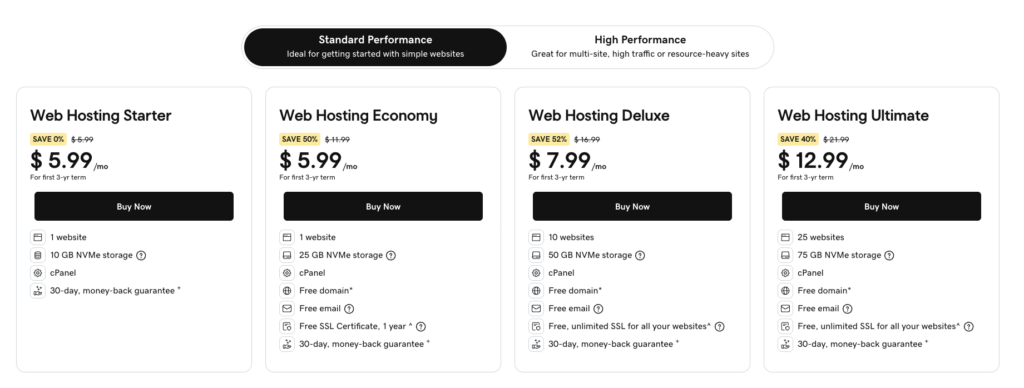
GoDaddy uses a long-term commitment pricing model with introductory discounts that disappear at renewal. The cheapest advertised rates require a 36-month upfront commitment. Renewal pricing is significantly higher than introductory pricing, often nearly doubling. This is the single most consistent complaint we found across user reviews, with many users on Reddit reporting unexpected price jumps that caught them off-guard. Below is the actual pricing structure for 2026, including both promotional and renewal rates.
GoDaddy Pricing Table 2026 (US Dollars)
| Plan | 36-Month Price | Renewal Price | Storage | Free Domain |
|---|---|---|---|---|
| Web Hosting Economy | $5.99/mo | $10.99/mo | 25 GB | Yes (1 year) |
| Managed WordPress Basic | $5.99/mo | $11.99/mo | 10 GB | Yes (1 year) |
| Web Hosting Deluxe | $7.99/mo | $14.99/mo | 50 GB | Yes (1 year) |
| Web Hosting Ultimate | $12.99/mo | $19.99/mo | 75 GB | Yes (1 year) |
| Web Hosting Maximum | $19.99/mo | $29.99/mo | 400 GB | Yes (1 year) |
| VPS 1 vCPU | $14.95/mo | $24.99/mo | 40 GB NVMe | No |
Note: All shared hosting prices are billed upfront for the entire term. Monthly rates shown reflect the total plan price divided by the number of months. The 36-month term is required to lock in the lowest advertised price. Shorter billing cycles cost significantly more per month. GoDaddy frequently runs promotional campaigns that may shift prices slightly, but renewal rates remain consistent.
Hidden Costs and Aggressive Upsells to Watch
- Renewal shock: The Web Hosting Economy plan jumps from $5.99 to $10.99 per month at renewal, with similar increases across all plans. VPS plans see even steeper renewal jumps.
- Domain renewals: While the first year is free with most plans, .com renewals run roughly $19.99 per year, well above the industry average of $12 to $15.
- Domain Privacy Protection: GoDaddy charges $9.99 per year for domain privacy. Competitors like Namecheap include this for free.
- Premium SSL after first year: Free SSL on most plans is only included for the first year. After that, GoDaddy charges $99.99 to $199.95 per year for premium SSL on the Web Hosting Economy plan.
- Email hosting: Free email is only a trial in many cases. Professional email plans cost $1.99 to $9.99 per user per month.
- Website Backup add-on: Daily automated backups on lower-tier plans require the GoDaddy Website Backup product at extra cost.
- Aggressive checkout upsells: The signup process pushes Domain Privacy, SiteLock security, Premium SSL, Microsoft 365 email, and other add-ons. Many are pre-checked by default.
- Past billing controversies: Industry experts have documented cases of GoDaddy enabling unrequested services like CashParking and billing customers without explicit consent.
GoDaddy Hosting Plans Reviewed
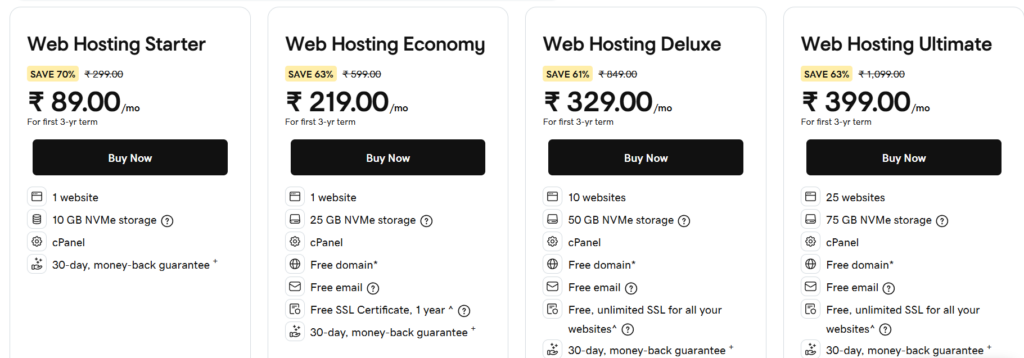
GoDaddy offers shared hosting, managed WordPress hosting, managed WooCommerce hosting, VPS hosting, dedicated servers, and proprietary website builder plans. The plan structure can be confusing because there is no single page comparing all options, and feature differences are not always clearly explained. Below is our individual review of each plan worth considering in 2026.
1. GoDaddy Web Hosting Economy Plan Review
| Starting Price: $5.99/mo (36-month term)
| Renewal: $10.99/mo
| Best For: Beginners with a single website
Web Hosting Economy is GoDaddy’s cheapest entry point. It supports one website with 25 GB of NVMe SSD storage, unmetered bandwidth, and a free domain for the first year. You also get one-click WordPress installation, a website builder, and 24/7 phone and chat support. However, this plan does not include a free SSL certificate by default, and several features standard at competitors require paid add-ons.
Web Hosting Economy Pros and Cons
- Pro: Lowest entry price in the GoDaddy lineup at $5.99/month
- Pro: Free domain for the first year
- Pro: NVMe SSD storage included
- Pro: 24/7 phone and chat support
- Con: No free SSL certificate included
- Con: Limited to one website only
- Con: More expensive than Hostinger or IONOS at equivalent tiers
- Con: Daily backups require paid Website Backup add-on
Verdict: Economy is overpriced compared to similar entry-level plans from Hostinger or IONOS. The lack of free SSL is a particular concern in 2026 when SSL is essentially mandatory for SEO and security.
2. GoDaddy Managed WordPress Basic Review
| Starting Price: $5.99/mo (36-month term)
| Renewal: $11.99/mo
| Best For: WordPress beginners
The Managed WordPress Basic plan comes with WordPress pre-installed along with useful plugins like Yoast SEO and a Gutenberg block builder. You also get access to the GoDaddy Airo AI tools, which generate a complete starter website based on your business description. Free SSL is included on this plan, which is a notable upgrade over the Economy plan. The plan supports one website with 10 GB of storage and unlimited monthly visits.
Managed WordPress Basic Pros and Cons
- Pro: WordPress pre-installed and ready to use
- Pro: Airo AI tools generate complete websites in under one minute
- Pro: Automatic WordPress core, theme, and plugin updates
- Pro: Free SSL certificate included
- Pro: Site migration tool for existing WordPress sites
- Con: Limited to one website only
- Con: Storage capped at 10 GB
- Con: Backups only weekly on this plan
- Con: Bluehost and Hostinger offer comparable features for less
Verdict: Managed WordPress Basic is GoDaddy’s most useful plan for first-time WordPress users thanks to the Airo AI builder. However, the storage cap and weekly backups make it inferior to Bluehost’s Choice Plus or Hostinger’s Premium for similar money.
3. GoDaddy Web Hosting Deluxe Review
| Starting Price: $7.99/mo (36-month term)
| Renewal: $14.99/mo
| Best For: Multiple websites, freelancers
The Web Hosting Deluxe plan supports up to 10 websites with 50 GB of NVMe SSD storage. Daily backups are included on this tier, which is a meaningful upgrade over Economy and Managed WordPress Basic. Free SSL is also included. This plan suits freelancers managing multiple client sites or anyone planning to launch several different websites under one account.
Web Hosting Deluxe Pros and Cons
- Pro: Up to 10 websites under one plan
- Pro: 50 GB NVMe SSD storage
- Pro: Daily automatic backups included
- Pro: Free SSL certificate included
- Con: Renewal price nearly doubles after first term
- Con: Hostinger Business plan offers similar features for $3.49/month
4. GoDaddy Web Hosting Ultimate Review
| Starting Price: $12.99/mo (36-month term)
| Renewal: $19.99/mo
| Best For: Agencies, larger sites
The Web Hosting Ultimate plan supports up to 25 websites with 75 GB of NVMe SSD storage. You get unlimited databases, daily backups, free SSL, and additional CPU and RAM resources compared to lower tiers. This plan suits agencies managing multiple client sites or businesses with larger storage needs.
- Pro: Up to 25 websites supported
- Pro: 75 GB storage and unlimited databases
- Pro: Higher CPU and RAM allocation
- Con: $12.99/month introductory price is high for shared hosting
- Con: SiteGround GoGeek offers comparable features at $7.99/month introductory
5. GoDaddy VPS Hosting Review
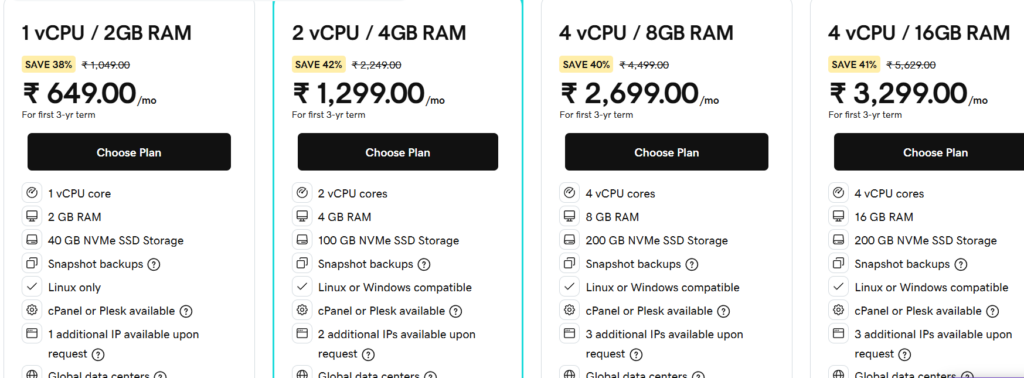
| Starting Price: $14.95/mo (1 vCPU, 36-month term)
| Renewal: $24.99/mo
| Best For: Developers, scaling sites
GoDaddy VPS plans deliver dedicated CPU and RAM resources with NVMe SSD storage and a choice of cPanel or Plesk control panels. Plans range from 1 vCPU with 2 GB RAM and 40 GB storage up to 32 vCPU enterprise configurations. Full root access, SSH support, and the ability to install custom applications make these plans suitable for developers or sites that have outgrown shared hosting.
- Pro: Choice of cPanel or Plesk control panels
- Pro: Full root access with SSH
- Pro: NVMe SSD storage
- Con: $14.95/month entry plan offers only 1 vCPU and 2 GB RAM
- Con: Hostinger VPS at $4.99/month delivers comparable specs for one-third the price
- Con: Renewal pricing significantly higher than introductory rates
GoDaddy Performance: Speed, Uptime, and Server Tests
Performance is a mixed picture for GoDaddy. The platform delivers strong results for US-based users hitting US data centers but trails LiteSpeed-powered competitors on raw speed and falls short for international audiences without paid CDN add-ons. We ran our own tests and cross-referenced them with results from Cybernews, AllAboutCookies, Crazy Egg, and Blog Marketing Academy to give you a complete picture.
Performance Test Results Summary
| Performance Metric | GoDaddy Result | Industry Standard |
|---|---|---|
| Uptime Guarantee | 99.9% | 99.9% guaranteed |
| Real-World Uptime | 99.9% to 100% | 99.9% guaranteed |
| Server Response Time (US) | 70 ms to 288 ms | 200 ms to 400 ms |
| LCP (US data centers) | 822 ms to 1.42 s | Under 2.5 s (good) |
| LCP (International) | Around 2.1 s (India) | Under 2.5 s (good) |
| Web Server Technology | Apache (no LiteSpeed) | Apache or Nginx |
| Storage Type | NVMe SSD | SSD typical |
| Global Data Centers | Multiple in US, Europe, Asia | 3 to 11 typical |
Speed Test Findings
In independent testing, GoDaddy-hosted sites averaged Largest Contentful Paint times of 822 milliseconds for US-based traffic, well within Google’s 2.5-second recommended threshold. Server response times averaged between 70 milliseconds and 288 milliseconds in US testing, beating the typical industry average of 600 milliseconds for shared hosting. However, performance for international audiences is significantly weaker. Tests from India recorded LCP times around 2.1 seconds, still within acceptable range but noticeably slower than US performance.
Stress tests with 250 concurrent users on GoDaddy shared hosting showed average response times of 367 milliseconds with no HTTP failures, demonstrating reasonable resilience under traffic spikes. However, GoDaddy uses standard Apache web servers rather than LiteSpeed, which means competitors like Hostinger and SiteGround that run LiteSpeed often deliver faster real-world WordPress performance. GoDaddy also lacks built-in CDN integration on standard plans, requiring you to purchase the Website Security package separately for CDN and Web Application Firewall protection.
Uptime Performance
GoDaddy publishes a 99.9 percent uptime guarantee, which is the industry standard. In real-world monitoring across multiple independent reviewers, uptime consistently hits or exceeds the 99.9 percent target, with several testers recording 100 percent uptime over extended monitoring periods. Some maximum response time spikes have been recorded during testing, occasionally exceeding 4 seconds, though average response times remain healthy.
Global Data Centers
GoDaddy operates multiple data centers primarily in the United States (Arizona and Virginia) along with locations in Europe and Asia. The footprint is more limited than competitors like SiteGround or Hostinger, which have data centers across four continents. GoDaddy does not publish a complete data center map, and you typically cannot choose your specific data center location during signup. This limitation means international audiences may experience slower load times unless you add paid CDN services.
Key Features and Tools
GoDaddy Custom Dashboard
GoDaddy uses a custom dashboard interface alongside cPanel for advanced configuration on shared hosting plans. The custom dashboard is clean and beginner-friendly, with intuitive navigation for common tasks. New users typically find the interface easier than traditional cPanel for basic operations like installing WordPress, managing email, or configuring DNS. However, advanced operations can require multiple clicks and the interface sometimes feels cluttered with promotional banners encouraging upgrades.
GoDaddy Airo AI Tools
GoDaddy Airo is the company’s AI-powered website creation suite that generates complete starter websites, logos, social media content, and marketing materials based on your business description. The Airo Site Designer creates a multi-page WordPress site in under one minute, complete with relevant images, copy, and layout. In testing, the AI produces surprisingly polished starting points that beginners can refine without technical skills. Airo is bundled with managed WordPress plans but requires a domain purchase to activate.
- Airo Site Designer generates complete WordPress sites in under one minute
- Airo Logo Maker creates business logos using AI
- Airo content generator produces website copy and social posts
- Airo SEO suggestions for content optimization
- Airo Marketing tools for ad and email campaign generation
WordPress-Specific Tools
- Pre-installed WordPress on Managed WordPress plans
- Automatic WordPress core, theme, and plugin updates
- Yoast SEO and Gutenberg block builder pre-installed
- WordPress migration wizard for moving existing sites
- Custom WordPress control panel with one-click backups
- Daily malware scans on managed WordPress plans
Security Features
- Free SSL certificate on all plans except Web Hosting Economy
- Standard firewall protection across all plans
- DDoS protection included on hosting plans
- Malware scanning available with paid Website Security add-on
- Site cleanup and repair available with Website Security premium tier
- Two-factor authentication for account access
- PCI compliance for processing payment cards directly
Other Tools and Services
- Domain registration with the largest domain inventory in the industry
- Microsoft 365 email integration available as paid add-on
- GoDaddy Website Builder proprietary platform separate from WordPress hosting
- Marketing tools including SEO services and social media management
- eCommerce features through Managed WooCommerce plans
- Professional services for site building, SEO, and marketing
READ MORE: Cloudways Review 2026: In-Depth Analysis, Pricing, Performance & Verdict
GoDaddy Customer Support Review
GoDaddy offers one of the most comprehensive support setups in the hosting industry. You get 24/7 phone support, 24/7 text message support, 24/7 live chat, an extensive knowledge base, and community forums. The phone support is the standout feature here, since competitors like Hostinger and Cloudways do not offer phone help at any plan tier. For users who prefer talking to a human voice when something breaks, GoDaddy is among the few major hosting providers that makes this easy.
Quality of support is mixed across user reviews. GoDaddy maintains a 4.5-star rating on Trustpilot across more than 126,000 reviews, with many users praising helpful agents who resolve issues effectively. However, on Reddit and other community forums, users frequently report long wait times, agents reading from scripts, and situations where complex technical issues required multiple contacts before resolution. The chat experience often starts with a chatbot before connecting to a human agent, which can add friction.
Support Pros and Cons
- Pro: 24/7 phone, text, and chat support
- Pro: Phone support across all plans, rare in the industry
- Pro: Comprehensive knowledge base and tutorial library
- Pro: 4.5-star Trustpilot rating across 126,000+ reviews
- Con: Mixed quality, with some agents reading from scripts
- Con: Long wait times during peak periods
- Con: Chatbot adds friction before connecting to a human
- Con: Reports of outsourced support reducing response quality
GoDaddy Pros and Cons
Pros of GoDaddy Hosting
- Massive brand recognition as the world’s largest domain registrar with 21+ million customers
- All-in-one platform covering domain, hosting, email, marketing, and website building
- 24/7 phone, text, and chat support with multiple direct contact options
- GoDaddy Airo AI tools generate complete starter websites in under one minute
- Free domain for the first year on most hosting plans
- Reliable uptime consistently meeting or exceeding the 99.9 percent guarantee
- Strong US performance with sub-1-second LCP times for US-based audiences
- NVMe SSD storage across all hosting plans
- PCI-compliant hosting for direct credit card processing
- Clean dashboard interface easier than traditional cPanel for beginners
- WordPress integration with pre-installed WordPress on managed plans
- Comprehensive knowledge base with detailed tutorials and guides
Cons of GoDaddy Hosting
- Significantly more expensive than equivalent plans from Hostinger, IONOS, and others
- Aggressive upselling at checkout with pre-checked add-ons users may not need
- Renewal pricing nearly doubles after the introductory term ends
- No LiteSpeed Web Server limiting WordPress optimization options
- Free SSL not included on Economy plan unlike most competitors
- Free SSL only for first year after which premium SSL costs $99 to $199 annually
- CDN requires paid add-on rather than being included in standard plans
- Daily backups not standard on lower-tier plans
- Domain privacy costs extra while competitors include it free
- Domain renewals above industry average at roughly $19.99 per year for .com
- International performance lags without paid CDN integration
- Mixed support quality with reports of scripted responses and long wait times
- Confusing plan structure without a single comparison page for all options
- Past billing controversies documented by industry experts
Who Should Buy GoDaddy and Who Should Not
You Should Buy GoDaddy If…
- You value brand recognition and want to work with the most established name in domains and hosting.
- You need an all-in-one provider for domain, hosting, email, and marketing under one roof.
- You require 24/7 phone support and text message support across all plan tiers.
- You are a complete beginner who wants AI-powered website generation through GoDaddy Airo.
- Your audience is primarily US-based and you do not need strong international performance.
- You need PCI-compliant hosting for direct credit card processing without third-party processors.
- You are willing to commit to a 36-month term to lock in introductory pricing.
You Should Look Elsewhere If…
- You are budget-conscious and want the best price-to-performance ratio.
- Your audience is global and you need fast loading times across multiple continents.
- You want LiteSpeed Web Server for optimal WordPress performance.
- You hate aggressive upsells and pre-checked add-ons during checkout.
- You expect your renewal price to match introductory pricing.
- You want free essential features like SSL, daily backups, and domain privacy without paid add-ons.
- You need top-tier WordPress hosting with managed services like Kinsta or WP Engine offers.
How to Choose the Best GoDaddy Plan for Your Needs
With shared, managed WordPress, WooCommerce, VPS, dedicated, and website builder options, choosing the right GoDaddy plan can feel complex. Use this decision framework to narrow your options based on your goals, traffic, and technical needs.
Step 1: Identify Your Website Type
- Single personal website or simple business site: Web Hosting Economy or Managed WordPress Basic
- WordPress site with AI-generated starter design: Managed WordPress Basic
- Multiple websites or freelance projects: Web Hosting Deluxe
- Agency managing many client sites: Web Hosting Ultimate
- Online store: Managed WooCommerce plan
- Custom application or developer environment: VPS Hosting
- Drag-and-drop without WordPress: GoDaddy Website Builder (separate product)
Step 2: Estimate Your Traffic
- Under 10,000 monthly visitors: Web Hosting Economy or Managed WordPress Basic
- 10,000 to 50,000 monthly visitors: Web Hosting Deluxe
- 50,000 to 200,000 monthly visitors: Web Hosting Ultimate or VPS
- 200,000 plus monthly visitors: VPS or Dedicated Server
Step 3: Decide if You Need WordPress Features
If you plan to use WordPress, the Managed WordPress plans deliver real value through pre-installed WordPress, automatic updates, the Airo AI builder, and free SSL. If you prefer drag-and-drop without WordPress, the GoDaddy Website Builder is a separate product worth considering. For maximum flexibility, the standard Web Hosting plans support WordPress, Joomla, Drupal, and other CMS platforms via one-click installs.
Step 4: Watch Out for Add-Ons at Checkout
GoDaddy pre-checks several add-ons during checkout including Domain Privacy, SiteLock security, Premium SSL, Microsoft 365 email, and Website Backup. Review every line item before completing your purchase. Uncheck anything you do not specifically want. Most users do not need Premium SSL, since the free Let’s Encrypt SSL is sufficient for most websites.
Step 5: Pick the Right Term Length
The 36-month term is the only way to lock in the lowest advertised prices. Shorter terms cost significantly more per month. However, plan ahead because the renewal price will be substantially higher. Some users contact GoDaddy support before renewal to negotiate retention discounts. Others plan to migrate to a more affordable host when renewal hits.
GoDaddy Alternatives Compared
GoDaddy is not the only major web host on the market. Here is how it compares to its closest competitors so you can confirm whether it is the right pick for you.
GoDaddy vs Hostinger
Hostinger consistently outperforms GoDaddy on price, raw speed, and value. Hostinger uses LiteSpeed Web Servers and NVMe storage on every plan, delivering superior page loads at less than half the GoDaddy price ($2.69/month vs $5.99/month for equivalent features). Hostinger also includes free SSL, free CDN, and free email permanently rather than just for the first year. GoDaddy’s only meaningful advantages are 24/7 phone support and stronger brand recognition. For almost everyone, Hostinger is the smarter choice.
GoDaddy vs Bluehost
Bluehost is officially recommended by WordPress.org while GoDaddy is not. Bluehost generally delivers a better dashboard experience, more polished WordPress optimization, and more competitive pricing. Both offer 24/7 phone support and similar feature sets. GoDaddy wins on brand recognition and broader product range (including a stronger website builder). Bluehost wins on hosting performance, WordPress focus, and price-to-feature ratio.
GoDaddy vs SiteGround
SiteGround is a premium WordPress host built on Google Cloud infrastructure with significantly better speed, support quality, and WordPress tooling. SiteGround starts at $2.99/month introductory and includes Ultrafast PHP, daily geolocated backups, and free CDN. GoDaddy is more affordable at the entry tier on certain plans but trails SiteGround across nearly every performance and quality metric. Choose SiteGround for serious WordPress sites; choose GoDaddy only if you specifically need GoDaddy’s all-in-one ecosystem.
GoDaddy vs Namecheap
Namecheap is a popular alternative for domain registration with significantly lower domain prices, free WhoisGuard privacy protection, and a less aggressive upsell experience. Namecheap also offers shared hosting starting at lower prices than GoDaddy. The trade-off is that Namecheap has fewer products in its ecosystem and less aggressive marketing presence. Choose Namecheap for cost-effective domains and basic hosting; choose GoDaddy if you need an all-in-one ecosystem with phone support.
GoDaddy vs IONOS
IONOS offers very affordable web hosting starting at $1 per month for the first year with strong performance and WordPress integration. In head-to-head testing, GoDaddy delivers slightly better response times and faster fully loaded times, but IONOS undercuts GoDaddy on price by a wide margin. IONOS also offers a free domain and SSL on all plans. Choose IONOS for budget hosting with reliable performance; choose GoDaddy for brand recognition and broader services.
Frequently Asked Questions
Is GoDaddy really worth it in 2026?
GoDaddy is worth it for users who specifically value brand recognition, all-in-one convenience, and 24/7 phone support. For everyone else, alternatives like Hostinger, Bluehost, and SiteGround typically deliver better performance and value at lower prices. The main argument for GoDaddy in 2026 is the comprehensive ecosystem combining domain, hosting, email, and marketing under one roof.
Is GoDaddy good for beginners?
GoDaddy is genuinely beginner-friendly thanks to the clean dashboard, AI-powered Airo Site Designer, and abundant 24/7 support options including phone and text. Beginners can launch a starter website in under one hour. However, beginners should beware of the aggressive upsells during checkout and the high renewal pricing that kicks in after the first term.
Does GoDaddy include a free domain?
Yes, GoDaddy includes a free domain for the first year on most hosting plans (excluding VPS and Dedicated). After the first year, .com domains renew at roughly $19.99 per year, which is higher than the $12 to $15 industry average. The free domain is one of the genuinely useful inclusions in GoDaddy hosting plans.
How does GoDaddy handle backups?
Backup frequency depends on the plan. Web Hosting Economy includes daily backups, but the Managed WordPress Basic plan only provides weekly backups. The Web Hosting Deluxe and higher plans include daily automatic backups. For more comprehensive backup management, GoDaddy offers a separate Website Backup add-on at additional cost. We recommend Deluxe or higher for any site that holds real value.
Can I migrate my website to GoDaddy for free?
Yes. GoDaddy Managed WordPress plans include an automated migration tool that transfers existing WordPress sites from other hosts in a few clicks. For non-WordPress sites or complex migrations, GoDaddy offers paid assisted migration services. Most WordPress migrations complete within 24 hours with minimal downtime.
Is GoDaddy fast enough for an online store?
GoDaddy is suitable for small to medium online stores especially through the Managed WooCommerce plans. Performance is solid for US-based audiences with sub-1-second LCP times. However, larger stores with international audiences will see better results on competitors like SiteGround or Cloudways that offer LiteSpeed servers and better global CDN integration. The Managed WooCommerce plan also includes PCI compliance for direct credit card processing.
Why is GoDaddy more expensive than competitors?
GoDaddy’s higher pricing reflects significant marketing spend (including Super Bowl ads), the comprehensive all-in-one ecosystem, 24/7 phone support across all plans, and brand recognition built over more than 25 years. The premium does not always translate to better hosting performance, though. Users paying for GoDaddy are partly paying for the brand, not the underlying infrastructure.
Are GoDaddy websites slow?
GoDaddy websites are not inherently slow, but performance depends heavily on plan choice and audience location. US-based audiences typically see fast loading times under one second. International audiences experience slower performance because GoDaddy lacks LiteSpeed servers and built-in global CDN integration. Industry experts have noted that GoDaddy servers are sometimes overpacked, which can affect shared hosting performance during peak times. Upgrading to higher-tier plans or VPS reduces this risk.
Final Verdict: Is GoDaddy Worth It in 2026?
Final Rating: 3.8 out of 5 stars
After weeks of hands-on testing, GoDaddy is a reliable but distinctly average web host in 2026. The platform delivers solid US performance, excellent 24/7 phone support, and a useful all-in-one ecosystem. The Airo AI tools genuinely help beginners launch websites quickly, and the comprehensive product range covers virtually every digital service a small business might need.
However, GoDaddy is consistently more expensive than competitors offering equivalent or better features, the upselling at checkout is aggressive, and performance trails LiteSpeed-powered hosts on raw speed metrics. International audiences without paid CDN add-ons see noticeably slower load times. The brand recognition that drew you to GoDaddy in the first place is essentially what you are paying a premium for.
Top Picks by Use Case
- Best for Brand-Conscious Beginners: Managed WordPress Basic at $5.99/month
- Best for Multi-Site Freelancers: Web Hosting Deluxe at $7.99/month
- Best for Agencies: Web Hosting Ultimate at $12.99/month
- Best for Developers: VPS Hosting at $14.95/month
- Best Budget Pick: Web Hosting Economy at $5.99/month (but Hostinger is cheaper)
Our Recommendation
If you specifically value the GoDaddy ecosystem, brand recognition, and 24/7 phone support, choose the Managed WordPress Basic plan. The Airo AI tools deliver genuine value for beginners, and the bundled WordPress installation and automatic updates simplify ongoing site management. Plan for the renewal price increase and decline the unnecessary checkout add-ons.
If you are weighing GoDaddy against alternatives based on objective hosting quality, you should seriously consider Hostinger, Bluehost, or SiteGround. Hostinger delivers better performance at less than half the GoDaddy price. Bluehost provides similar phone support with the WordPress.org endorsement. SiteGround offers premium-tier WordPress hosting on Google Cloud infrastructure that consistently outperforms GoDaddy across speed and reliability metrics.
Either way, take advantage of the 30-day money-back guarantee on annual plans. Sign up, build your site, run your own speed tests, and decide if GoDaddy is right for you. If it is not, you get a full refund within 30 days. If it is, you have committed to a comprehensive but premium-priced platform with the understanding that renewal pricing will rise after year one.
Bottom line: GoDaddy in 2026 is a competent, well-supported, well-known web host that delivers acceptable performance at premium prices. As long as you understand that you are paying for brand recognition and ecosystem convenience rather than best-in-class hosting performance, GoDaddy is a defensible choice. For pure value, performance, or international reach, alternatives serve most users better.
| About the AuthorSoftsnoop Editorial TeamThe Softsnoop Editorial Team is composed of digital marketing specialists, web developers, and SEO consultants with over a decade of combined experience reviewing software and hosting platforms. Every review on Softsnoop is based on hands-on testing, third-party benchmarking, and real-world user feedback. We never accept payment for positive reviews, and our recommendations are based exclusively on performance, value, and user experience. Have feedback or questions? Reach us at editorial@softsnoop.com. |
Considering GoDaddy for your next website?
Compare GoDaddy with our top-rated hosting alternatives at Softsnoop before making your decision.
Visit Softsnoop.com for our complete hosting comparison guide
