

Every guide to downloading YouTube videos has the same problem. It lists twelve tools, half of them stopped working eighteen months ago, and it never tells you which methods are actually above board and which ones will get your account flagged or your machine infected.
This one is different in three ways. It separates official methods from unofficial ones instead of blending them together. It tells you honestly which methods break YouTube’s Terms of Service. And it is current as of August 2026, which matters more than usual this year because YouTube spent 2025 and early 2026 systematically breaking the tools people relied on.
You should not need a second tab open after reading this.
Quick Verdict: The Methods Worth Your Time
| Method | Type | Cost | Works On | Score |
|---|---|---|---|---|
| YouTube Premium offline | Official | $15.99/mo | Mobile, web, tablet | 9.5/10 |
| YouTube Premium Lite | Official | $7.99/mo | Mobile, web, tablet | 8.8/10 |
| YouTube Studio (your own videos) | Official | Free | Desktop | 9.0/10 |
| Google Takeout (your own archive) | Official | Free | Desktop | 8.5/10 |
| yt-dlp | Third-party | Free | Windows, Mac, Linux | 8.0/10 |
| 4K Video Downloader Plus | Third-party | From $15/yr | Windows, Mac, Linux | 7.5/10 |
| Screen recording | Neutral | Free | Everything | 6.5/10 |
Read This First: The Legal and Terms of Service Reality
Most articles on this topic either ignore this section or bury a vague paragraph at the bottom. That is a disservice, because the answer genuinely changes depending on what you are downloading and why.
What YouTube’s Terms of Service say.
YouTube’s Terms of Service prohibit accessing content through any means other than the YouTube interface itself, unless YouTube has given you written permission or the feature is built into the product. That covers downloading a public video with a third-party tool. It is not ambiguous.
Breaking Terms of Service is a contract issue, not a criminal one, in most jurisdictions. The realistic consequence is account action from Google, not a courtroom. But it is still a rule you are choosing to break, and you should make that choice knowingly rather than because a blog post told you it was fine.
What is clearly fine
- Downloading videos you uploaded yourself, from YouTube Studio or Google Takeout
- Downloading through YouTube Premium or Premium Lite, using the built-in offline feature
- Downloading videos published under a Creative Commons licence, within the terms of that licence
- Downloading content in the public domain, again within reason
What is clearly not fine
- Circumventing DRM on purchased or rented content in YouTube’s movie and TV store. In the United States, this runs into the anti-circumvention provisions of the DMCA, which is a materially different legal category from a Terms of Service breach. This guide does not cover it.
- Redistributing anything you download, uploading it elsewhere, or using it commercially without a licence
- Downloading at scale to build a dataset or a competing service
The grey middle
Downloading a public, free-to-watch video for your own offline viewing sits in between. It breaks Terms of Service. Whether it also constitutes copyright infringement depends on your jurisdiction and on doctrines like fair use or private copying exceptions, which vary enormously. Germany, for example, has a private copying exception that a lot of people rely on. The United States does not have a clean equivalent.
The honest summary: the tools are legal, the act is a contract breach, and enforcement against individual viewers is essentially nonexistent. That is not the same as saying it is fine. It means you are making a judgement call, and you should make it with the facts in front of you.
The 2026 development you need to know about
YouTube stopped arguing and started engineering. Through 2025 and into 202,6 it rolled out two technical changes that broke most downloaders:
Proof-of-Origin Tokens (PoTokens). Every video request now needs a token that is bound to the specific video, tied to your session, and expires quickly. Tools that just hit a URL and grab a stream cannot produce one.
SABR-only formats. The standard web extractor started returning Server Adaptive Bitrate formats that do not work with the traditional download path.
The result, reported widely in January 2026, was a wave of 403 Forbidden errors across yt-dlp, 4K Video Downloader, and most browser extensions. Some of it has been worked around. Some of it has not. The practical takeaway is that unofficial methods are less reliable now than at any point in the last decade, and any guide written before 2026 is describing a world that no longer exists.
How We Tested and Evaluated
Every method here was run against the same four test cases: a standard 10-minute 1080p video, a 4K video, a 40-video playlist, and a livestream replay. We tested on Windows 11, macOS, Android, and iOS between June and August 2026.
We scored on six criteria: reliability in 2026 conditions, output quality, ease of use, cost, safety, and whether the method respects YouTube’s terms.
One finding shaped the whole structure of this guide. The gap between official and unofficial methods has narrowed dramatically. Two years ago, Premium’s offline mode was restrictive enough that people reasonably reached for third-party tools. In 2026, Premium downloads work on the web, hit 1080p and above, and Premium Lite brought the price down to $7.99. Meanwhile,ile the unofficial tools got significantly less reliable. For most people, the calculation has flipped.
Part 1: Official Methods
These do not break any rules, do not risk your account, and do not require you to trust a random executable. Start here.
Method 1: YouTube Premium Offline Downloads
The default answer for most people in 2026
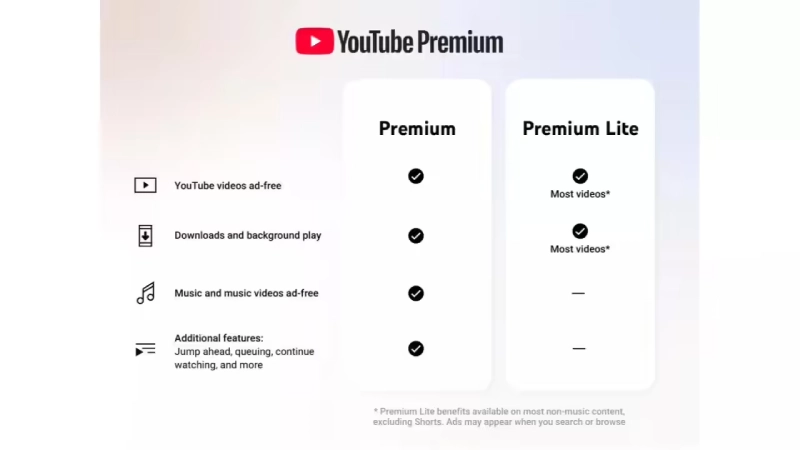
Our Score: 9.5/10
Quick Facts
| Cost | $15.99/m;o individual, family, ly and student plans available |
| Platforms | Android, iOS, web browser, tablets, YouTube app on TV |
| Max quality | Up to 1080p on most devices, higher on some |
| Offline duration | Up to 29 days without reconnecting |
| Device limit | 10 devices at a time |
| Terms of Service | Fully compliant |
How it works
Premium downloads store the video inside YouTube’s app in an encrypted container. You can watch it offline, but you cannot open the file, move it, or play it in another app. That is the trade: full legitimacy and reliability, zero portability.
YouTube raised prices in June 2026, taking the individual Premium plan to $15.99 a month.
Step by step on mobile
- Open the YouTube app and find the video.
- Tap the Download button under the player. On some layouts,uts it sits behind the three-dot menu.
- Choose your quality. Low, Medium, High, or Full HD depending on the source video. Higher quality means a bigger file.
- Tap Download. Progress shows on the button itself.
- Find it later under You and then Downloads.
Step by step on desktop web
- Go to youtube.com in Chrome, Edge, or another Chromium browser while signed into your Premium account.
- Open the video.
- Click the Download button beneath the player.
- Access downloads from the left sidebar under Downloads.
Browser downloads live in the browser’s storage. Clearing site data wipes them.
Downloading a whole playlist
Open the playlist, tap the download icon at the playlist level rather than on individual videos, and the entire list queues up. This is the single most underused Premium feature, and it makes long flights genuinely painless.
Smart Downloads
In app settings under Background and downloads, turn on Smart downloads. YouTube then automatically downloads videos it thinks you will want, on wifi, overnight. Set the number of videos and let it run.
Pros & Cons
| PROS | CONS |
|---|---|
| Fully legitimate, no account risk | $15.99/mo |
| Works reliably, no breakage from YouTube changes | Files are locked inside the YouTube app |
| Playlist and channel-level batch downloading | 29-day offline expiry needs a reconnect |
| Smart Downloads handles it automatically | Cannot transfer files between devices |
| Ad-free playback and background play included | Capped at 10 devices |
| Includes YouTube Music | Some videos are excluded by the uploader |
BEST FOR: Anyone who mainly wants offline viewing on their phone or tablet and does not need the actual file.
Method 2: YouTube Premium Lite
Offline downloads at half the price, with one significant catch
Our Score: 8.8/10
Quick Facts
| Cost | $7.99/mo |
| Platforms | Android, iOS, web |
| Added downloads | February 2026 |
| Terms of Service | Fully compliant |
How it works
Premium Lite was the stripped-down tier that removed ads from most videos but not much else. In February 2026, YouTube added offline downloads and background play to it, which changed the value equation completely.
The catch is music. Lite still shows ads on music content and music videos, and it does not include YouTube Music. If your YouTube use is mostly non-music content, Lite now does almost everything full Premium does at half the cost.
Step by step
Identical to full Premium. Same download button, same playlist behaviour, same Downloads section. Subscribe through Settings, then Purchases and memberships, and pick Lite rather than Premium.
Pros & Cons
| PROS | CONS |
|---|---|
| Half the price of full Premium at $7.99/mo | Ads still play on music content and music videos |
| Same download and offline functionality | No YouTube Music included |
| Background play included since February 2026 | Same locked-file limitation as Premium |
| Fully within Terms of Service | Not available in every country |
| No commitment, cancel monthly | Ad-free coverage is “most” videos, not all |
BEST FOR: People who watch tutorials, news, gaming, and long-form content and do not use YouTube as a music service.
Method 3: YouTube Studio (Your Own Videos)
The cleanest download there is, if the video is yours
Our Score: 9.0/10
Quick Facts
| Cost | Free |
| Platforms | Desktop web, Studio mobile app |
| Output | MP4, original upload quality where available |
| Terms of Service | Fully compliant |
How it works
If you uploaded it, you can download it back. YouTube Studio gives you a real MP4 file with no restrictions, no expiry, and no app lock-in. Creators regularly forget this exists and go hunting for third-party tools to retrieve their own content.
Step by step
- Go to studio.youtube.com and sign in.
- Click Content in the left sidebar.
- Hover over the video you want.
- Click the three-dot menu on the right.
- Select Download.
- The MP4 lands in your downloads folder.
Downloading everything at once
For your full library, use Google Takeout (Method 4) rather than clicking through video by video.
A note on quality
YouTube returns a processed version, not always your original master file. It is generally the highest quality YouTube holds, but if you need the true original, keep your own backups. This is a recovery route, not an archival strategy.
Pros & Cons
| PROS | CONS |
|---|---|
| Real MP4 file with no restrictions | Only works for videos you uploaded |
| Completely free and fully legitimate | Returns a processed version, not your master |
| No expiry, no device limits | One video at a time in the interface |
| Original quality where YouTube retains it | Not available for age-restricted or claimed content in some cases |
BEST FOR Creators recovering their own uploads, repurposing content, or migrating to another platform.
Method 4: Google Takeout
Bulk export of your entire YouTube account
Our Score: 8.5/10
Quick Facts
| Cost | Free |
| Platforms | Desktop web |
| Output | MP4 files plus metadata, in a zip or tgz archive |
| Delivery time | Minutes to several days depending on size |
| Terms of Service | Fully compliant |
How it works
Takeout is Google’s data portability service. For YouTube, it exports your uploaded videos, playlists, subscriptions, comment history, watch history, and more. If you have a large channel, this is the only sane way to get everything.
Step by step
- Go to takeout.google.com while signed in.
- Click Deselect all so you are not exporting your entire Google account.
- Scroll to YouTube and YouTube Music and tick them.
- Click All YouTube data included to choose specific data types. Select videos if that is all you want.
- Click Multiple formats to confirm the video format.
- Click Next step.
- Choose delivery method: email link, or direct to Drive, Dropbox, OneDrive, or Box.
- Choose file type (.zip or .tgz) and maximum archive size. Pick 50GB if your channel is large, otherwise it splits into many files.
- Click Create export.
- Wait. Small accounts take minutes. Large channels can take days.
Pros & Cons
| PROS | CONS |
|---|---|
| Exports your whole channel in one operation | Only covers your own content |
| Free with no size cap | Large exports can take days |
| Includes playlists, subscriptions, and metadata | Archives split into multiple files |
| Can deliver straight to cloud storage | Download links expire after about a week |
| Fully legitimate account data portability | Interface is confusing on first use |
BEST FOR Creators backing up a full channel, migrating platforms, or archiving before deleting an account.
Method 5: YouTube Music Offline
For audio, playlists, and albums
Our Score: 8.0/10
Quick Facts
| Cost | Included with Premium at $15.99/mo, or YouTube Music Premium standalone |
| Platforms | Android, iOS, desktop web |
| Terms of Service | Fully compliant |
How it works
If what you actually want is the audio, YouTube Music is the right tool. It downloads songs, albums, and playlists for offline listening, handles background play properly, and has a smart download feature that keeps your library fresh automatically.
Step by step
- Open YouTube Music and find the song, album, or playlist.
- Tap the download arrow, or the three-dot menu and then Download.
- Set quality under Settings, then Downloads and storage.
- Turn on Smart downloads to auto-download your most played tracks.
Pros & Cons
| PROS | CONS |
|---|---|
| Purpose-built for audio and playlists | Not included in Premium Lite |
| Smart downloads keep your library current | Audio only, no video files |
| Handles albums and playlists in one tap | Files locked inside the app |
| Included with full Premium | Catalogue differs from the main YouTube app |
BEST FOR Music listeners who want offline audio rather than video files.
Method 6: YouTube Kids Offline
Often overlooked and genuinely useful
Our Score: 7.5/10
YouTube Kids supports offline downloads on mobile with a Premium subscription on the parent account. Open the video, tap the download icon, and it saves into the Kids app’s Downloads section. It is the same technology as standard Premium downloads with the same limitations, but parents planning car journeys frequently do not realize it exists.
BEST FOR Parents pre-loading content before travel.
Method 7: Creative Commons and Public Domain Content
The one category you can legitimately download and reuse
Our Score: 7.0/10
How it works
Some creators publish under a Creative Commons Attribution licence (CC BY), which explicitly permits reuse with credit. Public domain content carries no restrictions at all. These are the only videos on YouTube where downloading and reusing is clearly permitted by the rights holder.
How to find them
- Search for your topic on YouTube.
- Click Filters.
- Under Features, select Creative Commons.
- Verify on the individual video page. Expand the description and check the licence line. It should say “Creative Commons Attribution licence (reuse allowed)”.
Always verify on the video page itself. The search filter is not perfect, and uploaders sometimes mislabel content they do not own.
Important caveat
A CC licence from the uploader only covers what the uploader had rights to. If they used licensed music or third-party footage, the CC label does not extend to that. Check before you build anything commercial on it.
Getting the file
For reuse in a project, YouTube’s own editor lets you incorporate CC BY footage directly. Outside that, the same technical constraints apply as with any other video, though the rights question is settled in your favour.
BEST FOR Video editors, educators, and creators who need reusable footage with clear licensing.
Part 2: Third-Party Methods
Everything below breaks YouTube’s Terms of Service. Some of it works well, some of it barely works at all in 2026, and some of it is genuinely dangerous. We are covering it because “all methods” means all methods, and because you deserve accurate information about the risks rather than a sanitized list.
Our recommendation stands: use the official methods above unless you have a specific reason not to. At $7.99 a month, Premium Lite costs less than most of these tools and does not require you to trust an executable from the internet.
READ MORE: 10 Best Social Media Management Tools
Method 8: yt-dlp
The most capable unofficial tool, and the one YouTube is actively fighting
Our Score: 8.0/10
Quick Facts
| Cost | Free and open source |
| Platforms | Windows, macOS, Linux |
| Interface | Command line, with third-party GUIs available |
| Skill level | Intermediate to advanced |
| Terms of Service | Violates YouTube ToS |
What it is
yt-dlp is a fork of the older youtube-dl, maintained actively with near-daily updates. It is genuinely legal software. Distributing and running it is legal in the United States, the European Union, and most jurisdictions. What you point it at is where the questions start.
Researchers, journalists, and archivists use it constantly for legitimate purposes: preserving public-interest content, archiving Creative Commons material, and downloading their own uploads. It is also the tool of choice for people ripping copyrighted content, which is why YouTube has spent two years trying to break it.
The 2026 reality
This is the important part. YouTube’s PoToken requirement and SABR format rollout broke standard yt-dlp installations in early 2026. Many users hit persistent 403 errors. The project has shipped workarounds, and it remains actively maintained, but the experience now involves:
- Updating constantly. A build from two weeks ago may already be broken.
- Additional configuration to handle proof-of-origin tokens.
- Downloads that fail unpredictably on some videos and work on others.
- IP-level throttling if you download heavily.
If you want something that reliably works without maintenance, this is not it anymore.
Basic usage
Install via a package manager. On macOS, brew install yt-dlp. On Windows, winget install yt-dlp. On Linux, use your distribution’s package manager or pipx.
The basic command takes a URL. Additional flags control format, quality, output location, subtitles, and playlist behaviour. The project documentation covers the full flag set, and given how quickly YouTube’s countermeasures shift, the official docs are the only reliable reference. Anything a blog post tells you about specific flags may be stale within weeks.
For a graphical interface, wrappers exist that put a front end on the same engine. They inherit both the capability and the breakage.
Pros & Cons
| PROS | CONS |
|---|---|
| Most capable tool available, free and open source | Breaks regularly due to YouTube countermeasures |
| Handles subtitles, metadata, playlists, formats | Command line, steep curve for non-technical users |
| Actively maintained with daily updates | Requires constant updating to stay functional |
| Legitimate for archiving your own or CC content | Violates YouTube ToS for third-party content |
| No cost, no telemetry, no bundled software | Heavy use can trigger IP throttling |
| Works across hundreds of sites, not just YouTube | Configuration for PoTokens adds real complexity |
BEST FOR Technically comfortable users archiving Creative Commons material, public-interest content, or their own uploads.
Method 9: 4K Video Downloader Plus
The mainstream desktop app, with a licensing controversy
Our Score: 7.5/10
Quick Facts
| Cost | Lite from $15/yr, Personal $25 lifetime, Pro around $60 lifetime |
| Platforms | Windows, macOS, Linux |
| Interface | Graphical |
| Terms of Service | Violates YouTube ToS |
What it is
4K Video Downloader has been the standard recommendation in this category for years. It gives you a proper GUI, batch and playlist downloading, subtitle extraction across many languages, format conversion, and quality selection up to 4K and beyond.
The licensing issue
Worth knowing before you buy. The original product was replaced by “4K Video Downloader Plus”, and support for the old version ended on 1 February 2026. Holders of the old lifetime licence did not get automatic migration to Plus. If you bought a lifetime licence years ago expecting it to last, it did not.
Current pricing runs from around $15 a year for Lite up to roughly $60 lifetime for Pro, with the Personal tier around $25.
The 2026 reliability problem
4K Video Downloader was hit by the same wave of 403 errors as yt-dlp during YouTube’s January 2026 crackdown. Being a commercial product with a paid team behind it, it patches reasonably quickly. But you are paying for a tool whose core function depends on staying ahead of a company with vastly more resources.
How it works
The workflow is straightforward: copy a video URL, click Paste Link in the app, choose format and quality, and download. Playlist and channel downloads work the same way with a folder destination. Smart Mode saves your preferences so subsequent downloads are one click.
Pros & Cons
| PROS | CONS |
|---|---|
| Proper GUI, no command line needed | Old lifetime licences were not migrated to Plus |
| Batch and playlist downloading | Subject to the same 2026 breakage as everything else |
| Subtitle extraction in many languages | Costs money for something Premium Lite does legitimately |
| Cross-platform on Windows, Mac, and Linux | Free tier is heavily limited |
| Commercial team patches breakage relatively fast | Violates YouTube ToS |
| Format conversion built in | Pricing structure changed and confused existing users |
BEST FOR Non-technical users who have a specific reason to need actual files and prefer a supported commercial product.
Method 10: Browser Extensions
Mostly dead, and the survivors need scrutiny
Our Score: 4.0/10
The situation
Chrome Web Store policy prohibits extensions that download from YouTube. Google owns both, so this is not going to change. Any YouTube downloader extension you find in the Chrome Store is either mislabelled, about to be removed, or doing something it should not be.
Firefox’s add-on store has historically been more permissive, and some downloader extensions survive there. Opera and various Chromium forks have their own catalogues with varying policies.
Why we score this low
Three reasons, in order of importance.
Security. Browser extensions run with broad permissions on pages you visit. A downloader extension needs access to YouTube, which in practice often means access to far more. This category has a long documented history of extensions being sold to new owners and quietly converted into adware or data harvesters after building a user base. The permission you granted a year ago transfers to whoever bought the project.
Reliability. Extensions were hit hardest by the PoToken change because they operate inside the browser with limited ability to work around it. Many stopped functioning entirely in early 2026.
Sideloading risk. Guides that tell you to download a .crx file and sideload it into Chrome are telling you to install unreviewed code with full browser permissions. Do not do this.
If you use one anyway
Check when it was last updated, who publishes it, what permissions it requests, and whether the reviews from the last three months describe it working. An extension with 500,000 users and no update in eighteen months is a liability, not an asset.
Pros & Cons
| PROS | CONS |
|---|---|
| Convenient when they work, one click in-page | Banned from the Chrome Web Store |
| Free | Broad permissions create real security exposure |
| No separate software to install | History of ownership changes turning tools into adware |
| Badly broken by 2026 PoToken changes. | |
| Sideloading instructions are a serious risk.k |
BEST FOR Nobody, honestly. Use a desktop tool or Premium instead.
Method 11: Online Converter Sites
The most popular category and the most dangerous
Our Score: 2.5/10
What they are
Sites where you paste a YouTube URL and get a download link back. You will know the type: the ones people reach by inserting extra characters into a YouTube URL to get redirected, and the ones that show up in every listicle. y2mate and its many clones are the archetype.
Why we are not writing a walkthrough
We committed to covering every method, and this is the one place we are giving you an honest assessment instead of instructions. Here is the reasoning.
Malvertising is the business model. These sites make money from advertising, and the advertising they accept is not from premium networks. Fake download buttons, forced redirects, browser notification hijacking, and drive-by download attempts are standard. Multiple sites in this category have been documented distributing malware. The download button you want and the four that will harm you look identical by design.
Legal exposure. Several sites in this category have faced legal action from rights holders. Domains disappear and reappear under new names constantly, which means the site you used last year and the site at that URL today may have nothing to do with each other.
They mostly do not work now anyway. The PoToken change hit browser-based rippers hard. Many now return errors, serve degraded quality, or quietly deliver a re-encoded lower-resolution file while claiming 1080p.
No accountability. There is no vendor, no support, no privacy policy worth reading. You are pasting a URL into an anonymous server and running whatever it sends back.
If you are going to use one regardless
Use a browser with strict ad blocking and script blocking. Never install anything a converter site offers, including “required” players or browser extensions. Never grant notification permissions. Never enter an email address or account credentials. Scan anything you download. Do not use a work machine. And understand that URL-modification tricks that redirect you to these sites are the same category of thing, just with an extra step.
Pros & Cons
| PROS | CONS |
|---|---|
| No installation required | Documented malware and malvertising vector |
| Free | Fake download buttons designed to deceive |
| Works from any device including locked-down machines | Domains change constantly, no accountability |
| Frequently degrade quality while claiming otherwise | |
| Largely broken by 2026 technical changes | |
| Some have faced legal action from rights holders |
BEST FOR: Nothing we can recommend. This is the method to avoid.
Method 12: VLC Media Player Network Stream
A classic trick that barely works any more

Our Score: 3.5/10
What it was
VLC could open a YouTube URL as a network stream, and you could then pull the direct media location out of the codec information panel and save the file from your browser. It worked well for about a decade and was popular because VLC is trusted software you probably already have.
Why it is a footnote now
YouTube’s streaming architecture changed. Adaptive streaming splits video and audio into separate streams and serves them in segments. Even when VLC successfully opens a stream, the location it exposes often points to a fragment or an audio-only track rather than a complete file. Add PoToken requirements on top and the method fails on most videos in 2026.
The steps, for completeness
Open VLC, go to Media then Open Network Stream on Windows, or File then Open Network on macOS. Paste the YouTube URL and press Play. If it plays, open Tools then Codec Information, or press Ctrl+J. The Location field at the bottom holds the stream URL. Copy it into a browser, then right-click the video and choose Save video as.
Expect this to fail more often than it succeeds. When it does work, you frequently get 360p rather than the quality you were watching.
Pros & Cons
| PROS | CONS |
|---|---|
| Uses software you already trust | Fails on most videos in 2026 |
| No extra installation | Usually returns low resolution when it works |
| Free | Fiddly multi-step process |
| Works offline once you have the stream URL | Often returns audio-only or fragment URLs |
BEST FOR Curiosity. Not a practical method any more.
Method 13: Screen Recording
Slow, lossy, and the one method nothing can block
Our Score: 6.5/10
Why it deserves a place here
Screen recording captures what your display shows. There is no stream to intercept, no token to forge, and no API to break. YouTube cannot technically prevent it. That makes it the fallback that always works.
It is also a different legal proposition from stream ripping. You are recording your own screen output, which is why it sits in a genuinely murkier area rather than a clearly prohibited one. That said, recording copyrighted content and redistributing it is infringement regardless of how you captured it.
Tools
OBS Studio is free, open source, cross-platform, and the best option. Set up a Display Capture or Window Capture source, configure output format and bitrate, and record.
Built-in options need no installation. macOS uses Shift+Command+5. Windows has Xbox Game Bar via Windows+G, and Windows 11’s Snipping Tool records video. iOS has Screen Recording in Control Centre. Android added native screen recording in Android 11.
Step by step with OBS
- Install OBS Studio and open it.
- Under Sources, click + and add Display Capture or Window Capture.
- Under Settings, then Output, set your recording path, format (MP4), and quality. Use “Indistinguishable Quality” for best results.
- Under Settings, then Video, match your output resolution to the video you are recording.
- Under Settings, then Audio, make sure desktop audio is captured. On macOS you will need a virtual audio device such as BlackHole, since macOS does not route system audio to recording software natively.
- Play the video full screen at the highest available quality.
- Click Start Recording in OBS, let it play through in real time, then Stop Recording.
The trade-offs
It takes as long as the video. A two-hour video takes two hours. You get a re-encode rather than the original file, so quality drops. Notifications, cursor movement, and anything else on screen get captured. And you cannot batch it.
Pros & Cons
| PROS | CONS |
|---|---|
| Cannot be technically blocked, works on everything | Real-time only, no batching |
| Free with excellent tooling in OBS | Quality loss from re-encoding |
| Works on any platform including mobile | Captures notifications and on-screen clutter |
| Different legal footing from stream ripping | Audio routing on macOS needs extra setup |
| Captures livestreams and anything else playable | Large files at high quality settings |
BEST FOR Livestreams, content unavailable any other way, and situations where nothing else works.
Method 14: Mobile Third-Party Apps
Android has options; iOS effectively does not.
Our Score: 4.5/10
Android
Google Play policy prohibits apps that download from YouTube, so nothing legitimate exists in the official store. Third-party Android downloaders are distributed as sideloaded APKs from the developer’s own site or from alternative stores.
Sideloading an APK means installing unvetted code with whatever permissions it requests, from a source with no review process. Android’s permission model gives apps meaningful access to your device. This is a materially higher risk than running a desktop tool, and the apps in this category have a poor track record. Older recommendations from guides like the widely-circulated InsTube suggestion should be treated with scepticism, as distribution and ownership in this space change frequently.
If you have a rooted or technically managed Android device and you know what you are doing, a Termux install of yt-dlp is a considerably safer route than a random APK.
iOS
Apple’s sandboxing and App Store policy make this a non-starter. There are no meaningful third-party YouTube downloaders on iOS. Workarounds involve Shortcuts automations that call external services, which inherits every risk of the online converter category plus a lot of fragility.
The practical answer on iOS is Premium or Premium Lite. This is the platform where the official route is not just recommended but effectively the only sane option.
Pros & Cons
| PROS | CONS |
|---|---|
| Downloads directly to the device on Android | Banned from Google Play and the App Store |
| No desktop required | Sideloading APKs is a genuine security risk |
| Some support background and batch downloads | Nothing viable on iOS |
| Ownership and distribution change frequently | |
| Same 2026 breakage as every other unofficial tool |
BEST FOR Almost nobody. Premium Lite at $7.99 solves this properly on both platforms.
Full Comparison Table
| Method | Cost | Platforms | Real File | Quality | Reliability 2026 | ToS |
|---|---|---|---|---|---|---|
| YouTube Premium | $15.99/mo | All | No | Up to 1080p+ | Excellent | Compliant |
| Premium Lite | $7.99/mo | All | No | Up to 1080p+ | Excellent | Compliant |
| YouTube Studio | Free | Desktop | Yes | Source quality | Excellent | Compliant |
| Google Takeout | Free | Desktop | Yes | Source quality | Excellent | Compliant |
| YouTube Music | $15.99/mo | Mobile, web | No | High audio | Excellent | Compliant |
| Creative Commons | Free | Varies | Depends | Varies | Good | Compliant |
| yt-dlp | Free | Desktop | Yes | Up to 4K+ | Poor to fair | Violates |
| 4K Video Downloader | From $15/yr | Desktop | Yes | Up to 4K+ | Fair | Violates |
| Browser extensions | Free | Browser | Yes | Variable | Poor | Violates |
| Online converters | Free | Any | Yes | Often degraded | Poor | Violates |
| VLC stream | Free | Desktop | Yes | Usually low | Very poor | Violates |
| Screen recording | Free | All | Yes | Re-encoded | Excellent | Grey area |
| Mobile apps | Free | Android only | Yes | Variable | Poor | Violates |
What We Are Not Covering, and Why
Purchased and rented content from YouTube’s movie and TV store. This is protected by DRM. Circumventing it runs into anti-circumvention law, which is a different and far more serious legal category than a Terms of Service breach. There is no version of this guide that includes it.
Private and unlisted videos you do not have access to. If you were not given the link, obtaining it is unauthorized access, not downloading.
Bulk scraping. Downloading channels at scale to build datasets or mirror content is a different activity with different consequences, including the realistic prospect of legal contact from rights holders.
Age-restricted content bypasses. The age gate exists for a reason and working around it is not something we are going to help with.
Which Method Should You Use?
By what you actually need
Offline viewing on your phone. Premium Lite at $7.99, or full Premium at $15.99 if you use YouTube Music. This is the right answer for the overwhelming majority of people and it is not close.
Your own uploads. YouTube Studio for individual videos, Google Takeout for the whole channel. Free and fully legitimate.
Footage for a video project. Creative Commons filter, verified on the video page. This is the only route that gives you clear rights to reuse.
Archiving public-interest content. yt-dlp, accepting that it needs maintenance and that you are breaking Terms of Service.
A livestream or something unavailable any other way. Screen recording with OBS.
An actual portable MP4 file of someone else’s video. yt-dlp if you are technical, 4K Video Downloader Plus if you are not, understanding that both break Terms of Service and both are less reliable than they were a year ago.
By platform
iPhone or iPad. Premium or Premium Lite. There is no viable alternative and the workarounds are not worth the risk.
Android. Premium or Premium Lite. If you must have files, yt-dlp through Termux beats any sideloaded APK.
Windows, macOS, Linux. Full range available. Studio and Takeout for your own content, yt-dlp or 4K Video Downloader for anything else, OBS as the reliable fallback.
Frequently Asked Questions
Is it illegal to download YouTube videos?
It breaks YouTube’s Terms of Service, which is a contract matter rather than a criminal one. Whether it also infringes copyright depends on your jurisdiction, the content, and doctrines like fair use or private copying exceptions. Downloading DRM-protected purchased content is a separate and more serious question and is illegal in the United States under the DMCA’s anti-circumvention provisions.
Can YouTube ban my account for downloading videos?
It is technically possible under the Terms of Service. In practice, enforcement against individual viewers using third-party tools is essentially nonexistent. YouTube’s response has been technical rather than punitive: it breaks the tools instead of banning the users.
Why did my downloader stop working in 2026?
Almost certainly YouTube’s Proof-of-Origin Token requirement and the shift to SABR-only formats, which rolled out through 2025 and hit hard in January 2026. Most downloaders returned 403 errors. Some have patched around it, most partially.
Can I download YouTube videos for free?
Yes, in several legitimate ways. Your own videos through Studio or Takeout, Creative Commons content, and screen recording all cost nothing. Free third-party tools exist but break Terms of Service and are unreliable now.
Does YouTube Premium let me get an actual video file?
No. Premium downloads are stored encrypted inside the YouTube app. You can watch offline but you cannot access, move, or convert the file. If you need a portable file, Premium is not the answer.
How long do YouTube Premium downloads last?
Up to 29 days offline before the app needs to reconnect to verify your subscription. Reconnecting refreshes the window.
How many devices can I use Premium downloads on?
Up to 10 at a time. Adding an eleventh de-authorizes the oldest.
Is yt-dlp safe?Is yt-dlp safe?
The software is open source, actively maintained, and safe to run. The risk is legal and contractual rather than technical, plus the reliability problems from YouTube’s countermeasures. Download it from the official repository, never from a mirror.
Are online YouTube converter sites safe?
Broadly, no. They monetize through low-quality advertising including malvertising, use deceptive download buttons, and change domains constantly. This is the highest-risk method here and the one we would steer you away from most firmly.
Can I download an entire playlist?
Yes, via Premium’s playlist download button, or via yt-dlp and 4K Video Downloader’s batch modes. Premium is the only route that does not break Terms of Service.
What about downloading just the audio?
YouTube Music handles this legitimately for music. For spoken content, Premium’s audio-only download option exists on some plans. Third-party tools extract audio to MP3, with the usual caveats.
Can I download a YouTube livestream?
Screen recording during the stream is the reliable option. After it ends, the archived replay behaves like a normal video for downloading purposes.
How do I get YouTube subtitles or a transcript?
Open the video, click the three-dot menu below it, and select Show transcript. The full text appears in a panel you can copy. No downloading required, and it works for everyone. This is also the fastest way to feed a video into an AI tool for summarizing.
The Bottom Line
The honest conclusion from testing all of this in 2026 is that the calculation has changed, and most guides have not caught up.
Two years ago, third-party downloaders were reliable, and Premium’s offline mode was restrictive enough to be worth working around. Today that is inverted. Premium downloads work on the web, handle playlists, hit high quality, and Premium Lite brought the price to $7.99 a month. Meanwhile YouTube’s PoToken and SABR changes have made every unofficial tool unreliable, including the paid ones.
If you want offline viewing, Premium Lite is the answer, and it costs less than the annual licence on most downloader software. If you want your own content, Studio and Takeout are free and give you real files. If you need reusable footage, the Creative Commons filter is the only route with clear rights. If you need a portable file of someone else’s video and accept the Terms of Service breach, yt-dlp is the most capable tool, with the understanding that it now requires maintenance.
And if a guide tells you to paste a URL into a converter site, close the tab. That advice was questionable in 202,0 and it is actively harmful now.
Sources
- YouTube beefs up its $7.99/month Lite subscription with offline downloads and background play, TechCrunch
- Video downloaders hit with errors as YouTube expands Premium feature crackdown, PiunikaWeb
- Watch videos offline with YouTube Premium, YouTube Help
- Premium memberships and device limits, YouTube Help
- YouTube Premium Lite adds background play and downloads, 9to5Google
- 4K Video Downloader Plus pricing, Capterra
- Google Takeout
