
By SoftSnoop Editorial, Software Reviews · Reviewed by SoftSnoop Editorial Standards Desk ·
Last updated: September 2026 · 17 min read · Some links are affiliate links; they never change our rankings or the cons we publish.

Key Takeaways
- Frame.io is still the default for editors who live in Premiere Pro or Final Cut. Pro costs $15 per member per month, but it caps at 5 members, so a sixth person pushes everyone to the $25 Team plan.
- Per-seat versus flat pricing decides more than features do. Filestage and Ziflow charge one flat fee (from $199/month billed annually) with 10 to 15 seats included, which beats per-seat tools once your team passes about eight people.
- The best cheap per-seat option is ReviewStudio at $12 per user per month billed annually, with unlimited guest reviewers on every plan.
- Kreatli is worth a look if you want review, task boards, chat and storage in one place instead of four tools, but it’s a young product with a thin independent review record and no real free plan.
- Every tool on this list lets clients comment through a link without creating an account. Vimeo now includes review links on its $12 Starter plan, which several older roundups still get wrong.
Quick Verdict
- Frame.io – Best for Adobe and Final Cut editors. The deepest editor integration and the most familiar client experience, with a genuinely usable free tier for two people.
- Filestage – Best for multi-stakeholder approvals. Flat pricing, unlimited reviewers and structured reviewer groups make it the pick when legal, brand and a client all need to sign off.
- ReviewStudio – Best value per seat. Real frame-level proofing for video, PDFs and images from $12 per user per month on annual billing.
- Kreatli – Best all-in-one workspace for small production teams. Review, Kanban boards, project chat and 500 GB+ of storage under one login, if you’re willing to bet on a newer tool.
Comparison Table
All prices are the lowest published rate on each vendor’s own pricing page (verified Sept 2026). “Annual” means billed yearly.
| Tool | Best for | Starting price | Free plan / trial | Standout feature | Rating |
|---|---|---|---|---|---|
| Frame.io | Adobe & Final Cut editors | $15/member/mo | Free plan (2 members, 2 GB) | Camera to Cloud on every plan | 4.6/5 |
| Filestage | Multi-stakeholder approvals | $199/mo flat (annual) | Free plan (1 project, 5 files/mo) + 14-day trial | Reviewer groups with staged sign-off | 4.4/5 |
| ReviewStudio | Value per seat | $12/user/mo (annual) | Free plan (3 active reviews) + 30-day trial | No file-size limit on uploads | 4.4/5 |
| Ziflow | Structured marketing workflows | $199/mo flat (annual) | Free plan (2 users, 60-day history) | 1,200+ reviewable file types | 4.3/5 |
| Kreatli | All-in-one production workspace | $14/user/mo | Explore tier (1 project, 2 files) + 7-day trial | Review, tasks, chat and storage in one project | 4.1/5 |
| Wipster | Solo editors on a budget | $9.95/mo (annual) | Free trial only | Flat-rate Light plan for one person | 4.0/5 |
| Vimeo | Teams already hosting on Vimeo | $12/seat/mo | Free plan (1 GB) | Review bundled with hosting and player | 3.9/5 |
| Krock.io | Animation & storyboard pipelines | $10/user/mo | Free plan (1 user, 2 GB) | Storyboard and animatic tools built in | 3.9/5 |
How We Evaluated & Ranked
Across the top-ranking roundups for “video review and approval software” in September 2026, 17 distinct tools appeared. We shortlisted 8.
For each one we checked the vendor’s own pricing page in September 2026 (entry price, seat caps, storage, free-tier limits, trial terms), read its help docs for plan gating, and read G2, Capterra, Trustpilot and Adobe Community threads for recurring complaints. We didn’t run a timed hands-on test of every tool for this edition, so we don’t publish testing hours.
The five scoring criteria:
- Client friction. Can an outside reviewer leave a timecoded comment without making an account?
- Review depth. Frame-accurate comments, on-frame drawing, version stacking and side-by-side compare.
- Real cost at 1, 5 and 10 seats, including seat caps and minimums that force an upgrade.
- Workflow fit. Editor integrations, approval stages, and what happens after sign-off.
- Track record. Product maturity, update activity and the volume of independent user feedback.
What disqualified a tool: live-session tools (cineSync, Evercast) do a different job. PM suites with review bolted on (Adobe Workfront) were overkill. PageProof and GoProof were dropped because we couldn’t verify current pricing on a vendor page. Newer all-in-ones such as Brault and kloudboard are held for the next refresh.
1. Frame.io – Best for Adobe and Final Cut Editors
| Quick Facts | |
|---|---|
| Best for | Editors working in Premiere Pro, After Effects or Final Cut Pro |
| Starting price | $15/member/mo (Pro); 13% off annually |
| Free tier | Yes: 2 members, 2 GB storage, 2 projects |
| Platforms | Web, iOS, iPadOS, tvOS; Premiere, Final Cut and Lightroom integrations |
| Standout feature | Camera to Cloud, included even on Free |
| SoftSnoop rating | 4.6/5 |
Why it made the list
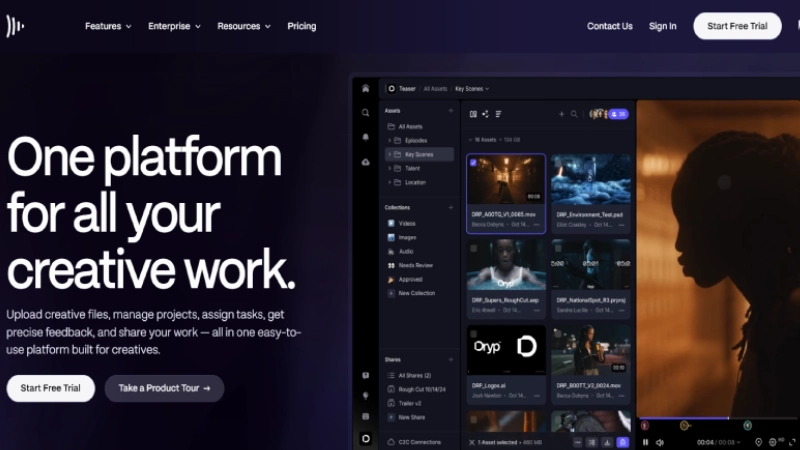
Frame.io is still the tool your clients have most likely used before, and that familiarity is worth real money in fewer “how do I leave a note?” emails. Owned by Adobe, it has the tightest integration with Premiere Pro of anything here, frame-accurate and range-based comments, version stacks, a comparison viewer, and Camera to Cloud, which uploads takes from set as they’re shot. That last feature is on every plan, including Free.
The pricing is where you need to pay attention. Pro is $15 per member per month but stops at 5 members. Member six forces the whole account onto Team at $25 per member, which is a 67% jump per seat overnight. Storage is tied to seats too: Pro includes 2 TB plus 2 TB per additional member, so heavy-storage teams effectively buy seats to get space.
The free plan is more useful than most, but it’s a two-person, 2 GB sandbox. Frame.io’s own plan table also shows 4K UHD playback is not included on Free, only from Pro upward.
Watch the security gating as well. Pro gets one static watermark template; session-based watermarking (stamping each viewer’s email or IP on the video) is Enterprise-only and a paid add-on even there.
| Pros | Cons |
|---|---|
| Premiere Pro, After Effects and Final Cut Pro integrations are first-party. | The 5-member cap on Pro forces a $25/seat Team upgrade at six people. |
| Camera to Cloud works on the free plan. | The Premiere V4 panel has had recurring login and marker-sync bugs through 2025–26. |
| Clients review through share links with no account needed. | Session-based watermarking is locked to Enterprise. |
| Passphrase-protected, expiring and download-disabled shares on Pro. |
Who it’s best for: Editors and small post houses working mainly in Adobe apps who want the review tool clients already recognise.
Who should skip it: Teams of six to 15 on a tight budget, and anyone whose approvals need legal or compliance stages.
What users actually say The Adobe Community forums show a steady run of complaints about the V4 Premiere panel: logins stuck at “Authenticating” after Premiere 2026 updates, and comment markers reverting to older versions. Adobe’s product team responds in those threads and shipped a rebuilt panel in late 2025. The browser app itself draws far fewer complaints than the in-editor integration.
2. Filestage – Best for Multi-Stakeholder Approvals
| Quick Facts | |
|---|---|
| Best for | Brands and agencies with several sign-off layers |
| Starting price | $199/mo flat, billed annually (Starter), 10 seats included |
| Free tier | Yes: 1 active project, 5 new files/month, 2 GB, 10 seats |
| Platforms | Web; Premiere Pro, After Effects, Photoshop and InDesign integrations |
| Standout feature | Reviewer groups that approve in sequence |
| SoftSnoop rating | 4.4/5 |
Why it made the list
Filestage isn’t the best pure video player on this list, but it’s the best at the part that actually slows projects down: getting five different people to approve the same cut in the right order. You set up reviewer groups (internal team, client, legal) and files move through them with due dates, automated reminders and a clear status for each reviewer.
It’s flat-priced rather than per seat. Starter is $199 a month on annual billing with 10 team members included, unlimited reviewers and 1 TB of storage. Extra seats come in bundles of five, each adding another 1 TB. For a 10-person team that’s cheaper than Frame.io Team, and reviewers never cost anything.
The free plan is honest about what it is: one active project and five new files a month. That’s a trial with no expiry, not a place to run client work.
Two details competitors rarely mention. Filestage stores files on ISO 27017-certified servers in Frankfurt, which matters for EU clients. And its Enterprise tier offers “Approve and sign” verification in line with FDA 21 CFR Part 11, which is why pharma and CPG teams use it.
| Pros | Cons |
|---|---|
| Unlimited reviewers on every plan, including Free. | $199/month minimum is steep for a solo editor or a team of three. |
| Staged reviewer groups with due dates and automatic reminders. | Free plan’s 5-files-a-month cap makes it unusable for real client work. |
| Handles video, images, PDFs, audio and live websites in one project. | Advanced compare modes, automations and review reports need the $329 Business plan. |
| EU data hosting and strong compliance options. |
Who it’s best for: In-house marketing and agency teams where video sign-off involves several departments or a regulated review.
Who should skip it: Freelancers and small edit teams who just need a client to leave timecoded notes.
What users actually say Reviewers on Capterra and G2 consistently praise how easy it is for clients to leave timestamped notes and how the comment checklist stops feedback falling through the cracks. The recurring complaints are price (“expensive for what it is”) and project limits on lower tiers.
3. ReviewStudio – Best Value Per Seat
| Quick Facts | |
|---|---|
| Best for | Small agencies proofing video alongside PDFs and images |
| Starting price | $12/user/mo billed annually ($15 monthly) |
| Free tier | Yes: unlimited users, 3 active reviews total, 5 GB |
| Platforms | Web; integrations with Asana, monday.com, Wrike, Dropbox, Photoshop |
| Standout feature | No per-file size limit on uploads |
| SoftSnoop rating | 4.4/5 |
Why it made the list
If your budget is per seat and your work is mixed media, ReviewStudio is the most defensible pick. Pro runs $15 per user per month, or $12 billed annually, and includes unlimited guest reviewers, versioning, compare mode and a task list built from comments. That annual rate undercuts Frame.io Pro by 20% and has no 5-member ceiling.
The details are well thought through. Guests can approve as well as comment. Feedback turns into assigned tasks. It handles video, audio, HTML and live web pages, 3D files and 360° images alongside PDFs. ReviewStudio’s FAQ also states there’s no file-size limit on individual uploads, only an account storage cap, which matters if you send ProRes masters.
The catches are in the plan table. Pro caps you at 10 active reviews per user and 25 GB of storage per user, which a busy video editor will hit. Advanced ($20 annual) removes the review cap but carries a 5-user minimum, so the real Advanced entry price is $100 a month. SSO only arrives at Enterprise with a 20-user minimum.
ReviewStudio is now powered by Storyteq, a marketing-content company, which is worth knowing if long-term roadmap stability matters to you.
| Pros | Cons |
|---|---|
| Cheapest real per-seat plan on this list with guest approvals included. | 25 GB per user on Pro is tight for video-heavy teams. |
| Comments become assignable tasks without a separate PM tool. | Advanced requires at least 5 paid users. |
| No individual file-size limit on uploads. | No first-party Premiere Pro or Final Cut panel. |
| 30-day full-featured trial with no card required. |
Who it’s best for: Agencies and in-house teams of 2–10 who proof video, print and web in the same place.
Who should skip it: Editors who want feedback to land as markers in their NLE timeline.
What users actually say Capterra reviewers repeatedly call ReviewStudio good value with a short learning curve, and its support team gets singled out on G2. The main criticism is speed with large files for reviewers on slower connections, and a few long-time customers note price increases over the years.
4. Ziflow – Best for Structured Marketing Workflows
| Quick Facts | |
|---|---|
| Best for | Marketing and in-house creative teams with repeatable review stages |
| Starting price | $199/mo flat, billed annually (Standard), 15 users included |
| Free tier | Yes: 2 users, 2 GB, 1 workflow stage, 60-day review history |
| Platforms | Web; Adobe Creative Cloud plugins; Asana, monday.com, Jira integrations |
| Standout feature | Reviews 1,200+ file types, including live websites and HTML5 banners |
| SoftSnoop rating | 4.3/5 |
Why it made the list
Ziflow is what Filestage’s buyers compare it against, and the honest summary is: similar price, more users included, more automation. Standard costs $199 a month on annual billing and includes 15 users and 1 TB, against Filestage Starter’s 10 seats. Pro at $329 gives you 20 users, 2 TB and three workflow stages.
Its strength is breadth. Ziflow reviews over 1,200 file types, including live websites and HTML5 banner ads, so a campaign’s video, display ads and landing page can go through one approval flow. Video feedback is down to the second, and version comparison is pixel-level.
The free plan has a limit most people miss: proofs are only accessible for 60 days after creation. That’s fine for a trial, but not an archive.
The plan structure also has sharp edges. Standard allows only two workflow stages and one active workflow template at a time. Marking comments resolved, custom comment labels and Slack or Microsoft Teams integrations all wait until Pro. Ziflow’s annual discount is 20% on Standard but only 17.5% on Pro, so the gap between tiers widens slightly on yearly billing.
| Pros | Cons |
|---|---|
| 15 users included on the cheapest paid plan. | Free-plan proofs disappear from access after 60 days. |
| Unlimited reviewers and unlimited proofs on every plan. | Only one active workflow template on Standard and Pro. |
| Handles video, static, rich-media and live web assets in one flow. | Video tooling is less editor-centric than Frame.io’s. |
| Adobe Creative Cloud plugins included even on Free. |
Who it’s best for: Marketing ops and in-house creative teams running the same approval path on every campaign.
Who should skip it: Post-production teams whose work is almost entirely long-form video.
What users actually say Capterra reviewers describe Ziflow as good value and quick for outside reviewers to pick up with almost no training. The recurring gripe from smaller teams is that the jumps between tiers feel steep when you only need one feature from the plan above.
5. Kreatli – Best All-in-One Workspace for Small Production Teams
| Quick Facts | |
|---|---|
| Best for | Small agencies and studios replacing separate storage, chat, task and review tools |
| Starting price | $14/user/mo (Creator, up to 3 members) |
| Free tier | Explore tier only: 1 project, 2 files. 7-day trial on paid plans |
| Platforms | Web; connects Google Drive and Dropbox |
| Standout feature | Review, Kanban task boards, project chat, deliverables and storage in one project |
| SoftSnoop rating | 4.1/5 |
Why it made the list
Kreatli is solving a different problem from the other tools here. Instead of being the best review player, it tries to replace the stack a small studio usually cobbles together: Drive or Dropbox for files, Trello or Asana for tasks, Slack for chat, and Frame.io for review. In Kreatli, each project holds a Kanban board of production stages, frame-pinned comments on media, side-by-side version compare, project chat, a deliverables tracker with due dates, and no-signup guest review links. It also includes a social safe-zone overlay for Reels, TikTok and Shorts.
If your five-person team pays for four tools today, Kreatli’s Team plan at $29 per user ($145 a month for five) may undercut the combined bill.
Read the pricing page carefully, though. The “free” option is an explore tier limited to one project and two files; it’s not a working free plan. The 7-day trial asks for a payment method at checkout. Creator ($14/user) caps at 3 members and 500 GB, and Kreatli lists guest review links and versioning with compare under Team, not Creator. If client links are your main need, budget for Team. Team itself caps at 10 members before Enterprise.
Kreatli is also young: its independent footprint is a Product Hunt launch and a handful of Trustpilot reviews.
| Pros | Cons |
|---|---|
| Replaces separate storage, task, chat and review tools for small teams. | No real free plan; the explore tier allows only 1 project and 2 files. |
| Frame-pinned comments, version compare and no-signup guest links on Team. | Creator plan lists no guest links or version compare; Team is the realistic entry. |
| Generous storage: 500 GB on Creator, 2 TB on Team. | Small independent review base and no published editor (NLE) integrations. |
| Uploads up to 10 GB per file. |
Who it’s best for: Small video agencies and content studios of 3–10 people who want one tool from brief to delivery.
Who should skip it: Editors who already love their project tracker and only need a review player, and teams that need NLE panel integration.
What users actually say Kreatli’s Trustpilot reviews are few but positive, with a content-studio owner highlighting frame-specific notes as the standout and others praising the combined review-plus-storage setup. The co-founders reply to reviews personally. There’s no meaningful volume of G2, Capterra or Reddit discussion yet, so treat early praise as early.
6. Wipster – Best for Solo Editors on a Budget
| Quick Facts | |
|---|---|
| Best for | Freelance editors and one-person studios |
| Starting price | $9.95/mo billed annually (Light); $11.95 monthly |
| Free tier | No free plan; free trial with no card required |
| Platforms | Web; Premiere Pro and After Effects panels; Slack |
| Standout feature | Flat-rate Light plan for one user with unlimited projects |
| SoftSnoop rating | 4.0/5 |
Why it made the list
Wipster’s Light plan is the cheapest credible way for one editor to send cuts to clients and get timecoded notes back: $9.95 a month on annual billing, with 50 GB of storage, unlimited projects, unlimited sharing and HD playback. For a freelancer who deletes projects after delivery, 50 GB goes further than it sounds.
It covers the essentials without fuss: version comparison, public and private commenting, variable playback speed, and panels for Premiere Pro and After Effects. It also reviews audio, PDFs and images, not only video.
The problems show up when you grow. Team is $19.95 per user annually ($25 monthly), which is more expensive per seat than ReviewStudio Pro and pricier than Frame.io Pro on monthly billing. Storage starts at 250 GB on Team, and Wipster’s help centre prices add-ons at $12 a month per extra 250 GB, capped at 1 TB before you’re pushed to Enterprise. There’s no free plan at all, only a trial.
Playback is listed as HD, not 4K, across every self-serve plan, which rules it out for colourists and anyone approving UHD masters.
| Pros | Cons |
|---|---|
| $9.95/month Light plan is the lowest-cost single-user option here. | No permanent free plan. |
| Unlimited projects, reviews and reviewers even on Light. | HD playback only on self-serve plans; no 4K. |
| Premiere Pro and After Effects panels on all plans. | Team seats cost more than ReviewStudio and storage tops out at 1 TB before Enterprise. |
| Trial needs no credit card. |
Who it’s best for: Freelance editors sending compressed review exports to a few clients a month.
Who should skip it: Teams that need 4K review, or anyone scaling past 3–4 seats.
What users actually say G2 reviewers like Wipster’s dashboard for being clean and easy to learn. Its weak spot shows up in migration stories: in an Adobe Community thread, one team explains they switched from Wipster to Frame.io specifically for the tighter native Premiere integration.
7. Vimeo – Best If You Already Host on Vimeo
| Quick Facts | |
|---|---|
| Best for | Creators and marketing teams who already publish on Vimeo |
| Starting price | $12/seat/mo (Starter, 1 user, 2 TB) |
| Free tier | Yes: 1 GB total storage |
| Platforms | Web, macOS, iOS, Android; Premiere Pro and Slack integrations |
| Standout feature | Review links bundled with hosting, a branded player and file transfer |
| SoftSnoop rating | 3.9/5 |
Why it made the list
Vimeo isn’t a dedicated proofing tool, but if you already pay for it, you may not need anything else. This is the most useful correction in this article: several 2026 roundups say Vimeo’s review pages need the Standard plan. Vimeo’s current pricing page lists video review, configurable review links, version history and downloadable review comments on every paid tier, starting with the $12 Starter plan.
Vimeo rebuilt its review flow in April 2026 so guests can open and comment on a review link without logging in. You can create several review links per video with different settings (one allows download, another doesn’t), add passwords, and let reviewers mark a video as approved. Starter includes 2 TB of storage, far more than the dedicated tools’ entry plans.
The limits are real. Starter is one user; teams start at Standard. Vimeo’s self-serve plans all cap bandwidth at 2 TB a month, and approval is a simple toggle rather than staged routing. There are no reviewer groups, no due-date reminders and no task lists built from comments. For a two-person client relationship, that’s fine; for five stakeholders, it isn’t.
| Pros | Cons |
|---|---|
| Review, hosting, a branded player and file transfer in one subscription. | No multi-stage approvals, reviewer groups or reminders. |
| Guests comment on review links without an account. | Starter includes only one user. |
| 2 TB storage on the cheapest paid plan. | 2 TB monthly bandwidth cap on all self-serve plans. |
| Premiere Pro integration included from Starter. |
Who it’s best for: Solo creators and small marketing teams that already publish on Vimeo and want lightweight client feedback.
Who should skip it: Agencies juggling many stakeholders, deadlines and formal sign-off.
What users actually say G2 reviewers praise Vimeo’s review links for client work and version control, but “expensive for small creators” is a recurring complaint. Older Vimeo community threads flagged that comments got scattered across separate review links when a cut’s duration changed; the version history added since then is Vimeo’s answer to that.
8. Krock.io – Best for Animation and Storyboard Pipelines
| Quick Facts | |
|---|---|
| Best for | Animation studios and motion designers working from storyboards |
| Starting price | $10/user/mo (Pro) |
| Free tier | Yes: 1 user, 2 GB, 2 projects |
| Platforms | Web; Adobe CC extension |
| Standout feature | Storyboard and animatic tools alongside media review |
| SoftSnoop rating | 3.9/5 |
Why it made the list
Krock.io earns its place with something none of the other seven offer: storyboarding and animatic tools in the same workspace as review. For an animation or explainer-video studio, that means boards, animatic and final render all get feedback in one place, with PDF and CSV storyboard export.
The pricing is also the simplest per-seat model here. Pro is $10 per user per month with no seat cap and 2 TB of storage to start, plus unlimited reviewers on every plan. Frame.io Pro costs 50% more per seat and stops at five people. Storage add-ons are $10 a month per terabyte. At the top end, an Unlimited plan starts at $400 a month and includes 100 users.
The free plan is effectively a solo sandbox: one user, 2 GB and two projects. Pro adds 4K playback, compare versions, password-protected shares, link expiration and download controls.
The trade-off is maturity and evidence. Krock’s independent review footprint is thin (its TrustRadius listing showed a single rating when we checked), and much of the comparison content about it is published by Krock itself. Run the free plan on a real job before committing a team.
| Pros | Cons |
|---|---|
| Storyboard and animatic tools built into the review workspace. | Free plan limited to one user and 2 GB. |
| $10/user/month with no seat cap. | Very little independent user feedback to verify claims against. |
| Unlimited reviewers on every plan. | Smaller integration ecosystem than Frame.io or Ziflow. |
| 4K playback and share controls on Pro. |
Who it’s best for: Animation, motion-graphics and explainer studios that start every job with a storyboard.
Who should skip it: Live-action post teams that never touch storyboards and want a proven, widely reviewed tool.
What users actually say There isn’t enough independent discussion of Krock.io yet to identify recurring themes with confidence. The few verified reviews that exist mention that clients find it easy to use with little onboarding, which matters because many clients only touch a review tool for one project.
Buyer’s Guide
By goal
Just timecoded client notes: Vimeo if you already pay for it, otherwise Wipster Light at $9.95 a month.
Formal sign-off from several people: Filestage or Ziflow. Both are flat-priced, include unlimited reviewers and route files through approval stages.
Feedback inside your editing timeline: Frame.io, with first-party Premiere Pro and Final Cut Pro integrations.
Fewer tools, not a better review tool: Kreatli, if you’re comfortable with a younger product.
Animation or explainers: Krock.io, for storyboards and animatics next to the review.
By team size
The price you’ll actually pay depends on headcount more than features. Here’s what each tool costs per month at list price for common team sizes, using the cheapest plan that fits.
| Tool | 1 person | 5 people | 10 people |
|---|---|---|---|
| Frame.io | $15 (Pro) | $75 (Pro) | $250 (Team) |
| Filestage | $199 (Starter, annual) | $199 | $199 |
| ReviewStudio | $12 (Pro, annual) | $60 (Pro, annual) | $120 (Pro, annual) |
| Ziflow | $199 (Standard, annual) | $199 | $199 |
| Kreatli | $14 (Creator) | $145 (Team) | $290 (Team) |
| Wipster | $9.95 (Light, annual) | $99.75 (Team, annual) | $199.50 (Team, annual) |
| Krock.io | $10 (Pro) | $50 (Pro) | $100 (Pro) |
Frame.io and Kreatli figures are monthly list prices; Frame.io is about 13% cheaper on annual billing. Kreatli’s 5- and 10-person figures use Team because Creator caps at 3 members. Vimeo is omitted because its per-seat structure varies by plan and seat type.
By skill level
First-time buyers and freelancers: Wipster or Vimeo, both learnable in an afternoon.
Established agencies: ReviewStudio or Filestage, which reward setting up reviewer roles and templates once.
Creative operations leads: Ziflow, whose stages, intake forms and audit trails suit someone who owns the process.
How to Choose: 5-Question Checklist
How many people need a paid seat, now and in 12 months?
If the answer crosses 5, check Frame.io’s Team pricing; if it crosses 8–10, compare flat-priced Filestage and Ziflow.
Does anyone besides you and the client have to approve?
If legal, brand or a second client contact signs off, you need staged approvals, not just comments.
Do you need feedback inside Premiere Pro or Final Cut?
If yes, weight Frame.io heavily and test the panel on your actual NLE version during the trial.
What resolution and file sizes do reviewers need to see?
4K masters rule out Wipster’s HD playback and Frame.io’s free plan.
Are you buying a review tool or replacing a stack?
If you’re also paying for storage, a task board and chat, price Kreatli against the combined bill, not against Frame.io alone.
FAQ
What is video review and approval software?
Video review and approval software hosts a cut, lets reviewers leave comments pinned to exact timestamps or frames, stacks each new version against the last, and records a formal approval. It replaces feedback scattered across email, chat and spreadsheets with one link where editors and clients see the same notes on the same frame.
What is the best free video review software?
Frame.io’s free plan is the most capable for two people, with Camera to Cloud and frame-accurate comments, but only 2 GB of storage. Ziflow’s free plan allows unlimited proofs and reviewers for two users, though proofs expire after 60 days. For occasional solo use, either works; neither suits ongoing client work.
Do clients need an account to leave feedback?
No, not on any tool in this list. Frame.io, Filestage, ReviewStudio, Ziflow, Kreatli, Wipster, Vimeo and Krock.io all let outside reviewers comment through a shared link. Some ask for a name or email so comments are attributed. Only your internal team members who upload and manage projects need paid seats.
What is the cheapest Frame.io alternative?
Krock.io Pro is the cheapest per seat at $10 per user per month with no seat cap. ReviewStudio Pro costs $12 per user on annual billing with guest approvals included. For one person, Wipster Light at $9.95 a month on annual billing is the lowest single-user price among the dedicated review tools here.
Is per-seat or flat pricing cheaper for video review tools?
Per-seat pricing is cheaper for small teams; flat pricing wins as you grow. At five people, Frame.io Pro costs $75 a month against Filestage’s $199. At ten, Frame.io Team costs $250 while Filestage Starter and Ziflow Standard stay at $199, both with unlimited reviewers. Model your next year’s headcount, not today’s.
Can Vimeo replace Frame.io for client review?
For simple client feedback, yes. Vimeo now includes review links, version history and approval marking from its $12 Starter plan, and guests comment without logging in. It lacks Frame.io’s Camera to Cloud, internal-only comments on Team, and deep Final Cut integration, so post-production teams usually still prefer Frame.io.
Does Kreatli have a free plan?
Not a working one. Kreatli lets you explore free with one project and two files, with no card required. Its paid plans include a 7-day free trial, and the pricing page says you add a payment method at checkout. Paid plans start at $14 per user per month on Creator.
Why does Frame.io get expensive for growing teams?
Frame.io’s Pro plan caps at five members. Adding a sixth person moves the whole account to Team at $25 per member, so a six-person team pays $150 a month instead of $90. Storage is tied to seats too, which means teams needing lots of storage often pay for extra members to get it.
Verdict
Best overall: Frame.io. For editors in Premiere Pro or Final Cut, nothing else matches its integration depth or client familiarity, as long as you plan around the 5-member Pro cap.
Best value: ReviewStudio. At $12 per user on annual billing with guest approvals and task tracking, it’s the most capable per-seat plan for mixed-media teams.
Best free: Frame.io Free for a two-person team, with Ziflow Free as the pick if you need unlimited reviewers and can live with 60-day proof access.
If your real problem is juggling four tools, trial Kreatli’s Team plan against your combined bill.

 Dhiraj