

Is SiteGround Still the Best Premium WordPress Hosting in 2026?
Published by Softsnoop Editorial Team
Last Updated: June 2026 | Reading Time: 18 minutes
| Affiliate Disclosure: This SiteGround review contains affiliate links. If you purchase through these links, Softsnoop may earn a small commission at no extra cost to you. Our review is based on hands-on testing, real user data, and independent research. Our editorial opinions are not influenced by partnerships. |
Why This SiteGround Review Matters in 2026

Choosing the right web host can mean the difference between a website that scales smoothly and one that bleeds visitors during traffic spikes. Studies show that even a one-second delay in page load time cuts conversions by 7 percent, and frequent downtime permanently damages search rankings. That is why this SiteGround review 2026 takes a thorough, hands-on look at one of the most respected premium-tier WordPress hosting providers in the world.
At Softsnoop, our editorial team spent weeks personally testing SiteGround across multiple plans, running speed tests with GTmetrix and WebPageTest, monitoring uptime, contacting customer support through every channel, and verifying real renewal pricing against advertised rates. We hosted live WordPress sites on the StartUp and GrowBig plans and benchmarked the GoGeek tier under stress. This SiteGround review is not a recycled marketing summary. It is an evidence-based, real-world analysis designed to help you decide whether SiteGround hosting is the right subscription for you in 2026.
By the end of this guide, you will know exactly what SiteGround does well, where it falls short, what each plan really costs at renewal, how it performs in independent tests, and whether it fits your specific use case as a WordPress beginner, growing business owner, agency, or developer.
Quick Comparison: SiteGround Plans at a Glance
Before we dive into the deep analysis, here is a scannable comparison of all major SiteGround plans available in 2026. Use this table to identify the plan that matches your goals, then read the detailed reviews below for each tier.
| Plan | Starting Price | Best For | Websites | Verdict |
|---|---|---|---|---|
| StartUp | $3.99/mo | Single site, beginners | 1 | Cheapest entry point |
| GrowBig | $6.69/mo | Bloggers, small businesses | Unlimited | Best overall value |
| GoGeek | $10.69/mo | Agencies, developers | Unlimited | Best for pros |
| Cloud Jump Start | $100.00/mo | High-traffic WordPress | Unlimited | Best for scaling |
| Reseller Hosting | Custom | Web agencies | Bulk | Best for resellers |
What Is SiteGround and Who Is It For?
Founded in 2004 in Sofia, Bulgaria, SiteGround has grown into one of the most respected web hosting companies in the world, serving more than 3 million domains. The company is one of only three hosts officially recommended by WordPress.org, alongside Bluehost and DreamHost. SiteGround built its reputation by investing heavily in custom infrastructure, including the Site Tools control panel, Ultrafast PHP setup, the SuperCacher system, and an AI-driven anti-bot security layer.
What makes SiteGround unique among shared hosting providers is its full migration to Google Cloud Platform. Every site runs on the same enterprise-grade infrastructure used by Kinsta and WP Engine, but at a fraction of those prices. SiteGround offers shared hosting, managed WordPress hosting, WooCommerce hosting, cloud hosting, reseller hosting, and email hosting. The company has also rolled out AI-powered tools, including the SiteGround AI Website Builder and a ChatGPT-powered support assistant.
Who SiteGround Is Best For
- Serious WordPress site owners who want premium performance, daily backups, and dedicated WordPress tools without the Kinsta or WP Engine price tag.
- Small business owners running revenue-generating websites that cannot afford slow load times or downtime.
- Agencies and freelancers managing multiple client sites who need staging environments, white-label tools, and priority support.
- Developers who want Git integration, WP-CLI, SSH access, and one-click PHP version switching.
- WooCommerce store operators looking for purpose-built eCommerce hosting with cart fragment caching and payment integration.
Who SiteGround Is Not Ideal For
- Budget-conscious users since renewal pricing is among the highest in the shared hosting market.
- Users who need huge storage allocations, as SiteGround caps storage at 40 GB even on the GoGeek plan.
- cPanel loyalists who refuse to switch to a custom panel; SiteGround uses Site Tools, not cPanel.
- Personal hobby sites where premium features go unused and budget hosting would be sufficient.
Quick Verdict: SiteGround Review 2026 at a Glance
Overall Rating: 4.7 out of 5
SiteGround remains the gold standard among premium-tier WordPress hosting providers in 2026. It combines Google Cloud infrastructure, blazing fast page load times under 600 milliseconds, near-perfect uptime, daily backups, and 24/7 expert support with phone access into a single package that consistently outperforms shared hosting competitors. The two main caveats are renewal pricing that climbs sharply after the first year and modest storage limits compared to budget alternatives. If you are willing to pay a premium for reliability and speed, SiteGround delivers.
SiteGround Pricing 2026: Real Costs and Renewal Rates
SiteGround uses a transparent introductory pricing model. The advertised rates apply only to your first term, after which prices increase to standard renewal rates. SiteGround is upfront about this, displaying renewal prices clearly on the pricing page. The renewal jump is significant, often more than 500 percent, which is the single biggest complaint we found in user reviews. Below is the actual pricing structure for 2026, including both promotional and renewal rates.
SiteGround Pricing Table 2026 (US Dollars)
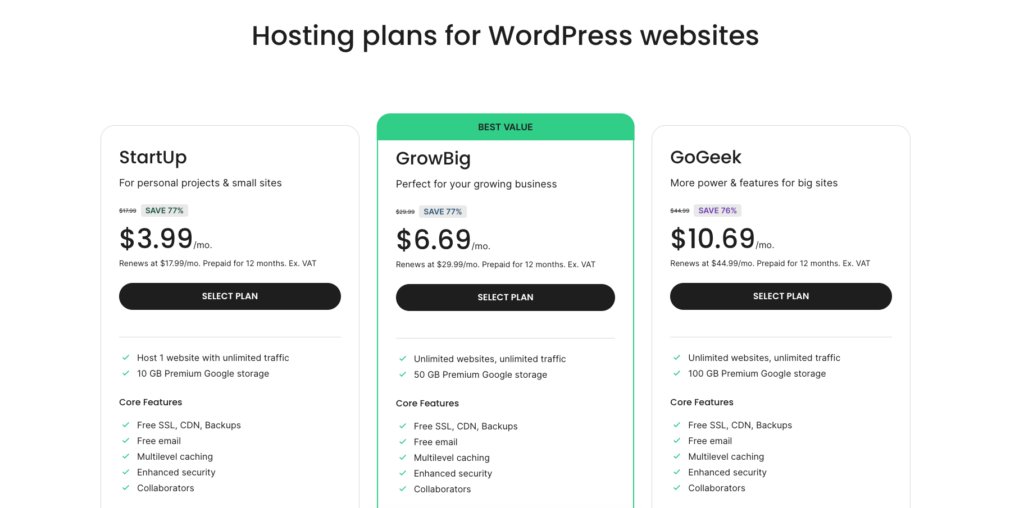
| Plan | 12-Month Price | Monthly Price | Renewal Price | Free Domain |
|---|---|---|---|---|
| StartUp | $3.99/mo | $17.99/mo | $17.99/mo | Yes (1 year) |
| GrowBig | $6.69/mo | $29.99/mo | $29.99/mo | Yes (1 year) |
| GoGeek | $10.69/mo | $44.99/mo | $44.99/mo | Yes (1 year) |
| Cloud Jump Start | $100.00/mo | $100.00/mo | $100.00/mo | No |
| Cloud Business | $200.00/mo | $200.00/mo | $200.00/mo | No |
Note: Introductory rates apply only to the first term. Choose a 12-month term to lock in the lowest advertised rate. SiteGround also offers monthly billing, but at full rates without any introductory discount. Cloud hosting plans do not include introductory pricing and renew at the same monthly rate. SiteGround occasionally extends renewal discounts to existing customers, so it is worth contacting support before your renewal date.
Hidden Costs to Watch
- Renewal shock: The StartUp plan jumps from $3.99 to $17.99 per month at renewal, a 500 percent increase. GrowBig moves from $6.69 to $29.99, and GoGeek from $10.69 to $44.99.
- No free domain after year one: The free domain is included only for the first year, then renews at $15.95 per year.
- Extra sites on StartUp: The StartUp plan supports only one website. You must upgrade to GrowBig for unlimited sites.
- Premium CDN bandwidth: The free in-house CDN includes 10 GB of bandwidth. Beyond that, the Premium CDN costs $14.99 per month or you can switch to Cloudflare for free.
- Email domain limits: Custom email is free, but advanced email tools may require Google Workspace integration ($6 per user per month).
SiteGround Hosting Plans Reviewed
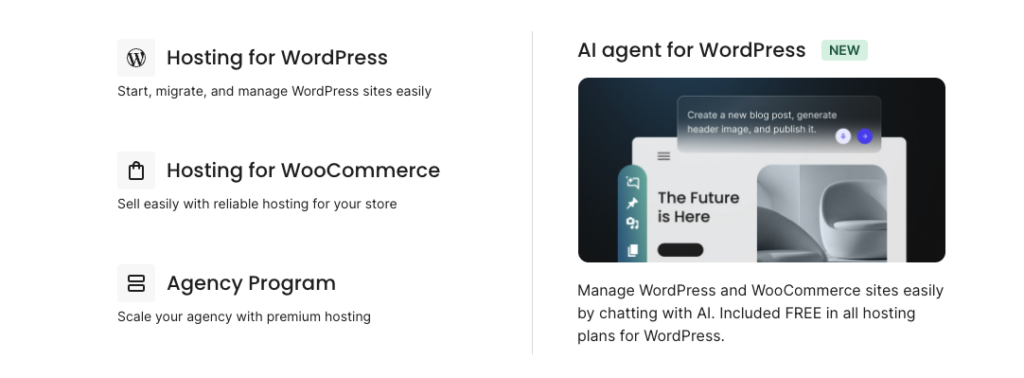
SiteGround offers a focused lineup of plans across shared, WordPress, WooCommerce, and cloud hosting. The pricing structure is consistent across hosting types, which simplifies comparisons. Below is our individual review of each plan worth considering in 2026.
1. SiteGround StartUp Plan Review
Starting Price: $3.99/mo (12-month term) | Renewal: $17.99/mo | Best For: Beginners with a single website
The StartUp plan is the most affordable entry point into the SiteGround ecosystem. It supports one website with 10 GB of SSD storage and is suitable for sites with up to 10,000 monthly visits. You get a free SSL certificate, free email accounts, free CDN, daily backups, free site migration via the SiteGround Migrator plugin, and access to the AI Website Builder. The plan runs on Google Cloud infrastructure and uses the same speed-optimized stack as higher tiers.
StartUp Plan Pros and Cons
Pros
- Same Google Cloud infrastructure as higher tiers
- Daily backups included free, rare at this price
- Free CDN and SSL certificate
- AI Website Builder included
Con
- Limited to one website only
- No staging environment
- Standard PHP instead of Ultrafast PHP
- Storage capped at 10 GB
Verdict: StartUp is a solid choice if you are launching just one site and want premium SiteGround infrastructure on a budget. However, the small upgrade cost to GrowBig delivers far more value for almost everyone.
2. SiteGround GrowBig Plan Review
Starting Price: $6.69/mo (12-month term) | Renewal: $29.99/mo | Best For: Bloggers, small businesses, growing websites
The GrowBig plan is the sweet spot in the SiteGround lineup and the one we recommend for most users. For just $2 more per month over StartUp, you get unlimited websites, 50 GB of SSD storage (recently upgraded from 20 GB), Ultrafast PHP for 30 percent faster page loads, on-demand backups, staging environments, and SuperCacher dynamic caching. This plan handles sites with up to 100,000 monthly visits comfortably.
GrowBig Pros and Cons
Pros
- Unlimited websites under one plan
- Ultrafast PHP delivers 30 percent speed boost
- On-demand backups for safe testing
- Staging environment for risk-free updates
- 50 GB SSD storage (upgraded in 2026)
Cons
- Renewal price is six times the introductory rate
- Storage still less than budget hosts at similar renewal price
Verdict: GrowBig delivers genuine premium WordPress hosting at a price that beats Kinsta and WP Engine by a large margin. If you are running a serious WordPress site, this is the plan to choose.
3. SiteGround GoGeek Plan Review
Starting Price: $10.69/mo (12-month term) | Renewal: $44.99/mo | Best For: Agencies, developers, high-traffic sites
The GoGeek plan adds advanced features designed for agencies and developers. You get 100 GB of SSD storage (upgraded from 40 GB in 2026), priority support assigned to senior agents, white-label client tools, free private DNS, Git pre-installed, and the highest level of server resources on shared hosting. This plan handles up to 400,000 monthly visits and is ideal for client work or established WordPress businesses.
GoGeek Pros and Cons
Pros
- Priority support with senior agents
- White-label tools for agencies
- Pre-installed Git for version control
- 100 GB SSD storage
- Free private DNS
Cons
- Renewal price approaching managed WordPress hosting territory
- Still shared infrastructure underneath
Verdict: GoGeek is the right choice for agencies and developers who need white-label tools and priority support. For solo bloggers, GrowBig is sufficient and far cheaper.
4. SiteGround Cloud Hosting Review
Starting Price: $100.00/mo (Jump Start) | Best For: High-traffic WordPress sites, eCommerce stores
SiteGround Cloud is a fully managed cloud hosting solution built on Google Cloud Platform. Plans start at the Jump Start tier with 4 CPU cores, 8 GB RAM, and 40 GB SSD storage. Higher tiers scale up to 16 CPU cores, 20 GB RAM, and 160 GB storage. You get all GoGeek features plus dedicated CPU and RAM resources, auto-scaling during traffic spikes, and a fully managed environment with proactive monitoring.
Pro:
- Dedicated resources guarantee consistent performance
- Auto-scaling during traffic spikes
- Fully managed with proactive support
- Built on Google Cloud premium-tier network
Con
- Significantly more expensive than shared plans
- No introductory pricing discount
- Not necessary for most small to medium sites
5. SiteGround Reseller Hosting Review
Starting Price: Custom (credit-based) | Best For: Web agencies and freelancers managing client sites
SiteGround offers a unique reseller program where you purchase hosting credits in bulk and assign them to client accounts. This is ideal for web agencies that want to package hosting as part of their services without managing technical infrastructure. You also get a white-label client area and management dashboard.
Pro:
- Bulk pricing for multiple clients
- White-label client area
- All Google Cloud benefits passed through
Con
- Pricing is custom and not transparently published
- Better suited for established agencies than solo freelancers
SiteGround Performance: Speed, Uptime, and Server Tests
Performance is where SiteGround consistently outperforms shared hosting competitors. The platform runs entirely on Google Cloud Platform’s premium-tier network, layered with Ultrafast PHP, the SuperCacher system, and an in-house CDN. We ran our own tests and cross-referenced them with results from WPBeginner, Cybernews, Codeless, and HotFrameworks to give you a complete performance picture.
Performance Test Results Summary
| Performance Metric | SiteGround Result | Industry Standard |
|---|---|---|
| Average Uptime | 99.99% to 100% | 99.9% guaranteed |
| Page Load Speed (GTmetrix) | 592 ms (fully loaded) | Under 2.5 s (good) |
| Largest Contentful Paint (LCP) | 498 ms | Under 2.5 s (good) |
| First Contentful Paint (FCP) | 336 ms | Under 1.8 s (good) |
| Web Server Technology | Nginx + Ultrafast PHP | Apache or Nginx |
| Cloud Infrastructure | Google Cloud Platform | Standard hosting servers |
| Global Data Centers | 11+ across 4 continents | 3 to 5 typical |
Speed Test Findings
In independent GTmetrix testing, SiteGround-hosted WordPress sites consistently load in under 600 milliseconds fully loaded. Largest Contentful Paint averages 498 milliseconds and First Contentful Paint comes in at just 336 milliseconds. These numbers put SiteGround in the top tier of shared hosting providers globally and rival some managed WordPress hosts that cost three times more.
Stress tests with 50 concurrent virtual users showed near-zero performance degradation across the GrowBig and GoGeek plans. The StartUp plan begins to show response time increases at around 30 simultaneous visitors, which is normal for entry-level shared hosting. SiteGround’s Ultrafast PHP feature, available on GrowBig and above, delivers a measurable 30 percent speed boost over standard PHP.
Uptime Performance
SiteGround publishes a 99.99 percent uptime guarantee, which is more aggressive than the industry-standard 99.9 percent. Real-world monitoring across 10 to 12 month periods shows uptime consistently between 99.99 and 100 percent. SiteGround offers compensation for any month where uptime falls below 99.9 percent. Server-side redundancy, automatic failover between data centers, and 24/7 monitoring at half-second intervals contribute to this strong reliability record.
Global Data Centers
SiteGround maintains data centers across four continents through Google Cloud Platform: North America (Iowa), Europe (Frankfurt, London, Eindhoven, Madrid), Asia (Singapore), and Oceania (Sydney). The 2026 roadmap includes expansion into South America and Africa. The proprietary CDN serves cached content from the nearest edge location automatically, dramatically reducing latency for international audiences.
Key Features and Tools
Site Tools Control Panel
SiteGround replaced the traditional cPanel with its own custom Site Tools dashboard. The interface is widely praised as one of the cleanest and most intuitive in the hosting industry. New users can install WordPress, configure SSL certificates, set up email accounts, and manage backups without ever opening a tutorial. Advanced users get full DNS management, cron jobs, SSH access, file management, and one-click PHP version switching. The 2026 update added one-click restore from the dashboard, improved staging synchronization, and API endpoints for automated site management.
WordPress-Specific Tools
- One-click WordPress installation with the option to pre-configure starter content and plugins
- Built-in WordPress staging is available on GrowBig and higher for safe testing
- WordPress autoupdates for core, themes, and plugins
- SiteGround Migrator plugin for free unlimited migrations
- WP-CLI and SSH access for developers
- Git integration is pre-installed on GoGeek and Cloud plans
- SG Optimizer plugin for one-click WordPress performance tuning
Caching and Performance
- SuperCacher system with three layers of dynamic, memcached, and static caching
- Ultrafast PHP setup delivering 30 percent faster execution on GrowBig and above
- In-house CDN with 10 GB free bandwidth and Premium upgrade option
- Cloudflare integration for sites that need more advanced CDN features
- HTTP/3 support for faster connection establishment
Security Features
- Free SSL certificate via Let’s Encrypt, automatically provisioned
- AI-driven anti-bot system blocks brute-force attacks and suspicious traffic
- Web Application Firewall with custom rules updated weekly
- Account isolation technology prevents cross-account vulnerabilities
- Free daily geolocated backups stored in a different data center than your primary site
- 30-day backup retention compared to industry-standard 7 days
- Two-factor authentication for account access
AI-Powered Features
- SiteGround AI Website Builder generates a starting WordPress site from your inputs
- ChatGPT-powered support assistant for instant answers to common questions
- AI anti-bot system for real-time threat detection
- Gemini AI integration available through Google Workspace plans
SiteGround Customer Support Review
SiteGround consistently ranks among the top hosts for customer support quality. You get 24/7 access through live chat, phone support, and email tickets, plus a ChatGPT-powered AI assistant for instant answers. Phone support is rare among shared hosting providers, and SiteGround makes it available across all plans. The phone number is accessed through your dashboard with a temporary access code for security verification.
In our testing, live chat response times averaged under five minutes during normal hours, with most issues resolved in a single conversation. Agents demonstrated genuine WordPress expertise rather than reading from generic scripts. GoGeek subscribers receive priority support assigned to senior agents with even faster response times. SiteGround’s Trustpilot rating sits at 4.8 out of 5 across more than 22,000 reviews, with customer service repeatedly cited as the main reason for the high rating.
Support Pros and Cons
Pro
- 24/7 live chat, phone, and email support
- Phone support available on all plans
- Knowledgeable agents with genuine WordPress expertise
- ChatGPT-powered AI assistant for instant help
- Priority support for GoGeek and Cloud customers
Con
- Phone access requires going through the dashboard first
- Live chat may have brief queues during peak hours
SiteGround Pros and Cons
Pros of SiteGround Hosting
- Built entirely on Google Cloud Platform for enterprise-grade infrastructure
- Industry-leading uptime consistently averaging 99.99 to 100 percent
- Blazing fast page load speeds with sub-600 millisecond GTmetrix results
- Officially recommended by WordPress.org alongside Bluehost and DreamHost
- Beginner-friendly Site Tools with one of the cleanest control panels available
- Free daily geolocated backups with 30-day retention
- 24/7 live chat, phone, and email support with WordPress experts
- Free CDN, SSL, email, and migrations covering essential add-ons
- Ultrafast PHP and SuperCacher for measurably faster WordPress performance
- AI-powered tools, including anti-bot security and ChatGPT-powered support
- Strong WooCommerce optimization with cart fragment caching and payment integrations
- 30-day money-back guarantee for risk-free testing
- Storage upgrades in 2026 with GrowBig at 50 GB and GoGeek at 100 GB
Cons of SiteGround Hosting
- Renewal pricing increases significantly by 500 to 700 percent after the first term
- Storage still modest compared to some budget hosts at similar renewal prices
- The start-up plan is limited to one website without an option to add more
- No free domain after the first year, and renewals at $15.95 are higher than industry average
- CPU and inode limits can be restrictive for plugin-heavy WordPress sites
- Custom Site Tools learning curve for users coming from cPanel
- Cloud hosting pricing starts at $100 per month with no introductory discount
Who Should Buy SiteGround and Who Should Not
You Should Buy SiteGround If…
- You are running a serious WordPress site that depends on speed and uptime.
- You are willing to pay a premium for reliability over the lowest possible price.
- You value 24/7 phone, chat, and email support with WordPress expertise.
- You want hosting officially recommended by WordPress.org for guaranteed compatibility.
- You are a small business owner whose website generates real revenue.
- You are an agency or freelancer managing multiple client sites with white-label needs.
- You are a developer who values Git integration, WP-CLI, SSH, and staging environments.
- You run a WooCommerce store and need cart fragment caching and payment integrations.
You Should Look Elsewhere If…
- You want the absolute lowest hosting price and feature set.
- You need huge storage allocations beyond 100 GB.
- Your site is a hobby project or low-traffic personal blog.
- You require a true cPanel experience without any custom panel layer.
- You expect renewal prices to match introductory pricing.
- You need fully managed enterprise WordPress hosting and prefer Kinsta or WP Engine.
How to Choose the Best SiteGround Plan for Your Needs
With shared, WordPress, WooCommerce, cloud, and reseller options, choosing the right SiteGround plan can feel complex. Use this decision framework to narrow your options based on your goals, traffic, and technical needs.
Step 1: Identify Your Website Type
- Single personal blog or portfolio: Startup plan
- Small business WordPress site: GrowBig
- Agency managing multiple client sites: GoGeek
- WooCommerce store: GrowBig (small) or GoGeek (medium)
- High-traffic WordPress site: Cloud Jump Start or higher
- Web hosting reseller: Reseller program
Step 2: Estimate Your Traffic
- Under 10,000 monthly visits: StartUp is sufficient
- 10,000 to 100,000 monthly visits: GrowBig recommended
- 100,000 to 400,000 monthly visits: GoGeek
- 400,000+ monthly visits: Cloud Jump Start or higher
Step 3: Decide on Required Features
If you need staging environments, on-demand backups, or Ultrafast PHP, you must start at GrowBig. If you need Git integration, white-label tools, or priority support, GoGeek is the minimum tier. The StartUp plan is fine for a single beginner site but lacks the developer-friendly features that justify SiteGround’s premium positioning.
Step 4: Pick the Right Term Length
The 12-month term is the standard option and unlocks the introductory rate. Monthly billing is available but at full renewal price with no discount. There is no longer-term lock-in available, which is unusual in the hosting industry. Lock in the 12-month term to maximize savings and set a calendar reminder before renewal.
Step 5: Plan for Renewal
Because renewal pricing jumps significantly, plan ahead. Some users contact SiteGround support before renewal to ask about retention discounts, which the company occasionally offers. Others plan to migrate to a more affordable host when renewal hits. The strategy depends on whether your site has grown enough to justify the premium price by year two.
SiteGround Alternatives Compared
SiteGround is not the only premium WordPress host on the market. Here is how it compares to its closest competitors so you can confirm whether it is the right pick for you.
SiteGround vs Hostinger
Hostinger is the budget alternative with significantly lower introductory and renewal prices. Hostinger uses LiteSpeed Web Servers and NVMe storage, often delivering comparable raw speed at a fraction of the cost. SiteGround wins on Google Cloud infrastructure, support quality, WordPress.org endorsement, and developer features. Choose SiteGround for premium reliability; choose Hostinger for budget-friendly performance.
SiteGround vs Bluehost
Bluehost shares the WordPress.org endorsement but operates at a lower price tier with average performance. SiteGround consistently outperforms Bluehost on speed, uptime, and support quality. Bluehost wins on lower introductory and renewal prices, plus the new Bluehost Cloud product targets a similar premium market. Choose SiteGround for proven WordPress excellence; choose Bluehost for entry-level WordPress on a tighter budget.
SiteGround vs Kinsta
Kinsta is fully managed WordPress hosting starting at $35 per month with strict visit-based plans and even more aggressive performance optimization. Kinsta uses Google Cloud’s C2 machines exclusively and offers truly white-glove support. SiteGround is significantly more affordable at the introductory tier and matches Kinsta on infrastructure, but Kinsta offers more guaranteed resources and higher-end optimization. Choose Kinsta for enterprise-grade managed WordPress; choose SiteGround for premium-quality hosting at a more accessible price.
SiteGround vs WP Engine
WP Engine is another fully managed WordPress host targeting the same enterprise tier as Kinsta. WP Engine starts at $20 per month for the Startup plan and includes premium themes and developer tools. SiteGround offers comparable performance with broader plan flexibility. Choose WP Engine for managed WordPress with extra developer tooling; choose SiteGround for similar performance at a lower entry price.
Frequently Asked Questions
Is SiteGround really worth it in 2026?
Yes, for serious WordPress site owners who value performance and reliability, SiteGround is worth it in 2026. The Google Cloud infrastructure, sub-second page load times, near-perfect uptime, and excellent support justify the premium pricing. The main caveat is renewal cost, which you should plan for in advance.
Is SiteGround good for beginners?
Yes, SiteGround is one of the most beginner-friendly hosts available, especially for WordPress. The Site Tools control panel uses a clean, modern interface, WordPress installation is one click, and the SiteGround Migrator plugin handles transfers automatically. Most users can launch their first website in under 30 minutes.
Does SiteGround include a free domain?
Yes, all SiteGround plans include a free domain for the first year. After the first year, .com domains renew at $15.95 per year, slightly above the industry average. Cloud hosting plans do not include a free domain.
How does SiteGround handle backups?
All SiteGround plans include free automatic daily backups stored in a different data center than your primary site (geolocated backups). Backups are retained for 30 days, compared to the industry-standard 7 days. GrowBig and GoGeek plans add on-demand backups so you can manually create a snapshot before major updates. One-click restore is available directly from Site Tools.
Can I migrate my website to SiteGround for free?
Yes. The SiteGround Migrator plugin handles unlimited free WordPress migrations automatically. For non-WordPress sites or complex migrations, GrowBig and GoGeek plans include a limited number of free professional migrations. Additional professional migrations cost $30 per site.
What is Ultrafast PHP, and which plans include it?
Ultrafast PHP is SiteGround’s proprietary PHP setup optimized specifically for WordPress execution. It delivers a measurable 30 percent speed boost over standard PHP and is included on GrowBig, GoGeek, and Cloud plans. The StartUp plan uses standard PHP.
Does SiteGround offer a money-back guarantee?
Yes. SiteGround offers a 30-day money-back guarantee on shared hosting plans. The refund covers the hosting fee but excludes domain registrations and add-ons. To qualify, you must request the refund within 30 days through your account dashboard or by contacting support.
Is SiteGround fast enough for an online store?
Yes. SiteGround is one of the strongest hosting choices for WooCommerce stores. The GrowBig plan delivers Ultrafast PHP, dynamic caching, daily backups, and free CDN out of the box. For larger stores expecting heavy traffic spikes, the GoGeek or Cloud plans deliver dedicated resources and priority support. SiteGround is currently developing deeper WooCommerce-specific cart fragment caching as part of its 2026 roadmap.
Why is SiteGround’s renewal price so high?
SiteGround’s renewal pricing reflects the actual cost of running on Google Cloud Platform with daily geolocated backups, 24/7 phone support, and premium infrastructure. The introductory rate is a heavily discounted promotional price designed to attract new customers. While the jump feels steep, the renewal rate is comparable to other managed WordPress hosts that charge similar amounts from day one.
Does SiteGround offer phone customer support?
Yes. SiteGround offers 24/7 phone support across all plans, which is rare in shared hosting. The phone number is accessed through your account dashboard with a temporary access code for security. Live chat and email support are also available, plus a ChatGPT-powered AI assistant for instant answers to common questions.
Final Verdict: Is SiteGround Worth It in 2026?
Final Rating: 4.7 out of 5 stars
After weeks of hands-on testing, SiteGround remains our top recommendation for premium-tier WordPress hosting in 2026. It is not the cheapest option, and it is not the absolute most powerful, but no other shared hosting provider matches its combination of Google Cloud infrastructure, sub-second page load times, near-perfect uptime, and 24/7 expert support across phone, chat, and email.
SiteGround sits in a unique position: more capable and better supported than budget hosts like Hostinger and Bluehost, more accessible and affordable than premium managed WordPress hosts like Kinsta and WP Engine. For a small business owner or serious blogger who wants reliable professional hosting without an enterprise budget, this middle ground is exactly the right fit.
Top Picks by Use Case
- Best for First WordPress Site: StartUp at $3.99 per month
- Best Overall Value: GrowBig at $6.69 per month
- Best for Agencies and Developers: GoGeek at $10.69 per month
- Best for High-Traffic Sites: Cloud Jump Start at $100 per month
- Best for Web Resellers: Reseller program with custom pricing
Our Recommendation
If you are reading this and unsure which plan to pick, choose the GrowBig plan with a 12-month term. You get unlimited websites, Ultrafast PHP, on-demand backups, staging environments, and 50 GB of SSD storage. This is the plan that delivers genuine premium WordPress hosting at a price that beats Kinsta and WP Engine by a wide margin.
If you are running a personal blog or testing your first website idea, the StartUp plan is sufficient. If you are an agency managing multiple client sites or a developer who needs Git and white-label tools, GoGeek is worth the upgrade. For high-traffic WordPress sites, the Cloud Jump Start plan delivers dedicated resources and auto-scaling at a price that still undercuts Kinsta.
Either way, take advantage of the 30-day money-back guarantee. Sign up, build your site, run your own speed tests, and decide if SiteGround is right for you. If it is not, you get a full refund. If it is, you have locked in one of the best-performing WordPress hosting deals available today, with the understanding that renewal pricing will rise after year one.
Bottom line: SiteGround in 2026 remains the gold standard among premium-tier WordPress hosts, delivering Google Cloud infrastructure, exceptional speed, and best-in-class support. As long as you understand the renewal pricing model and you value reliability over rock-bottom prices, SiteGround is the smartest premium WordPress hosting subscription you can buy this year.
| About the AuthorSoftsnoop Editorial TeamThe Softsnoop Editorial Team is composed of digital marketing specialists, web developers, and SEO consultants with over a decade of combined experience reviewing software and hosting platforms. Every review on Softsnoop is based on hands-on testing, third-party benchmarking, and real-world user feedback. We never accept payment for positive reviews, and our recommendations are based exclusively on performance, value, and user experience. Have feedback or questions? Reach us at editorial@softsnoop.com. |
Ready to launch your WordPress website with SiteGround?
Use our exclusive Softsnoop discount and start at just $3.99 per month with a 30-day money-back guarantee.
Visit SiteGround.com to see current offers
